Activity
Mon
Wed
Fri
Sun
May
Jun
Jul
Aug
Sep
Oct
Nov
Dec
Jan
Feb
Mar
Apr
What is this?
Less
More
Memberships
MLO Performance
427 members • Free
Referral Bosses
158 members • Free
14 contributions to Referral Bosses

Jun '25 •
Clone Your Voice. Multiply Your Impact. (Here’s How We’re Using Eleven Labs)
If you're building a business on trust, reputation, and referrals — you already know: people don’t buy from brands. They buy from you. But how do you stay personally present…→ In your videos→ In your emails→ In your lead follow-ups→ In your client drips…… without cloning yourself? Now you can. And the tool that makes it possible? 👉 Elevenlabs creates a cloned version of your voice that sounds almost too real — and reads any script like it’s you on your best day. 🛠 What’s the Play? This month, we’ve been building full-on AI-powered video funnels — using Eleven Labs + Broll — to: - Turn FAQ lists into trust-building video series - Send personalized client follow-ups (without recording 100 videos) - Launch nichified YouTube channels for sellers, buyers, and partners - Create drip campaigns that sound like a real human (because they do — it’s you) - More content. More conversations. More referrals. And you never even hit “record.” 🔧 How to Set Up Eleven Labs Here’s the quick-start setup for Referral Bosses: Step 1: Create a Paid Account Use elevenlabs.io — go with the Creator Plan ($22/mo) for pro-quality voice clones. Step 2: Upload Voice SamplesUse past Zooms, podcast clips, training videos — anything with clean audio. Try to stick to the same mic and environment. Step 3: Let It TrainTakes an hour or two. Then boom: your voice is cloned. Step 4: Test + RefineType in a test script. Listen. Adjust. You'll hear how good it is — then you'll start getting ideas. 🔁 Real Use Cases Inside Referral Boss Here’s what Referral Boss clients are already doing with their cloned voices: ✅ VA Follow-Up Drips: Your voice sends warm follow-up messages to referral partners or past clients. Feels real. Sounds real. It is real — just cloned. ✅ Video FAQs: 50+ short videos answering the top client questions using your AI avatar + voice — posted to YouTube, Instagram, and your CRM. ✅ Challenge & Event Promos: Invite people to your next workshop or masterclass in your voice — without ever rerecording.

0 likes • Jan 28
I just did my first clone voice in "hey jen" and uploaded a picture. I had a video script just hit record and said my video message. Hey jen made it a talking video (took about 30 minutes to process). NOW what? which AI should I use to edit with captions etc and be able to post :) ...I just created my CHAT GPT AI Coach to help me be more productive every day too. Staying more focused.
0 likes • Jan 29
To make more videos less time easy edit the editing captions is really why I haven't posted as much I have videos made
Jan '25 •
Optimize Your Link in Bio: Complete Audit Checklist
Hey Referral Bosses 👋, Are you ready to optimize your ecosystem 🌐 and make sure your audience can always find their way to your offers, lead magnets, and value-packed resources? Here’s your step-by-step guide to placing your link in bio everywhere it matters—and I mean everywhere! 🚀 Let’s dive in 🏊♀️: 1. Facebook Personal Profile - Intro Section: Add your lead magnet or link to your bio ✨. - Profile Picture Caption: Include the link in your profile picture description 📸. - Pinned Post: Create a post with your best-performing content and include the link in the caption or first comment 📌. - Featured Photos: Curate up to nine featured photos, each with captions containing your link 🖼️. 2. Facebook Groups - Group Cover Photo: Add your link in the design 🖌️. - Featured Posts/Announcements: Pin a post that links to your lead magnet or offer 📋. - About Section: Place the link in your group’s description 📖. - Guides/Units: Organize guides by pain points and include relevant links 🛠️. 3. Instagram - Link in Bio: Use tools like Beacons or Linktree to create a visually appealing link hub 🌈. - Pinned Posts: Ensure your top-performing posts point people to your link in bio 📌. - Story Highlights: Save stories based on pain points and link to your resources 📚. - Stories: Use the link sticker in relevant stories 🎟️. 4. LinkedIn - About Section: Add the link in your profile description 🖊️. - Experience Section: Include the link in job descriptions 💼. - Posts: Share posts with a copy-pasteable link for easy access 📎. 5. Pinterest - Board Covers: Optimize covers to promote your lead magnet links 🎯. - Pins: Ensure pins link directly to your resources 📌. 6. YouTube - About Section: Include a copy-pasteable link 🖋️. - Channel Banner: Add clickable links 🎥. - Video Descriptions: Place your link in every video description 📝. - Pinned Comments: Add your link to the top comment on each video 💬. 7. Threads - Link in Bio: Ensure it’s active and leads to your lead magnet or offer 🔗.

0 likes • Feb '25
Going to work on these edits this week!!
0 likes • Jun '25
@Keith Goeringer ok i finally made edits To linktree To Youtube channel Now the next ones Curious if you would look at them @michelleyourloanranger (you tube) Linktr.ee/MichelleMathewsKalinock
May '25 •
This Week’s Free Drop: Build Your Command Center (Zoom Friday @ 1PM)
Before you chase another lead or write another post, ask yourself this: 👉 Do you actually have a system that runs your business with you? This week, we're dropping Day 0 of the 90-Day Referral Boss Sprint — and it's all about building your Tech Command Center. Inside: - How to set up ChatGPT as your entire C Suite - CMO, CEO ect... - The folder that runs your entire business - Why your calendar > to-do list - The CMO, COO, and CRO GPTs I actually use - A CRM setup that doesn’t suck - How I trained my VA to think like me 💥 Join the FREE live Zoom on Friday @ 1PMWe’ll walk through the whole setup, live. Q&A included. 📥 Drop “Command” in the comments and I’ll s end you the early access link + downloads. Let’s get your system built BEFORE we scale 🚀 The Event is also in the Calender Section of the Community to your right.

0 likes • May '25
@Keith Goeringer did you send link and download or is it posted somewhere for todays call. :)
0 likes • May '25
Or was it last Friday :(
Apr '25 •
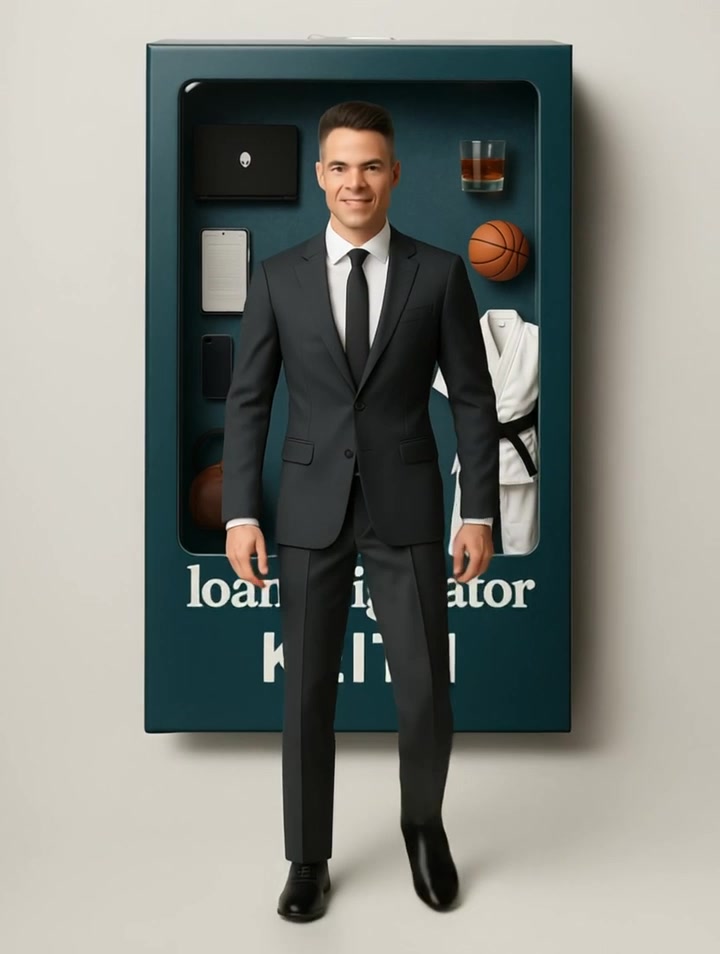
🧸 Seen the Barbie Box Trend? Here’s How to Make Your Own — and Make It Walk 🏃♂️💼
You’ve probably seen the Barbie-style action figure trend going around… I loved it — but I wanted to put my own twist on it. ✅ Business version.✅ Realtor/Loan Officer ready.✅ With accessories.✅ Oh, and… IT WALKS. Wanna do the same? Here's the exact step-by-step to create your own action figure image and then make it walk in video using Runway ML Gen-2. 🔧 Step 1: Create Your Action Figure Image Copy and paste this prompt into ChatGPT and fill in your details: 📦 Custom Action Figure Prompt: Create a hyper-realistic, collectible-style boxed action figure based on the following details: - Name on the box: [Insert Name] - Job title or role (for the label): [Insert Job Title] - Physical description: [Height, gender, hair color/style, eye color, body type] - Outfit: [Describe head to toe — include colors and any accessories like earrings, shoes, etc.] - Pose: [Optional – confident stance, arms crossed, smiling, etc.] - Accessories inside the box (max 6–8): [Example: MacBook, clipboard, coffee mug, iPhone, SOLD sign, plant, etc.] - Box design & color: [Example: Glossy hot pink Barbie-style, masculine navy blue with silver, bold purple sparkle, etc.] - Any changes to appearance (optional): [Look younger, slimmer, more muscular, etc.] 🖼️ Once your image is generated, save it and get ready for the fun part… 🎥 Step 2: Make It WALK with Runway ML (V4 / Gen-2) Here’s the video prompt to use inside Runway ML: 🎬 Runway Prompt: A hyper-realistic action figure of [Insert Name], a [Insert Job Title], steps confidently out of a glossy boxed packaging. The figure is dressed in [brief outfit description], holding [1–2 key accessories], with a confident expression and smooth, lifelike motion. The background is studio-lit, with dramatic lighting and slight camera movement as the figure takes a few steps forward. Cinematic, lifelike, clean, 4K detail. ✅ Choose Gen-2 / V4✅ Add slight camera motion (pan or orbit)✅ 4–6 second length✅ Use 50mm lens for cinematic look
0 likes • Apr '25
Love this will try making tmr
0 likes • May '25
I have made the action figure too not quite close enough now also trying to get it to walk
Dec '24 •
Ready to Create Your Own Leads? Podcast Inside!
For those of you who prefer listening over reading, I just recorded a podcast all about how to generate your own clients and leads using lead magnets. This podcast gives you a short preview of what we’ll be diving into next Friday during our in-depth, free training. Next Friday, I’ll break down exactly how to create powerful lead magnets and the platforms you can use to implement them. It’s a class I’ve been putting together for weeks, and I’m excited to share it with you. The podcast is short—around 10 minutes—but packed with actionable insights. 🎧 Here’s the link to listen on Apple Podcasts: https://podcasts.apple.com/us/podcast/referral-boss-podcast-with-keith-goeringer/id1746342074?i=1000679479118 Take a listen, and I’ll see you next Friday for the full training!

1 like • Apr '25
Found your podcasts on Spotify:)
0 likes • Apr '25
So sorry ugh I had some crud for about 7 days about a month ago and now I think it is allergies the Pollen is awful.
1-10 of 14
@michelle-mathews-kalinock-2501
LOAN Ranger of Mortgage's | 1992
Keep evolving! Be open and adapt. Learn new technology, tools to be a better advisor to your clients.
Active 67d ago
Joined Nov 27, 2024
Powered by