Activity
Mon
Wed
Fri
Sun
Aug
Sep
Oct
Nov
Dec
Jan
Feb
Mar
Apr
May
Jun
What is this?
Less
More
Owned by Michael
Learn agentic AI by building real systems. For people starting out and seasoned builders sharing workflows, templates, and ideas.
Memberships
Skoolers
167.8k members • Free
AI Automation Society
418.2k members • Free
58 contributions to AI Automation Society

8d •
Are we still using N8N?
With how powerful Claude Code is, are we still building automations for clients using n8n, or is everything now being handled directly in Claude Code? What approach are you all taking?

0 likes • 6d
Here’s the deal…n8n is an orchestration framework. EVERY enterprise AI system runs on a framework ALL OF THEM…Pydantic, LangChain, Power Automate, CrewAI, n8n, flowise. Why? Configurable, model agnostic (you use the capability vs cost matrix and choose the best model for the job based on that not who’s model it is.) Observable…you can build in error reporting, have visual waterfalls to see each step, look at latency. Templableable…you can reuse them across clients, verticals. Can you have Claude go spawn a bunch of sub agents…sure…can you see what they’re doing? NOPE, are those Claude agents using output tokens to make http requests you could otherwise make at zero cost..YEP…. Can you see when the Claude agents break…NOPE. Does Anthropic make a lot of money on tokens…? YEP! So they have a vested interest in keeping you locked into one vendor and pushing these agent loops and stuff that are token use heavy? I’m gonna say yes here. Frameworks are going nowhere and Boris wants you to build loops to burn tokens ;)
6d •
Every Automation and Agent......One Desk!
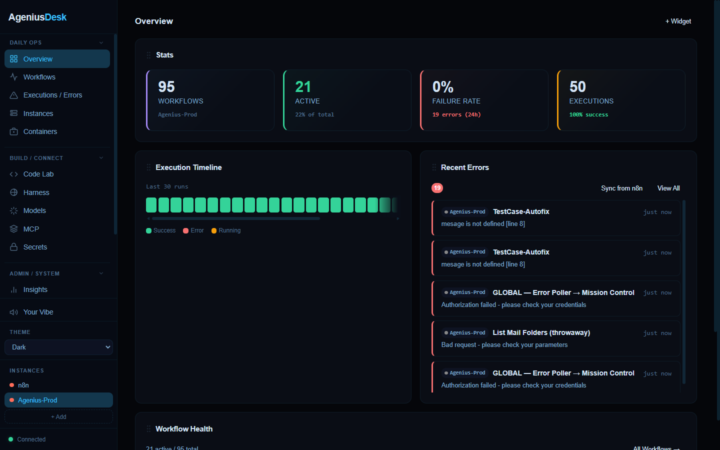
Finally launched! Please go Star it on Git and testers needed! What it does today: 🗂️ One dashboard for every n8n instance 🚨 Live error feed with one-click AI root-cause 🔬 Per-execution tracing & token spend tracking(see exactly where a run slowed or failed) 🧠 AI workflow builder that injects straight into n8n 🧰 Integrated, sandboxed Harness (agent skills, research, RAG, SQL, Redis, MCP) 🔐 Fernet-encrypted secrets vault (inject credentials straight into any n8n) 🐳 Full Docker management & One-click Docker deploy (n8n, Postgres, Redis, Qdrant, Ollama) Coming soon: LangChain and Pydantic Agent support 100% self hosted and open source https://github.com/Mfrostbutter/ageniusdesk-ce https://ageniusdesk.com/

Apr 29 •
🚀 I just built an Agent OS (and I want to show you)
Released TODAY on GIT! AgeniusDesk-CE Hey everyone, After 3+ years building AI automation systems, I realized something: the bottleneck isn't the model. It's context and resources. Better context = better agents. But here's the real problem: everything is segmented. Your agents are in Pydantic AI. Your workflows are in n8n. Your knowledge is scattered. Your execution is fragmented. So I built AgeniusDesk, a unified platform that manages ALL of it: agents, workflows, knowledge, resources. One command center. No silos. What is it? A unified management layer for AI platforms, agents, and workflow frameworks (n8n, Pydantic AI, Flowise, etc.): - Multi-instance n8n visibility + control from one dashboard - AI agents (Pydantic, Claude, OpenAI, local models) as first-class citizens - Real-time error detection + AI diagnostics (catches issues before they blow up) - Agent Lab: write and debug code with AI, deploy instantly - Encrypted secrets vault (never plaintext, never exposed) - Shared resource layer: context, guardrails, execution contracts - Full local/self-hosted control (no vendor lock-in) Built on Python + FastAPI + Vanilla JS. Docker compose ready. Why I'm posting this here: This community gets it. You're not asking for another no-code builder or magic button. You're building real systems, running agents in production, managing multiple deployments. AgeniusDesk is built for that. What I want from you: Drop a comment and tell me: - → Are you managing multiple n8n instances or agents right now? - → What's your biggest pain point? (visibility? errors? scale?) - → Would you test-drive this if it solved that problem? I'm open-sourcing the whole thing. No strings. Just want to build something the community actually needs.
0 likes • 7d
@Andy Hartfield https://github.com/Mfrostbutter/ageniusdesk-ce
0 likes • 7d
@Zain Baig https://github.com/Mfrostbutter/ageniusdesk-ce
8d •
One dashboard to rule every n8n instance you run 👑 (free + open source)
If you run more than one n8n instance, this one's for you. 👇 I got tired of juggling separate logins, digging through scattered execution logs, and never having one place to see what's actually broken. So I built AgeniusDesk, a command center that sits on top of the n8n you already run. Today I'm releasing the Community Edition, free and open source (MIT). It talks to any n8n over the public API, so there's nothing to change in your workflows. Run it with Docker in about two minutes. What it does: 🚀 One-click n8n deploy. Spin up a fresh self-hosted n8n in Docker right from the dashboard (name, port, admin login, done). The same flow also stands up Postgres, Redis, Qdrant, and Ollama. 🗂️ Multi-instance. Manage unlimited n8n instances from one screen and switch between them instantly. 🚨 Real-time error feed. Failures from every instance, grouped by workflow, node, and type, with one-click "ask AI to find the root cause." 💾 Import, export & backup. Pull workflows in from JSON (single or bulk), export any workflow, and back up everything (or just the active ones) to a single file you can restore later. Real portability and disaster recovery across instances. 🧪 Code Lab. A Monaco editor for n8n Code nodes with AI generation, a prompt builder, and one-click send-to-n8n. 🤖 Per-area AI models. Code Lab, error triage, and chat each get their own provider and model (OpenRouter, OpenAI, Anthropic, or local Ollama). Keys stay encrypted server-side and never touch the browser. 📊 Insights. Success rates, execution timelines, and busiest/slowest workflows per instance. 🔒 Built in already: account login, encrypted secrets, role-based access, and a security-hardening pass. It's free, self-hosted, and MIT licensed. No catch. Full walkthrough video is dropping on YouTube soon (I'll add the link below once it's up). If you run n8n, I'd genuinely love your feedback: what's missing, what's confusing, what would make this part of your daily stack. Drop a comment. 🙏
0 likes • 7d
@Aditya Chauhan i’m also releasing my first community module for it, which is my YouTube transcript to research document workflow you drop a link right in it pulls the captions. It runs a technical deep dive and saves it and marked down in the sandbox harness for your agents to use.
1 like • 7d
@Aditya Chauhan I’m finishing up the first community module and about to release the next version of it with the updates that I’ve made

💎
⭐
Oct '25 •
Is it still worth learning n8n?
I’ve been getting this question a lot lately. With AI automations becoming easier to build with AI, and OpenAI releasing AgentKit, people are wondering if n8n is even worth learning anymore. But here’s the truth: if I had to start all over again knowing nothing, I’d still learn everything I could about n8n. Because when you learn n8n, you’re not just learning one tool, you’re learning how systems think. You start to see how triggers connect, how data flows, and how logic turns into results. And once you understand that, you can jump to any platform in the world and master it instantly. You become tool-agnostic, and that’s where the real freedom lies. When you learn how to build workflows yourself, you also learn lessons that can’t be taught through flashy AI demos. You start to see what automations can really do, how reliable AI actually is, and what’s possible when you combine logic with creativity. You learn how to build systems that save time, cut costs, and actually work in the real world, not just on paper. That skill separates you from everyone else trying to sell the same thing. Because when clients hire you, they’re not hiring you to drag nodes on a screen, they’re hiring you to think like an automator. They want someone who understands the logic behind the system, can identify what’s going wrong, and knows how to make it better. The people who skip this step, the ones relying entirely on “AI agents that build workflows for you”, are like someone trying to sell a cake after only seeing a picture of it. They don’t know the ingredients, how it was baked, or even the flavor. So when they try to explain it to others, they sound the same as everyone else. But when you’ve actually baked the cake yourself, you can describe the flavor, the texture, the process, and that builds trust. And in this space, trust is everything. Automation is one of the few skills in the world that directly compounds over time. Once you know how to identify bottlenecks, map processes, and connect systems, you can apply that skill to any business or industry. And the ROI is real, recent studies by Deloitte and McKinsey show companies that invest in automation see up to a 30% reduction in operating costs and often double or triple their productivity within months. The people who understand how to build and maintain these systems are the ones leading that transformation.

1 like • 8d
0 likes • 8d
@Alessandro Waidmann https://youtu.be/cbpyj9h-AAY
1-10 of 58

@michael-frostbutter-4170
20 years in IT infrastructure. Now building n8n stacks, AI tools, and AgeniusDesk. Founder of Agenius AI Labs.
Active 3h ago
Joined Feb 2, 2025
New York City
Powered by