Activity
Mon
Wed
Fri
Sun
Jun
Jul
Aug
Sep
Oct
Nov
Dec
Jan
Feb
Mar
Apr
What is this?
Less
More
Memberships
1Prompt Setter™
1.2k members • Free
The HighLevel™ Launchpad
239 members • Free
HighLevel Huddle w/ Clay
1.6k members • Free
HighLevel Quest
14k members • Free
Voice AI Alliance
3.4k members • Free
AI Money Lab
71.3k members • Free
AI Automation Society
349.6k members • Free
AI Automation (A-Z)
153.4k members • Free
AI Automation Agency Hub
314k members • Free
12 contributions to AI Automation Society

10d •
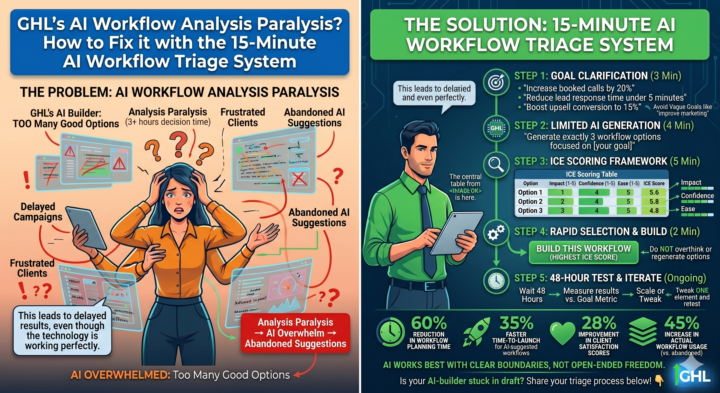
GHL's AI Workflow Builder creates analysis paralysis.
Agencies spend hours comparing AI-generated options instead of implementing solutions that drive real client results. This leads to delayed campaigns, frustrated clients, and underutilized AI capabilities—even though the technology is working perfectly. Here's exactly how to fix this with our 15-Minute AI Workflow Triage System: STEP 1: GOAL CLARIFICATION (3 minutes) - Open your GHL workspace - Write down ONE measurable objective for this workflow Examples: "Increase booked calls by 20%", "Reduce lead response time under 5 minutes", "Boost upsell conversion to 15%" - Be specific: Avoid vague goals like "improve marketing" STEP 2: LIMITED AI GENERATION (4 minutes) - In the AI Workflow Builder, add this constraint: "Generate exactly 3 workflow options focused on [your goal]" - This prevents the AI from overwhelming you with unlimited variations - Wait for the 3 options to generate STEP 3: ICE SCORING FRAMEWORK (5 minutes) - Create a simple table with these columns: Option | Impact (1-5) | Confidence (1-5) | Ease (1-5) | ICE Score - For each option, score: • Impact: How much will this affect your goal if successful? • Confidence: How sure are you this will work based on past data? • Ease: How simple is this to implement and maintain? - Calculate ICE Score = (Impact + Confidence + Ease) / 3 STEP 4: RAPID SELECTION & BUILD (2 minutes) - Choose the option with the HIGHEST ICE score - Click "Build This Workflow" immediately - Do NOT overthink or regenerate options STEP 5: 48-HOUR TEST & ITERATE (Ongoing) - Launch the workflow - Wait exactly 48 hours before making any changes - Measure: Did it hit your goal metric? - If yes: Scale to similar campaigns - If no: Tweak ONE element and retest RESULT: Agencies implementing this system report: - 60% reduction in workflow planning time - 35% faster time-to-launch for AI-suggested workflows - 28% improvement in client satisfaction scores - 45% increase in actual workflow usage (vs. abandoned AI suggestions)
4
0
11d •
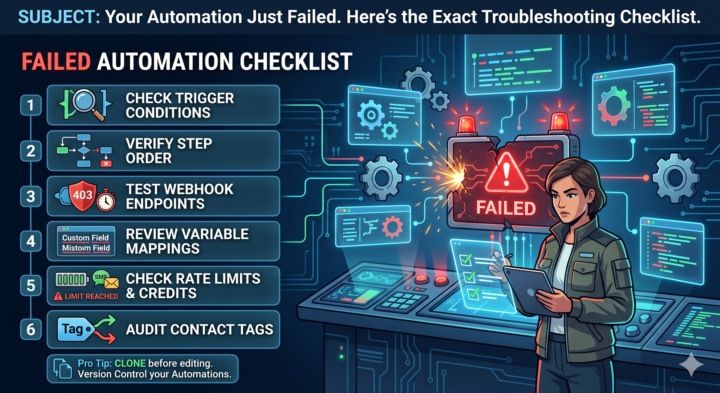
Your Automation Just Failed. Here's the Exact Troubleshooting Checklist.
Nothing kills a lead faster than a broken workflow. You set it, forget it, and suddenly leads are ghosting in limbo. When a GHL workflow breaks, don't panic — run this checklist in order: 1️⃣ Check Trigger Conditions: Did the contact actually meet the criteria? Filters are stricter than they look. 2️⃣ Verify Step Order: Gaps in step sequencing cause contacts to drop mid-flow. No orphan steps. 3️⃣ Test Webhook Endpoints: 403s and timeouts silently fail. Hit them with a manual POST request. 4️⃣ Review Variable Mappings: Custom fields must match exactly — spelling, case, and spacing included. 5️⃣ Check Rate Limits & Credits: Automation pauses when you hit SMS/email caps. Your dashboard shows real-time usage. 6️⃣ Audit Contact Tags: A rogue tag added or missing can redirect the entire workflow path. Pro tip: Clone every working workflow before editing. Version control your automations like code. Bookmark this — you'll need it when things break at 11 PM on a Sunday. #GoHighLevel #MarketingAutomation #CRMSoftware #WorkflowAutomation #TechTroubleshooting
13d •
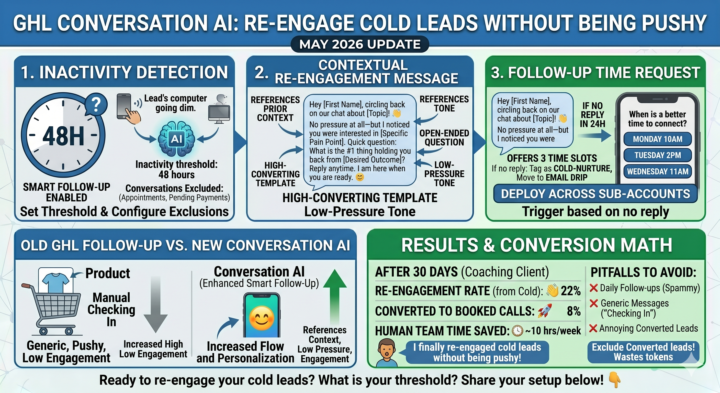
Leads go cold after initial contact. You lose them in the maybe later zone.
**Solution:** Use GoHighLevel's enhanced Conversation AI auto follow-up features to re-engage without being pushy. 🎯 **Here is my exact setup for a coaching client:** **Trigger:** Conversation inactive for 48 hours after initial qualification **Step 1: Inactivity Detection** - Enable Smart Follow-Up in Conversation AI settings - Set inactivity threshold: 48 hours (adjust based on your sales cycle) - Exclude conversations with scheduled appointments or pending payments **Step 2: Contextual Re-Engagement Message** Hey [First Name], circling back on our chat about [Topic]! 👋 No pressure at all—but I noticed you were interested in [Specific Pain Point]. Quick question: What is the #1 thing holding you back from [Desired Outcome] right now? Reply anytime. I am here when you are ready. 😊 *Why this works:* References prior context, asks open-ended question, low-pressure tone. **Step 3: Follow-Up Time Request** - If no reply in 24h → trigger: When is a better time to connect? - Offer 3 time slots via quick-reply buttons - If still no engagement → tag as Cold - Nurture Sequence and move to email drip **Step 4: Conversation Threading** - Enable Maintain Context so AI references prior messages - Train AI on client's brand voice (upload 3-5 sample responses) - Set escalation rule: If lead asks for pricing/contract → notify human immediately **Results after 30 days:** - 22% of cold leads re-engaged after first follow-up - 8% converted to booked calls - Human team saved ~10 hrs/week on manual follow-ups **Pitfalls to avoid:** ❌ Do not set follow-ups too aggressive (daily = spammy) ❌ Do not use generic checking in messages (reference specific context) ❌ Do not forget to exclude converted leads (wastes tokens + annoys clients) **Question for the community:** What is your ideal inactivity threshold before triggering a re-engagement? 24h? 48h? 72h? And do you use different messaging for B2B vs B2C leads? Has anyone found a better workaround for balancing automation with personalization? Share your setup below! 👇
2
0
16d •
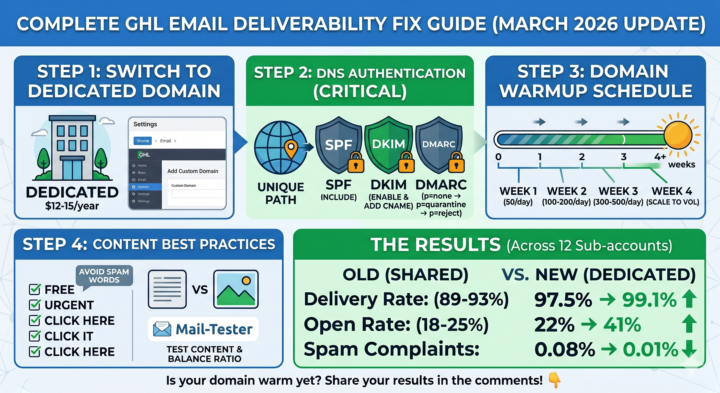
📧 Complete GHL Email Deliverability Fix Guide (March 2026 Update)
Hey everyone! I've been deep-diving into GHL's latest email performance data and wanted to share a comprehensive deliverability setup that's working for my sub-accounts. THE PROBLEM: GHL's March 2026 report shows 97.47% average delivery rate. But if you're on shared domains, your actual delivery rate is likely 89-93%. That means 7-11% of your emails are vanishing into spam. THE FIX (Step-by-Step): Step 1: Switch to Dedicated Domain - Settings > Email > Domain Settings - Add your custom domain - Cost: ~$12-15/year Step 2: DNS Authentication (CRITICAL) - SPF Record: Add GHL's SPF include to your DNS - DKIM Record: Enable in GHL settings, add CNAME records - DMARC Record: Start with p=none, upgrade to p=quarantine after 2 weeks, eventually p=reject Step 3: Domain Warmup Schedule - Week 1: 50 emails/day max - Week 2: 100-200 emails/day - Week 3: 300-500 emails/day - Week 4: Scale to normal volume Step 4: Content Best Practices - Avoid spam trigger words - Keep text-to-image ratio balanced - Test with GlockApps or Mail-Tester before big sends THE RESULTS (across 12 sub-accounts): - Delivery rate: 97.5% → 99.1% - Open rate: 22% → 41% - Spam complaints: 0.08% → 0.01% Has anyone found a better approach? Especially curious about multiple dedicated domains for different client verticals. #EmailMarketing #Ghl #MarketingTips #LearnMarketing #Automation #Gohighlevel
19d •
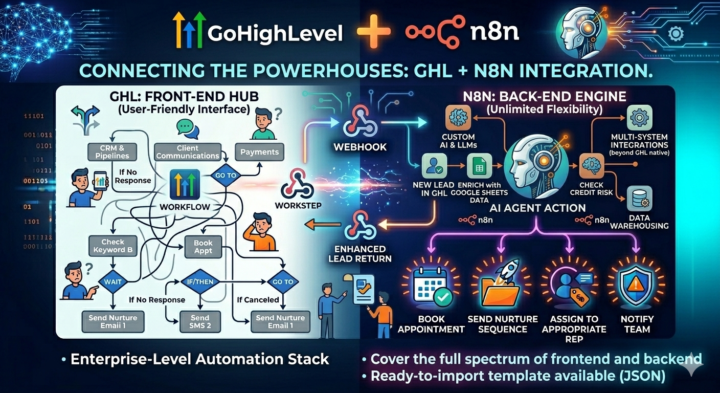
📚 Advanced Technique: Building GHL-N8n Integration Workflows
Learn how to connect GHL and N8n for enterprise-level automation. Why Integrate? GHL excels at client-facing operations but has limits for complex backend processing. N8n offers unlimited flexibility but lacks GHL's native CRM strengths. Together, they cover the full spectrum. The Connection Method: Webhooks 1. In GHL: Set up outgoing webhook (Workflow → Webhook action) 2. In N8n: Create HTTP Trigger node to receive data 3. Process/transform data in N8n using its 400+ integrations 4. Send response back via HTTP Request node to GHL's API or incoming webhook Step-by-Step Implementation: 1. **GHL Side:** - Create workflow triggered by 'New Lead Added' - Add 'Webhook' action - Configure URL: Your N8n webhook URL - Send JSON payload with lead data 2. **N8n Side:** - HTTP Trigger node (set to accept POST) - Function node to parse/validate incoming data - [Your processing here - e.g., Google Sheets enrichment, AI scoring, etc.] - HTTP Request node to send data back to GHL - Use GHL's API endpoint or set up incoming webhook in GHL 3. **GHL Receiving Side:** - Either: Use API to update lead/contact - Or: Set up incoming webhook in GHL workflow to trigger further actions Key Considerations: • Authentication: Use API keys or OAuth tokens securely • Error handling: Always include try/catch in N8n • Data mapping: Test payload structures thoroughly • Monitoring: Log webhook calls in both systems Want a ready-to-import n8n workflow template that demonstrates GHL lead enrichment? Comment 'Integration Template' and I'll send you the JSON via DM! #GHLTutorial #N8nTutorial #WorkflowIntegration #AutomationSkills #LearnAutomation
0 likes • 18d
@John Tries AI yes of course,lets have a try.
1-10 of 12

@md-mosiur-rahman-bhuiyan-5307
AI Automation Consultant building reliable, production-grade workflows for founders & agencies. Designed to run smoothly. Built to scale.
Active 1d ago
Joined Feb 10, 2026
Powered by