Activity
Mon
Wed
Fri
Sun
Dec
Jan
Feb
Mar
Apr
May
Jun
Jul
Aug
Sep
Oct
Nov
What is this?
Less
More
Owned by MarKesha
A reselling community for building confidence, better judgment, and steady habits without the pressure.
The room solo builders were looking for. Land, build with WHOs, and ship.
Gen X Still Standing
85
Free
Women Build AI
6.9k
Free
Google Ads Masterclass
16.8k
Free
Easy Machine AI
4.8k
5.0
Free
AI Automation Society
478.4k
Free
Your First $5k Club w/ARLAN
34.2k
5.0
Free
AI Bits and Pieces
906
5.0
Free
Your Vegan Homie
221
Free
Crochet For Self-Care Oasis
113
$1/m
3 contributions to AI Bits and Pieces

Jul 3 •
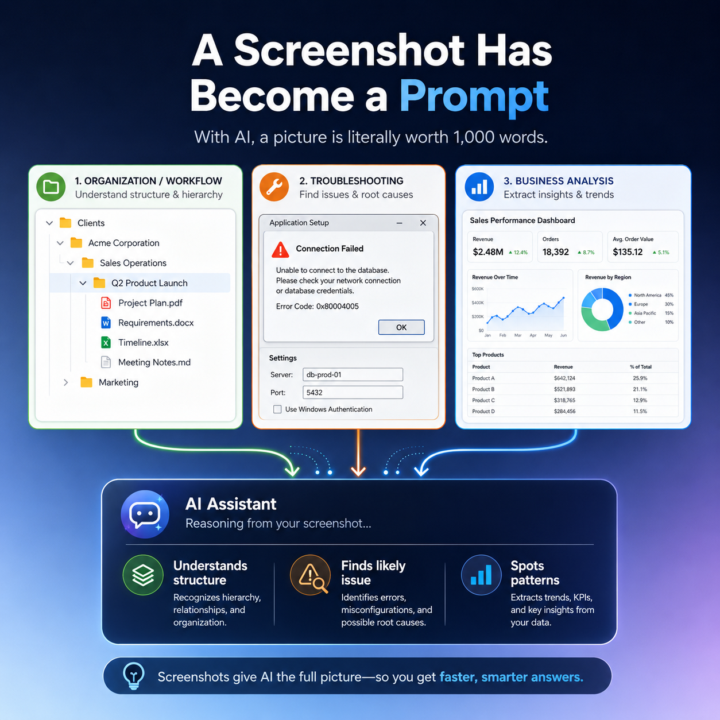
🖼️ With AI, a Picture Is Literally Worth a 1,000 Word Prompt
"A picture is worth a thousand words." That phrase has always been true, but with today’s LLMs it is starting to take on a much more practical meaning. One of the quiet advances in AI is not just better writing, coding, or summarization. It is image recognition and, more importantly, image understanding. I have noticed this in my own workflow. In the past, when I wanted Claude or ChatGPT to understand what I was looking at on my screen, I would usually describe it first. I would explain the structure, the problem, or the context, and then I would paste the screenshot to support what I had already written. Now I often skip that step entirely. I just paste the image and go. And the AI gets it. That is a bigger shift than it sounds. The improvement is not simply that the model can read text inside an image. It is that it can often understand what the image is doing, why it matters, and how it connects to the broader conversation. In other words, the image itself has become usable context. I ran into this recently while organizing my directory structure for a new project. I needed to update Claude on changes I had made, and instead of describing the folder structure, I simply pasted the screenshot into the chat. Claude immediately responded: “That's a clean hierarchy: client → business area → project. Every future engagement follows the same pattern.” That response stood out to me because Claude did more than recognize folder names. It understood the hierarchy. It understood the logic behind the structure. It understood the intent of the organization. And it connected that image to the ongoing context of the conversation without me needing to explain much at all. This is starting to change how I work with LLMs, and I think it has broader implications for a lot of people using AI in practical ways. A screenshot is no longer just supporting material. In many cases, it is now the prompt. Example 1: A very useful example is organizational or workflow context, like the file folder case. Instead of describing a folder structure, a software layout, or a system you are building, you can often just show it. The AI can quickly interpret the structure, identify patterns, and give feedback on what is organized well, what may be unclear, and what the next step should be.

2 likes • Jul 3
@Michael Wacht awesome, I love seeing people’s approach to it. I have one brewing up and I also built a system to help me structure everything I’m learning into courses crafted to how my brain works.
2 likes • Jul 3
@Michael Wacht Looking forward to it!

Feb 14 •
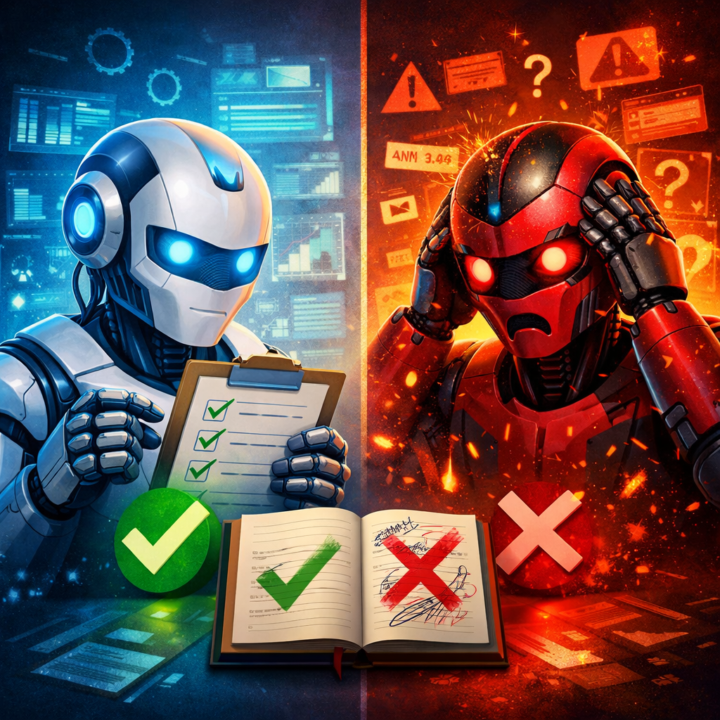
I built a framework for writing prompts that deliver. Let me show you how it works.
I spent last week watching people struggle with AI-generated marketing content. The problem wasn't the AI. It was the prompts. "Write a blog post about X" produces 800 words of nothing. "Write a 1200-word blog post for skeptical solo consultants who think AI is too complicated, with 3 ROI examples and a FAQ addressing 'I don't have time to learn this'" produces something you can actually publish. So I built a training resource that teaches the framework I use for every marketing prompt: Context → Who is this for and what's their current state? Constraint → What's NOT allowed? Output Format → What should the structure look like? Success Criteria → How do we know it worked? It's an interactive HTML guide with good/bad examples, copy-paste templates, and a pre-flight checklist. No app to install, just download and open in your browser. If you're tired of editing below average output for 30 minutes, this will save you time. Link below. Let me know if it helps.
0 likes • Feb 15
@Matthew Sutherland, I really like the preflight checklist! Thanks for sharing 🔥
Jan 7 •
🌀 AI Quirks — Did You Know ChatGPT Can’t Tell Time?
✨ The Quirk: If you ask ChatGPT what time it is, it can’t actually tell you — even though it feels like it should. There’s no built-in awareness of the current clock or moment. What’s Going On: - ChatGPT doesn’t have a live clock or real-time awareness by default. - It generates responses based on patterns, not the current moment. - Time only exists for the model if you explicitly provide it. - So asking “What time is it?” is a bit like asking a calculator what day it is. 🔧 What To Do If You See It: - Don’t assume AI knows “now” — give it the time when it matters. - Include the date, time, or timeframe directly in your prompt. - Try this prompt: “It’s currently 3:15 PM on Tuesday. Based on that, what should I do next?” Why This Matters: This quirk is a reminder that AI is context-driven, not situationally aware. The clearer the context you provide, the smarter it feels. This one genuinely surprised me. For some reason, I assumed “knowing the time” was basic. Turns out, it’s not. Does this surprise you too? Or is this something you already knew? Try asking ChatGPT the time, and see what response you get.

2 likes • Jan 7
@Jason Hagen Yep. Tried that one too.😅
1 like • Jan 7
@Jason Hagen It was a general news search because I hadn't seen the news in a couple of days. I forgot the exact subject. I do remember just turning the TV on instead.
1-3 of 3

@markesha
Reverse engineering broken systems is my jam. Building in public inside the WHO Collective, and helping people flip for $$ in Thrift to Flip Camp.
Active 4h ago
Joined Jan 1, 2026
Minneapolis, MN
Powered by