Activity
Mon
Wed
Fri
Sun
Aug
Sep
Oct
Nov
Dec
Jan
Feb
Mar
Apr
May
Jun
What is this?
Less
More
Memberships
CopyFirst Creatives FREE
178 members • Free
Copywriting Launchpad
5.4k members • Free
GetHookd.ai Community
903 members • Free
4D Copywriting Community
64.3k members • Free
Med & Mr. X Mentorship
29 members • $27/month
15 contributions to Copywriting Launchpad

May 29 •
Sample case study of a customer for cold email
Hello everyone, Working with my first client (a B2B AI business). I built a sample case study to attach to their cold email sequence for prospects – using a fictional field services company built around their ICP. The deck follows the McKinsey one-idea-per-slide principle. Dark background for the problem slides, light for the roadmap and results — deliberate design choice based on presentation psychology. Would love a quick gut check before it goes to the client: — Does it feel like something a COO would actually read? — Is the messaging sharp enough to support a cold email sequence? — Anything that feels off? Attached. Thanks in advance. Abrar

0 likes • 12d
Nice one

13d •
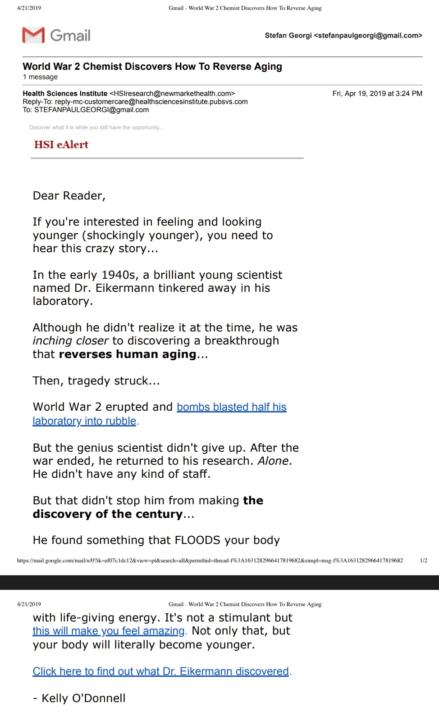
Day 26 Copy Translation. 16/06/26 pt2
Same Email, Just The Second Part of the Analysis.. I was going to post this here a while ago.💀 1 Reader: An individual who wants to feel and look younger. 1 idea : Big Discovery that can reverse human aging. 1 Offer : No offer 1 Action: There are a couple of links but the link that requires you to 'click here to find out what Dr. Eikermann discovered. 1 Core Emotion : Tenacity 1 Captivating, Compelling Story : The Story of the chemist who triumphed after the ww2 tradgey in his laboratory. 1 Single, Desireable Benefit: Feel and Look Younger. Prospect Check -Stage of Awareness Problem/Solution, I think the prospect know he wants to reverse his aging but doesn't know how to. Although i do think if the prospect was truly problem aware then the copy would be leaning more on how does it feel to be old. What your body does because then it would easier empathize with the prospect. Prospect Mind -Desire, what desire does the prospect want to be satisfied? To feel alive again. -What emotion is driving the copy? Curiosity Beliefs (Notions) -Intial Belief There is an something out there that reverse aging Goal Belief The secret is found in Dr. Eikermann Discovery
0 likes • 12d
Well done

14d •
Blog Copy Review / Critique Request (v2)
(AUDIENCE: SENIOR LEADERSHIP AT CORPORATE MICROSOFT-ENABLED BUSINESSES IN THE UK) (HEADLINE:) Your Personal Claude Agent Already Sits Inside Microsoft Copilot: Cowork Unboxed (SUBHEAD:) Why Read? Most business owners already know how to use Microsoft Copilot well. But, those very same people have no clue that sitting right inside their Copilot sits a brand-new, game-changing AI agent designed by Claude's Anthropic team... This AI agent is called Microsoft Cowork. This blog is going to tell you exactly what Cowork is, what it can do, and how you can get it quickly... so you don't need to look anywhere else. (SUBHEAD:) Quickfire: Your 5 Must-Have Takeaways: - Cowork is the part of Microsoft 365 Copilot that goes ahead and completes your work for you (like generating PowerPoints, Excel sheets, Word docs and invoices), not just answering questions by texting. - You can now allow Cowork to work across apps across Microsoft's Office 365 interface. This means it can access and work between your SharePoint, Outlook email, calendar and Teams Meetings. - This exciting new AI runs on Claude, built by Anthropic, inside Microsoft. So you get a top AI model without your data leaving the business. - Cowork is an Agent, not a GPT chatbot. It runs automatically behind the scenes (which is one of the key reasons we can't get enough of it). You prompt and simply wait for it to complete your list of tasks and hand over the deliverables. - It is available now through Microsoft's Frontier programme, on a Microsoft 365 Copilot licence. (SUBHEAD:) What is Microsoft Cowork? Cowork is what we call an AI agent. This is a type of AI that completes tasks all the way through for you. Where you can set it up to work through a task- go grab a coffee, and when you're back, it's got your deliverables ready to claim. Here at labdesk, some of the tasks we enjoy putting to work on include: - Cleaning up and rescheduling your Outlook calendar. - Building meeting materials from emails and past meetings or files. - Researching deep intel on a topic and delivering results in a full Excel workbook. - Drafting and sending emails in Outlook. - Messaging people in Teams. - Creating Word documents and PowerPoint decks. - Building plans and competitive comparisons, and delivering them to your team.
1 like • 12d
Well done, keep going
13d •
Day 8 - Cold Email Stats
46 cold emails over the last week 3 replies (6.5%) 2 opportunities identified Subject line used '(no subject)' Very little personalization - just the prospects first name found on their social pages Day 8 work - 5 cold emails sent - 1 Upwork proposal sent - Client work - ConvertKit and Instantly set up - Spec work - systeme.io landing page build - Funnel analysis for 2 prospects - 1 loom video recorded - 1 short video recorded for my social page
1 like • 12d
Well done
12d •
Day 9 Daily Post
Slower day today still got in some outreach: - 5 cold emails - 1 loom video for a prospect Otherwise it was client work and 1 video for growing my personal brand on socials
1 like • 12d
Well done keep pushing
1-10 of 15

Active 16m ago
Joined Jun 13, 2026
Moroco
Powered by