Activity
Mon
Wed
Fri
Sun
Mar
Apr
May
Jun
Jul
Aug
Sep
Oct
Nov
Dec
Jan
Feb
What is this?
Less
More
Memberships
AI Automation Station
2.3k members • Free
AI Automation Agency Hub
295.6k members • Free
GoHighLevel Growth Systems
1.2k members • Free
HighLevel Basecamp
35 members • Free
GHL Money Labs
225 members • Free
Ai Automation Vault
15.5k members • Free
OS Architect
11k members • Free
AI Automation Society
262k members • Free
5 contributions to AI Automation Society

4h •
"Your Business Loses Money Every Hour You Sleep. Here's the Fix."
⚡ I Replaced a $40,000/Year Employee With a $10,000 AI Agent. Here's Exactly What Happened. This isn't a theory. This isn't a case study from a course. I built it. I deployed it. I watched it work. And I'm going to show you the exact numbers — because in this community, we don't do hype. We do results. The Problem My Client Had (Sound Familiar?) My client was running a growing business with real customer inquiries coming in every day — across WhatsApp, Instagram DMs, Facebook Messenger, and SMS. They had a support person handling it. But here's what was actually happening: — Leads coming in at 11pm got responses at 9am the next day. Cold leads. Dead deals. — When volume spiked, quality dropped. Frustrated customers. Lost sales. — The support person left. Hiring again. Training again. 3 months of productivity lost. They were paying $40,000+ per year for a system that worked 8 hours a day and broke down regularly. Here's What Most People Miss — The Multiplier Effect Let me ask you something. Right now, if 10 customers message your business at the same time — what happens? Your support person picks up one conversation. The other 9 wait. Some get frustrated. Some leave. Some go to your competitor. A human can only handle one conversation at a time. That's biology. That's a hard limit. Now here's what the AI Agent does: 10 customers message simultaneously → All 10 get responses within seconds. 15 customers message simultaneously → All 15 get responses within seconds. 100 customers during a flash sale → All 100. Simultaneously. Instantly. There is no queue. There is no "please hold." There is no bottleneck. While your competitor's customer is waiting on hold, your customer already has their answer and is ready to buy. This isn't just automation. This is an unfair advantage. One human = 1 conversation at a time. One AI Agent = unlimited conversations, simultaneously, forever. Think about what that means during your busiest hours. During a product launch. During the holidays. During a viral moment.
0 likes • 4h
@Moloy Kundu thanks for your compliment
0 likes • 3h
@Haqi Ramadhani thanks

9d •
Need some help for guidance.
Recently I have been working on a project in which I created a workflow that would take creators videos or even youtube videos, analyze the transcript and based on a database with rules and examples form the past, and AI model would extract a few clips that matched perfectly the criteria given in the prompt. After that I set up a discord server for my first trial client which is a friend of mine and in fact the AI processing has been improving and addating better to what my client liked. The situation that I find myself is: the client could be trying the system giving me feedback but I don't know how or when to actually sell this. The problem is that I have been working on this project for more than 3 months now, I haven't sold anything created by me on n8n yet and I don't really know if this workflow could have been the best one for a complete begginer. Just 4 months ago I literally could not drag a single node and connect it propperly. So my question now is: What should be my next steps? Should I try to focus all my attention on this specific project and try to sell it as a SaaS? (consider that opus clip is only 30$ a month or less) Or should I try to expand into other niches or workflows to start selling faster? I just want to start actually have a real bussiness or something tangible for the first time and I feel a bit lost about which direction should I go now, and I really want to take action and build great success over this activities in my life. pd: sorry if my english is not perfect, I'm Spanish but I tried my best.
2 likes • 7d
@Javier Cobo Domínguez Hi! First of all, congratulations on building such a complex workflow in just 4 months—that’s impressive growth. Regarding your dilemma, here is a realistic strategy for you: 1. Don’t Compete on Price, Compete on Precision: You mentioned Opus Clip costs $30, but Opus is a 'one-size-fits-all' tool. Your strength is Customization. Your workflow uses specific rules and historical data to match a creator's unique style—Opus cannot do that easily. Sell this as a 'Boutique AI Editor' service, not just a tool. 2. Focus on Agency Service, Not SaaS (For Now): Building a SaaS requires heavy marketing and infrastructure. Instead, position yourself as an AI Automation Partner for 3-5 more 'Trial Clients.' Use these clients to refine your logic and gather testimonials. Real success in the beginning comes from solving specific problems for specific people. 3. Next Step - The 'Beta' Offer: Reach out to mid-tier creators and say: 'I’ve built a custom AI logic that clips videos based on your specific brand rules, not just random viral metrics.' People will pay a premium for something that saves them time and stays 'on-brand.' My advice: Don't get lost in the 'SaaS dream' yet. Start selling this as a high-ticket service first. Once you have 5 happy paying clients, you'll have the capital and the data to build a real business.

8d •
[SOLVED]Should this be deployed? How?
I have finished setting up the AI Photoshop Agent template and let's say I want to use it for myself or as something I refine for a small business. I still do not understand how I can do that without going into n8n. This workflow is supposed to be triggered by sending messages through telegram but when I test it I find myself hitting the "Execute Workflow" all the time, how do I move away from that for either a client or myself to use? Thanks!
3 likes • 7d
@Valentina S Hi! I totally understand—hitting 'Execute' every time defeats the purpose of automation! Here is the realistic fix to move away from manual execution: Activate the Workflow: Look at the top right corner of your n8n screen and toggle the 'Active' switch to ON. This puts the workflow in production mode. Production Webhook: Ensure your Telegram Bot is pointed at the production URL, not the 'test URL.' Cloud Hosting: If you are running n8n on your local computer, it will only work while your laptop is open. To use it for a client, you'll need to host n8n on a cloud server (like Railway or DigitalOcean) so it's online 24/7. Once you do this, your Telegram messages will trigger the AI Photoshop Agent automatically without you ever opening n8n!

8d •
Progress Not Updating in 'Your First Agent' Training
I am currently taking the 'Your First Agent' training. I am nearly halfway through the course, but I noticed that my progress percentage is not updating.
1 like • 7d
@Marcela Murillo Hey! Sorry to hear your progress isn't updating in the 'Your First Agent' training. Sometimes, the platform's tracking gets stuck. I'd recommend clearing your browser cache or trying a different browser first. If the issue persists, contacting their technical support is usually the quickest way to get it synced. Hope it gets sorted soon!

9d •
n8n Google Drive Trigger -> File created not working
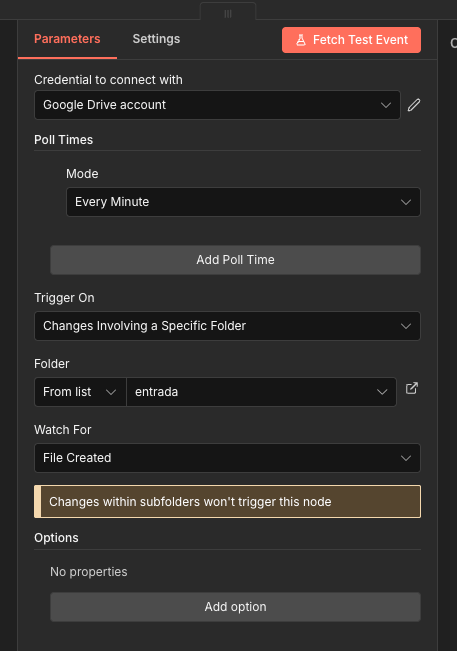
Hello community: I have workflow where the customer will be uploading PDFs for the workflow to process. They may upload multiple PDF files at once. During all the testing process with just one file the workflow worked like a charm. Once I uploaded 3 PDF files, nothing moves, just the workflow is waiting for a "file created". I have attached the parameters of my Google Drive Trigger. Anyone knows a workaround or the proper way to do it?
1 like • 7d
@Dani Szwarc Hey! I noticed your workflow struggles with multiple uploads. This often happens because the trigger can't keep up with near-simultaneous events. I'd recommend using a Schedule Node combined with the Google Drive 'List' node to batch-process the files. It’s much more stable for multi-file scenarios than the standard 'File Created' trigger. Let me know if you need help setting that logic up!
1-5 of 5

Active 1h ago
Joined Jan 12, 2026
Powered by