Activity
Mon
Wed
Fri
Sun
Jul
Aug
Sep
Oct
Nov
Dec
Jan
Feb
Mar
Apr
May
What is this?
Less
More
Memberships
8 contributions to AI Automation Society

Feb 7 •
Anyone here inside the Real Estate Niche ?
Hey guys 👋, I hope you're all doing great! My name is Paul, and I'm planning to start an AI agency in the real estate niche 🏡🤖. I just wanted to ask if there are any other agencies here working in the same niche! If so, let's connect 🙌


1 like • Feb 9
Hi @Paul Planko, nice to see you in this community. I lost track of you last few months. Keep my fingers crossed for your agency.
Dec '25 •
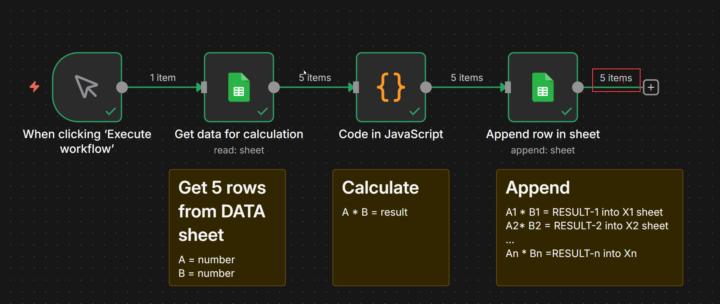
Google sheet - row by row execution VOL 2
vHi, since my previous attempt to solve the Google Sheets problem was unsuccessful, I've created a simple scenario that illustrates my challenge. There is a Google sheet with sheets: DATA, X1, X2, ... Xn - In the sheet, DATA are variables - There is a SCRIPT node that calculates via JS simple multiplication - row by row - Result of multiplication of variables from each row has to be appended by the last node into a different sheet accordingly to X1, X2, to Xn Simple? When the scenario was executed, all the results were appended into sheet X1. Could you help me solve my puzzle ?
1 like • Dec '25
@Albert Gray I'm afraid the problem is that Google Sheets operates in batch mode; it doesn't go row by row. With the append operation, it works in batches. I solved the problem with the loop node, but I do not like it.

🔥
Dec '25 •
Interesting to learn
Which niche sounds less exciting but more sustainable? Which one from this and different from this you already learned/learning?
Poll
27 members have voted
4 likes • Dec '25
@Muskan Ahlawat, as @Aslam Khatri said, we are still learning :)
Dec '25 •
Google sheet - row by row execution
Dear N8N enthusiasts !!! I use Google Sheets as a database; in each record on the main sheet, there is a new "item" entity. In this scenario, I want to select the first item from the first row and then execute all nodes of the scenario. Then the scenario should extract the second row and manage all remaining nodes as a fresh one. I have to misconfigure something because, on the first run, the very first node gets all the records, and the remaining nodes try to use them in one pass, which makes JS not work correctly. How do I force my scenario to go through a table, one row at a time, until the last node, then start over for the next item?
1 like • Dec '25
@Rafan Natasya, It was my first idea, but since it didn't work for me, I focused on the node loop. I still have some issues, so I'm in debug mode.
1 like • Dec '25
Follow up on my challenge presented on a simple 4-node scenario - could you share your help ? https://www.skool.com/ai-automation-society/google-sheet-row-by-row-execution-vol-2
Dec '25 •
Google sheet new row formatting issue
I work on a scenario where the last node adds a row to a Google Sheet via Upsert. In scenario I have to add two values in columns A and B; all other columns have formulas and should propagate automatically. I add only raw data in columns A and B, and formatting is not copied from the previous record, nor are formulas propagated. Could you advise me on what I should do differently to force formula propagation and formatting propagation?
1 like • Dec '25
@Adesoji Johnson, I've decided to use the Script node to rewrite all formulas there in JS, then upload the final numbers to the Google Sheet. I've tried the proposed method by you, then I thought of two areas that calculate the final result in the system and about future problems with maintenance, so I have migrated all of it into N8N.
2 likes • Dec '25
@Chris Jadama Thank you for the tip - I considered that, but formulas were working on a specific range of cells, and it was an additional complication. I've decided to use the Script node to rewrite all formulas there, then upload the final numbers to the Google Sheet.
1-8 of 8

@grzegorz-scislo-8975
30 years in IT! From BASIC in the 80s to AI and automation today. Love sharing tech war stories and exploring AI automation with fellow enthusiasts.
Active 24d ago
Joined May 15, 2025
Powered by