Activity
Mon
Wed
Fri
Sun
Oct
Nov
Dec
Jan
Feb
Mar
Apr
May
Jun
Jul
Aug
Sep
What is this?
Less
More
FBA Canadian Academy
528 members • Free
40 contributions to FBA Canadian Academy

12h •
Video ideas
Hey everybody! It's been a while since I've posted a YouTube video that's not a Canflip update. What's something that you guys would like to see? - a video on what to do for Q4 - another FBM video - a sourcing video Let me know in the comments!
0 likes • 11h
An FBM video for sellers without a Stallion Express or Chit Chats nearby would be especially helpful. What KPF filters, for example, might such sellers use to find FBM products, given the higher cost of shipping they have to pay?

20d •
How much inventory should you buy for a variation listing (wholesale)?
This is one of the most common questions I see in wholesale, and honestly, most people are just guessing. You don't have to. There's a simple way to figure this out using Keepa and SellerAmp. Here's how I break it down. Step 1️⃣: Find the variation split on Keepa Go to Keepa and click on the Variation tab. Scroll to the right and you'll see a column called Review Percentage. This shows you how sales are split between the different variations (colors, sizes, etc). Let's say there are 2 variations. One is doing 86% of sales, and the other is doing 14%. And let's say the whole listing sells 5,000 units a month. You're interested in the variation doing 14%. because it has high profits Step 2️⃣: Work out the monthly sales for that specific variation. Just multiply the total sales by the percentage. 5,000 x 14% = 700 sales a month for that variation. Step 3️⃣: Check how many sellers are on that listing. Now head over to SellerAmp and check the seller count for that ASIN. Let's say there are 20 sellers. Step 4️⃣: Divide the sales by the number of sellers. 700 / 20 = 35 sales per month, per seller. That number (35) is roughly what you can expect to sell each month if you're one of 20 sellers on that variation. Step 5️⃣: Now decide your inventory From here, it's up to you. If you're comfortable getting a 2-3 month supply, you'd order somewhere around 70 to 105 units for that specific variation. If you want to start smaller and test it first, order less and scale up once you see how fast it actually moves for you. The key thing here is you're not just looking at total listing sales. You're breaking it down by variation and by seller count, so you're not overbuying stock nobody's going to touch, or underbuying something that could've sold way more. Anyone else have a method they use for this? Curious to see how other people approach it.

1 like • 20d
Keepa's "Variations" tab is unreliable in Canada; there isn't any way of distinguishing between US-based and CAD-based sales. Chances are that most of the sales are US-based.
1 like • 17d
@Umer Humayun Select the appropriate variation on the product page; navigate to the "Data" tab and then "Offers"; filter by "Prime" and "Include historical offers"; and then check and cross-reference the "Sold 30 days" column and the adjacent "Stock History" graphs, particularly those graphs with staircase-like line formations, which typically indicate sales. You'll get a rough estimate of how many units of a certain variation have sold within the last 30 days, but some of the sellers listed could be US sellers, so you still have to check whether they're based in the US to ensure that your own assessment is based on Canadian data.

Aug 12 •
Ungating inquiring
Hello everyone, My name is Sirak, and I started selling on Amazon this month. However, I have a question. Every time I try to get ungated in a particular category, I end up getting ungated for a specific brand instead, which was not my original intention. How do you know which products to buy from a distributor that will allow you to get ungated in a particular category rather than just a specific brand? Any tips or advice would be greatly appreciated. Thank you.
0 likes • Aug 15
@Sirak Yegzaw Are you saying that you're able to continue selling units of a product whose ASIN or brand Amazon had re-gated after you sent the units in? If this is what you mean, then I would just sell through/price-to-move the units you have in stock already but refrain from sending in any additional units.
1 like • Aug 16
@Sirak Yegzaw Oh, I see. Thanks for the clarification! I've never had that happen to me before; but, to answer your question, I think it's possible that your units, upon arriving at a fulfillment centre, could just become stranded inventory. If they do, you could ask for them back and possibly return them to recoup some of your capital, depending on when they'd arrive, what kind of items they are, where you bought them, and so on. Another option is that of trying to sell them on another marketplace (e.g., eBay, Facebook Marketplace). Unexpected gatings/re-gatings underscore the importance of being picky about how you allocate your capital, especially as a new(er) seller. If the amount you spent on the gated units represents, say, 5% of your capital, that's much easier to recover from than if it represents 50%. I don't know if you do this already, but you might want to consider limiting your capital allocation to no more than 10% per brand or ASIN, especially if you have relatively minimal capital to work with. For example, if you have $3000 capital and want to buy 10 units of a certain bottle of XYZ shampoo for a total of $150, then you'd have $150 left to spend on any other profitable product manufactured by XYZ. Similarly, if you wanted to buy 30 units, you would instead limit yourself to 20 because buying 30 would cause you to overspend.
Jul 21 •
Big CanFlip Update Coming Soon
I have some very interesting updates on the way. - The ability to Track 25 Sellers, receiving an update when they add new asins.(working on it even pre-check what you're ungated in out of those asins!) - Saved Keepa Product Finder Filters, to easily load them - The ability to see if another seller has a lot of ungated products and see how many ASINs are shared with your tracked list - Upgrading the bulk checker - A quick SellerAmp Style calculator on keepa product finder, to see if somethings profitable before clicking into the amzn link - Fine Tuning the AI button to focus more on risk, it will check if theres IP risks, meltable, seasonal etc The thing is, a lot of these new features will cost tokens. These tokens are part of your keepa subscription. The base plan generates 1 token/minute and caps you at 300 tokens. Nerd speak: Refreshing a storefront costs 10 tokens. So if you track 25 sellers, and it refreshes once per day, thats 250 tokens. If you ever start missing tokens, Keepa has upgradable plans that gives you more tokens (CanFlip makes NOTHING from tokens, its just our way of communicating with keepa to fetch data) Stay tuned!

0 likes • Jul 21
@Anthony Mancini Sounds great! Will you be recording and publishing a video demo once the updates have been finalized and made available to all subscribers of CanFlip?

Jul 14 •
🥲
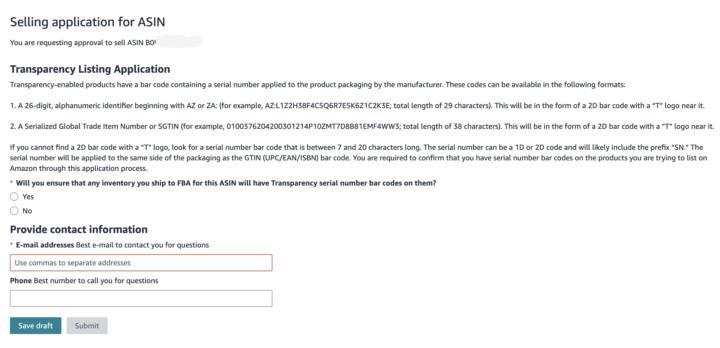
Hi brother, I need your advice. I previously sold 15 units of this ASIN on Amazon Canada without any issues. After I restocked and sent more inventory to FBA, Amazon is now asking me to request approval again. During the application, they’re asking if I can ensure all FBA inventory has Amazon Transparency serial number barcodes. My products have the regular UPC and serial stickers, but I can’t find any Amazon Transparency code. Should I select “Yes” or “No”? What would you recommend I do to get this approval? Thanks
0 likes • Jul 17
@Anthony Mancini I don't know whether this would be a helpful or feasible addition to CanFlip, but maybe a transparency code, IP complaint, and meltable checker could be integrated into the software. If not, then a separate IP Alert-like software specifically for Canadians that checks for all three based on crowdsourced data might be useful.
1-10 of 40
@evan-jones-8309
Only if we are capable of dwelling, only then can we build.
Active 36m ago
Joined Jan 1, 2026
Powered by