Activity
Mon
Wed
Fri
Sun
Aug
Sep
Oct
Nov
Dec
Jan
Feb
Mar
Apr
May
Jun
Jul
What is this?
Less
More
Memberships
DP
Digital Product Creators Club
767 members • Free
5 contributions to Digital Product Creators Club

19d •
What does BN do for you
After reading all the replies, what exactly does this program do if you have to go out of it and use other programs to make your corrections? When I researched this program, It said I could do my own book, which I did, do my own book cover, which I did and after making it a PDF I could go to the dashboard and do editing from there. All my dashboard is is an upsell page. So I wasted my money and time on my book or how can I fix this or do I just get my money back?
2 likes • 15d
@John Weir I like the story bible part too, it helps me dig deeper into my characters.
1 like • 3d
@John Cox on the screen it has at the top generate, if you click on it your book will be there and you can make changes in there

19d •
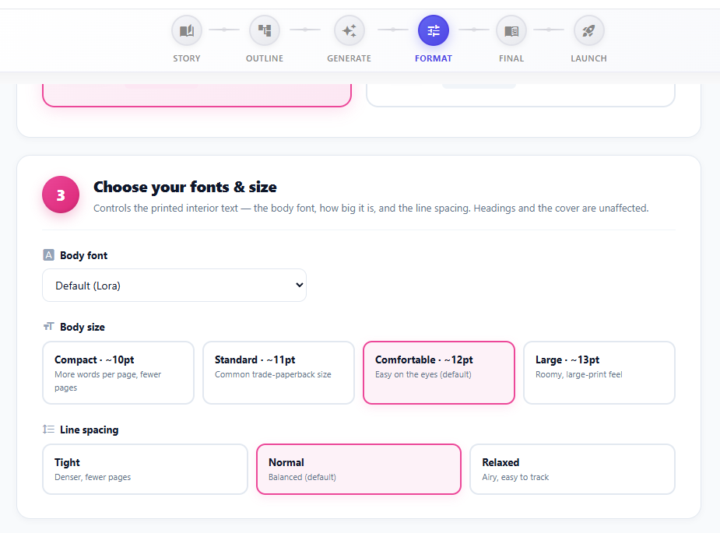
🎨 New: You're now in control of your book's fonts & sizes!
One of the most-requested things from this community just went live — and it came straight from your feedback. 🙌 Until now, every book exported with the same interior typography. Some of you found the text a little larger than you'd like, especially when printing. Now you decide. Head to the Format step of any book and you'll find a brand-new "Choose your fonts & size" panel: ✍️ Body font — choose the typeface for your interior 🔠 Body size — Compact · Standard · Comfortable · Large 📏 Line spacing — Tight · Normal · Relaxed Want a denser, more "real paperback" feel with more words per page? Go Compact + Tight. Prefer a roomy, easy-on-the-eyes large-print look? Go Large + Relaxed. It's your call. 📚 💡 Publishing on Amazon KDP? We keep your body text at 11pt or larger so your printed proof matches the page count Amazon expects. Just making a PDF for yourself or readers? Switch the publishing target to Personal Use and unlock the most compact size too. No reformatting headaches — pick your settings, re-download, done. ✅ Go give it a try on your current book and drop a screenshot below — we'd love to see the styles you land on! 👇 Keep the feedback coming — this one was 100% built because you asked for it. ❤️
1 like • 15d
I used it, it works well.
22d •
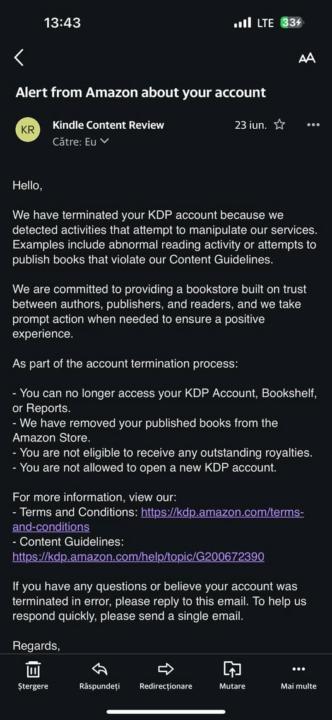
Be carful when submitting to KDP
Ok this is a copied post... not my account but I wanted to share, to warn people when they submit to KDP to make sure they fill out the AI generated section carfuly "Warning to all fellow Amazon KDP creators! I want to share a painful lesson I recently learned, hoping it will help you protect your hard work. After 3 months of daily effort pouring my heart into creating educational materials and books, my Amazon account was permanently terminated. The reason? A simple human error regarding the AI-disclosure checkbox (using Google Gemini for illustrations) on one of my latest books. Even though I spent hours manually designing the layouts and structures, missing that single checkbox in the metadata form triggered an automated alert that ended in a full account termination for 'manipulating services'. What I want you to learn from my experience: - Be 100% transparent: If you use AI (even just for illustrations or content assistance), always disclose it during the publishing process. Amazon does not play around with their Content Guidelines. - Don't take risks: Their algorithms are incredibly rigid. Any suspicion of undeclared or duplicate content can lead to an immediate ban, loss of bookshelf access, and forfeiture of your royalties. - Double-check everything: Even if you are tired or in a hurry, double-check your submission forms. A single second of oversight can wipe out months of genuine, passionate work. Protect your accounts and stay extremely vigilant with their rules! I wouldn't want anyone else to go through what I am facing right now. Wishing you all the best of luck with your projects!"
1 like • 18d
I have not done my first book yet, is the check box for AI hard to find?

Jun 14 •
Help needed
Good afternoon to you all. I am completely new to this stuff. I was wondering if anyone could help me please? Once your book has generated and it comes up in PDF form how can you edit out the inconsistence's or errors in it. I have looked everywhere on the dashboard and I can not see anything. Many thanks.
3 likes • 18d
I figured out how to edit it. After you do generate PDF go to the top and click back on generate, there you can edit it and it saves it there. Once you have done all the editing you want done to your book. Go back to the top and click on final and then at the bottom you click regenerate PDF and it will generate all the changes you made. It was simple once I figured it out.
19d •
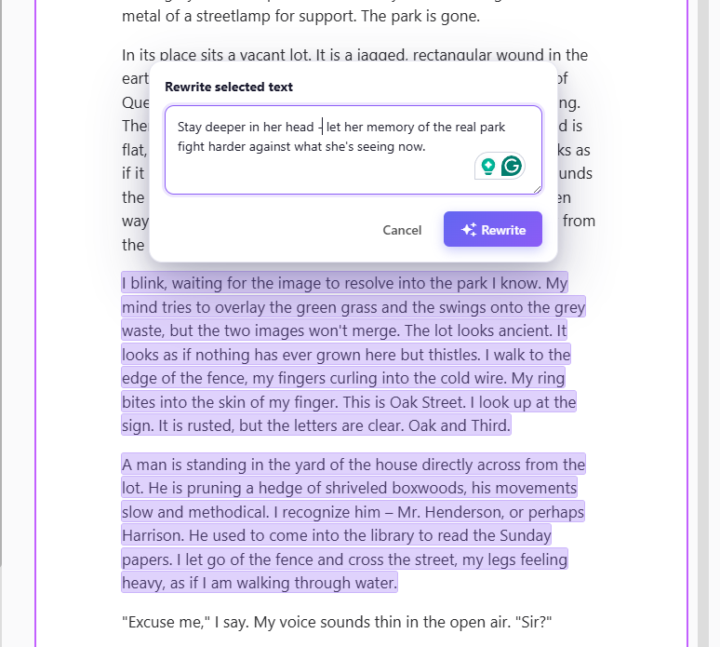
✨ New: Rewrite any part of your book with a single instruction
Hey everyone, I just shipped something I'm genuinely excited about, and I think it's going to change how you polish your books inside BookNova. Up until now, if you wanted to change a sentence or a scene, you either edited it by hand or regenerated the whole chapter. Today I'm giving you something far more surgical: you can now rewrite any specific piece of text just by selecting it and telling the AI what you want. Here's how it works: Highlight any sentence, line of dialogue, or paragraph in your chapter (just drag your mouse over it). A small Rewrite button pops up right above your selection. Click it, and a box slides open. The text you picked stays highlighted, so you always know exactly what's about to change. Type an instruction for how you want it rewritten — or leave it empty for a standard rewrite — and hit Rewrite. That's it. The AI rewrites only the part you selected, in your book's language, using the same model that wrote the chapter — so it blends right in with the prose around it. The real power is in the instruction box — this is where you direct the scene like a showrunner. A few examples of what you can actually type: "Give her dialogue a sharper, more sarcastic edge — she's hiding how scared she is." "Rewrite this fight so it's chaotic and close-quarters instead of clean and choreographed." "Add a beat of physical tension between them before he answers." "Make the villain's threat quieter and more menacing — no shouting." "Switch this from telling us he's grieving to showing it through small actions." "Slow this moment down and stretch the suspense right before the door opens." "Layer in sensory detail — what the tavern smells and sounds like." "Plant a subtle hint here that she's lying, without giving it away." "Deepen the POV so we're fully inside his head during the betrayal." You can get as specific as you like — name the character, the emotion, the stakes. The more precise your direction, the closer the result lands to the scene in your head.
3 likes • 19d
Sounds exciting. I'm currently trying to make changes to my first book. I look forward to trying this, it sounds so much easier.
1-5 of 5