Activity
Mon
Wed
Fri
Sun
Nov
Dec
Jan
Feb
Mar
Apr
May
Jun
Jul
Aug
Sep
What is this?
Less
More
Clief Notes
50.5k
5.0
Free
126 contributions to Clief Notes

Mar 30 •
Multi-agent memory management with... folders and files
Open sourced a memory management plugin for Claude Code (and Cowork) a little while back. @David Vogel asked for the architectural specifics, so I'm happy to oblige. Some interesting observations and findings in it, but I could really use a researcher's endorsement for publication on arxiv.org under CS.AI. Referrals are deeply appreciated. https://nominex.org/research/what-we-found-building-poor-mans-multi-agent-memory.html Full disclosure: while I said "multi-agent" the reality of it is that the orchestration layer predominantly runs as a single agent roleplaying different agents depending on the folder it's running in. This is the main lesson @Jake Van Clief means when he speaks of folders. Being the over-engineer that I am, sometimes I am tempted to run tasks with multiple agents running in the background. PMM makes it quite context-window efficient (so I don't burn as many tokens or run into message limits on Claude Code).

1 like • Jun 5
@Mira Bradshaw yeah it might have been a repetition on the curve where both the agent and myself were both running out of tokens and coffee in the 4,201 cup curve. I’ll probably leave it as it is. Been working on running the benchmarks differently in a v2 iteration of the paper but haven’t gotten around to it - mainly because of token based pricing now which is unavoidable and expensive. Will get to it in due course but focusing on development first or the revised version of the memory system.
0 likes • Jun 10
@Patrice Roatan Quebecois I actually implemented HyPE (maybe HyDE to follow) on a completely files based embeddings. But yeah, thanks for the suggestion, per directory awareness was something. I felt Claude.md and individual user preferences could handle without it being a feature of the engine. Was there something else on your mind on this?
Apr 30 •
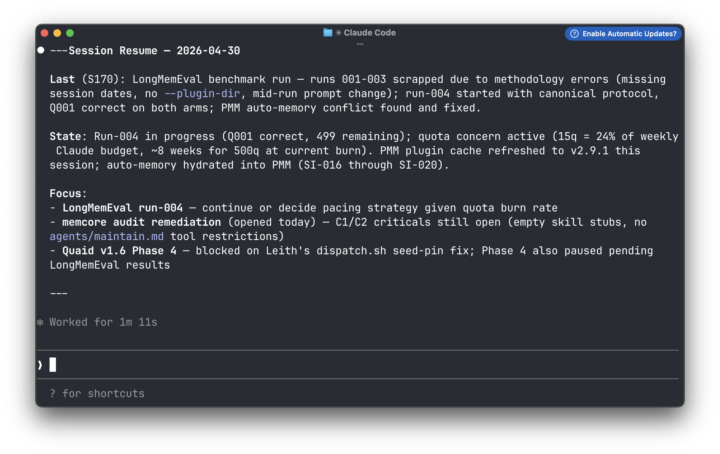
Helping your AI remember tasks between sessions (Session Aware Memory Management )
TLDR: LLMs forget everything between sessions. You re-explain yourself constantly, lose progress on long-running work, and have no reliable way to pick up where you left off — especially when switching between models or tools. I built PMM to fix that. @Deacon Wardlow helped me improve it by identifying a specific gap: session continuity — what changed, what’s still open, where you stopped. That’s now live in PMM v 2.8. Edit: I figured screenshots tell a better story => same memory on three different tools with 3 different models, where I've asked the LLM to basically recall outstanding tasks across the 4-5 current projects. Slightly different perspectives because I'm working a slightly different project with each model. I initially built PMM to remember stuff beyond the context window to fix an issue i had with the LLMs I use failing to remember and recall over long conversations. I used it to have the same conversation, while switching between Claude Code CLI and Co-work. Eventually it became a tool for helping me with continuity in my conversations with different LLMs on different apps and harnesses ( I switch a lot between Claude, OpenCode and GitHub Co-Pilot). I now use it to give multiple agents long-term memory (while they switch between different models on Claude, Gemini, Model Ark and a couple of smaller local models) without the use of model routing. I currently deploy it (along with with another agentic plugin I developed) to give agents long-term individual and collective organisaitonal memory in their conversations with multiple users over telegram in a small pilot. @Deacon Wardlow tested PMM in his own workflows, identified a gap in session memory management, and tried a couple of changes, which he outlined in another thread discussing Session Memory Layer + PMM
2 likes • Jun 5
@Andrew Begley that’s great. Everyone will have some form of memory system they call their own that suits their needs eventually. It will evolve I assure you. I’ve been building a local only version of the memory system with embeddings and a local embedding model. Runs off files and doesn’t need a vector db and doesn’t connect to any other remote service besides the LLM. It has evolved somewhat since the early iterations I’ve been discussing here.
1 like • Jun 10
@Patrice Roatan Quebecois I actually took it a step further. HyPE (as opposed to HyDE). Didn’t need chromadb though. Embeddings is completely file based (because I thought it would be fun… and it was). I haven’t released this new repo yet though because it’s still work in progress.

May 29 •
Cleaning up my mess: fs-audit skill
I'm often my own worst enemy when it comes to file organization. I build a clean system. Routing tables, CONTEXT.md files, load instructions pointing at exactly the right places. And it works great, until I decide to reorganize something. A folder gets renamed. A file moves. A whole workspace gets restructured. Life happens. The routing table doesn't update itself. Now Claude walks into a session, follows the instructions I left, and hits a dead end. A CONTEXT.md that references a path that no longer exists. A load instruction pointing at a folder that moved two weeks ago. Files sitting on disk that nothing is looking for anymore - completely disconnected from the system. The instructions are precise. The map is just wrong. I already had an ICM audit skill (it's great at what it does thanks to @Yucky Yuckyyyy's work HERE diagnosing structural problems in Claude's instruction architecture). But it wasn't built for filesystem integrity. That's a different problem. So I built one that is. **fs-audit** walks a target directory, catalogs everything on disk, extracts every path reference from your docs, and cross-references them. Orphaned files. Orphaned folders. Dead paths cited in routers that lead nowhere. It flags everything, tells you the severity, and in fix mode it'll walk you through cleaning it up one confirmed action at a time - nothing moved, archived, or touched without your approval. It's a small skill. Took about an hour to build. And it solves something I've been working around for months. I checked (not exhaustively) other repos, there are a metric f-ton of skills for file organization, but I couldn't locate anything specific to cleaning up the files and folders within CLAUDE desktop. Hope this helps others. Please post thoughts (especially any improvements, critiques, etc. - there's always room for improvement).
1 like • May 29
Maybe subtrees / work trees when making changes, then a diff after you’re done to capture the changes and then a small LLM like haiku to update the state based on the diff?
May 17 •
Problem statements: start with the "why", not the "how"
For the last couple of years, I spend two weeks each year teaching AI fundamentals, patterns and solutions to aspiring cloud architects from this one FAANG (or MAANG, MAMAA, what have you). The syllabus is already set, but I make it a point to add value in each cohort by imparting relevant, but game changing advice, particularly relating to their upcoming certifications and examinations. TLDR; this year, the cohort is a little more engineering-savvy. Most engineers tend to overthink problems and over-engineer solutions, in addition to being susceptible to shiny object syndrome. This is relevant to most of us who build on shiny new tech. We are often distracted and tempted to dive into solution building before we the problem is understood. We end up in a spiral refactoring or building the next feature, not quiet knowing when to stop. The game-changing advice I had for them was ask (before diving into architectures, and prescribing solutions): "what is the problem statement that best captures this question or issue?". 1. The problem in broad terms: what is it that you can't do or can't do well enough? What needs to change or improve? 2. Scope or criteria: what aspects of the organisation or problem needs solving, and what is the criteria for done? 3. Break it down into sub-problems if needed: articulate the problem statement, scope and criteria for each one. 4. Avoid producing any architectural diagrams, or committing to solutions and components before the problem statement is clear and unambiguous. 5. If unclear or ambiguous, keep questioning until clarity emerges. Now, this two-week intensive program is intended to prepare these cloud architect aspirants with most of the basic knowledge about data engineering, as well as cloud and AI solutions. It is highly modular, but the the syllabus don't encourage application or synthesis of knowledge across domains. My solution to this was a hypothetical case study drawn from real-world use-cases: an early stage startup has had some traction with their B2C SaaS. They now have 20K monthly active users globally, but have been receiving complaints and feedback from users in EU of a lack of GDPR compliance. Their web-based app is currently hosted on a different cloud provider and running a particular stack. It needs to be GDPR compliant.
1 like • May 17
@Akram Dahmani the fomo is real.
0 likes • May 17
@Nikolaj Knespel Sinek talked about leadership. And in that talk (and book) he spoke about how great leaders start with the why (reasons why the organisation exists) to inspire action. It’s more human and organisational psychology. The why is the starting point, and actions compound outward. In the context of systems architecture and design, the why (problem statement) constrains the scope. We don’t want scope creep (expansion outwards) unless that’s in the scope and problem statement. I think they are similar concepts, but applied to two different behaviours.

May 13 •
Someone just killed Personal Coaching
This one deserves a deeper dive https://github.com/danielmiessler/Personal_AI_Infrastructure A developer spent 22,000 hours building a Personal AI Operating System on top of Claude Code it knows your goals, remembers every decision you've made, and prepares your morning briefing while you sleep [ the numbers are insane ]: - hours of dev work in it: 22,000 - sessions logged: 6,000 - time saved per day: 2-3 hours - GitHub stars: 12,100 - skills built in: 45 - workflows wired up: 171 - safety hooks: 37 - cost to install: $0 What do you think? https://x.com/i/status/2054314953616855129
0 likes • May 15
@David Vogel another case to be made for harness agnostic frameworks.
0 likes • May 15
@David Vogel I was thinking more along the lines of files, folders, ICM. 🙃. But yeah. Those work too.
1-10 of 126

Active 84d ago
Joined Mar 24, 2026
ENTJ
Powered by