Activity
Mon
Wed
Fri
Sun
Jun
Jul
Aug
Sep
Oct
Nov
Dec
Jan
Feb
Mar
Apr
May
What is this?
Less
More
Memberships
Mixing Intensive
233 members • Free
Production Intensive
129 members • Free
Learn Music Composition, May21
108 members • Free
Mastering.com Members Club
35.1k members • Free
Intro to Music Production
2.9k members • Free
The Hub
79 members • $10/m
Sync 101
72 members • Free
Closed Group
4.3k members • Free
Learn Music Composition, 03Nov
347 members • Free
4 contributions to Mastering.com Members Club

Jan 9 •
Plugin database
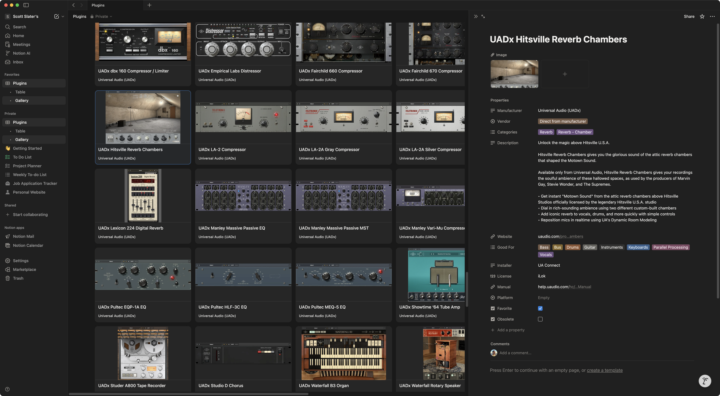
I've always been a visual person, and it's always killed me that these huge lists of available plugins in any given DAW are just lists of text. Sure, they can be broken down by type or by manufacturer, but when there are, say, 30 compressors I don't get that immediate feel of which one I want to use just by seeing the name. But when I see an IMAGE of the plugin, I always know right away which one I'm looking for. (Also doesn't help when a plugin is simply called "Tape", for example -- I'm looking at YOU, Softube.) Back in the day, word processors and graphics programs like Illustrator would have you pick a font from a huge list of names, which to me is a bit useless. Nowadays, many of those programs show you a SAMPLE of each of those fonts, making it much easier to find the one you're looking for. I wish that the list of plugins available to a DAW would have, at the bare minimum, an image of the plugin for reference. So I finally did something I've been wanting to do for ages. I made a database in Notion of every plugin I have, with a short description of each and other helpful info (FET vs OPTO vs Vari-Mu etc. for example, or Spring reverb vs. Plate, Hall, Chamber etc. etc.), AND that database is completely filterable (show me all limiters! Or show me all tape delays! Show me all amp simulators!). It's truly been a silver bullet for me. Plus, I'll admit, it's just kinda fun to have at my disposal and to play around with.

1 like • Jan 12
I like this idea. But I would also like to tie it into a RAG or AI. Something like this https://youtu.be/J_h9Th_J0uU?si=F50cfJmoQSJXBxwu An AI virtual studio assistant.

May '25 •
Best plugins / apps - supporting your work as DJ and producer?
hello, what are the best plugins, and apps that support your work as a dj and producer?
0 likes • May '25
DJ Apps: Traktor, Ableton Live, DJ.Studio, RipX DAW Producer Apps: Studio One, Ableton Live, Unify, Scaler Plugins both as DJ and Producer: to many to list but what tend to live in all my sessions are Unify and Scaler.

⭐
May '24 •
May 20th Fix-The-Mix
Hey all, Fix-The-Mix is happening next Monday, May 20th! Come join us for three days of live mixing and mastering. You'll come away with plenty of gold nuggets to improve your mixes! This event is in partnership with Spitfire Audio. Head to the Calendar section here in Skool to get the details: https://www.skool.com/fix-the-mix-challenge-2089/calendar?calDate=1715708318 Comment below if you're planning to attend! See you there, Rob
4 likes • May '24
I'm in. 😁

Aug '23 •
Welcome to Fix-The-Mix (Start Here)
Hey everyone! Welcome to this month's Fix-The-Mix Challenge (sponsored by Mastering The Mix)! Before doing anything, watch this super quick video where I walk you through how this challenge works. Drop a 🔥 emoji once you've finished so I know you're attending! https://www.loom.com/share/506a50bc20e54b3cb9e138abc7ccf5e1 See you in a few days! Michael

1 like • Aug '23
🔥
1-4 of 4

@david-secore-4023
Twitch (Dave Secore) member of cold wave band Society Burning (1996-2022) guitar, bass, keyboardist and dj (DJ Twitch).
Online now
Joined Aug 22, 2023
ENTP
Colorado
Powered by