Activity
Mon
Wed
Fri
Sun
Jul
Aug
Sep
Oct
Nov
Dec
Jan
Feb
Mar
Apr
May
What is this?
Less
More
Memberships
JP Middletons - AI Agency Hub
166 members • Free
Agent Empire
925 members • Free
Agentic Academy
1.5k members • $37/month
AI Automation Society Plus
3.7k members • $99/month
AI Automation Society
388.2k members • Free
Chase AI Community
66.4k members • Free
AI Automation Vault
14.2k members • Free
Claude Code Architects
1.3k members • Free
AndyNoCode
33.8k members • Free
47 contributions to AI Automation Society

30d •
Most founders I speak to know enough about AI to sound smart at dinner. Not enough to defend their business in 18 months.
That's not a strategy. That's a vibe. Been on a lot of calls and DMs the last few weeks. Founders building in AI. Some funded, some bootstrapped, some solo. Different stacks, different verticals. Same conversation underneath all of them. Two things I can't unsee. One. "AI" still means ChatGPT with a system prompt. I ask what they actually run internally. The deck says agentic everything. The reality is a Google Doc, an SDR they're about to hire, and Apollo. That's it. The product pitch is 2026. The ops are 2023. If your own back office still runs on copy paste and good intentions, you are not selling AI. You are selling a logo. Two. The knowledge is bubble shaped. They know their model, their stack, their wrapper, their corner of Twitter. They have no clue what large corporates are quietly shipping in compliance, finance, sales ops, back office. The bubble feels safe because everyone in it is reading the same five Substacks and nodding at each other. I sat inside those corporates for 20 years. Three quick examples so this isn't abstract. - A bank reads every new FCA update with an internal agent, maps it to the relevant policy docs, drafts the gap analysis, pings the compliance lead with a one page summary. Used to be three people, two weeks. Now one person, half a day. - An accounts payable team rebuilt itself around an agent that reconciles invoices against POs, flags the mismatches, drafts the supplier email, queues it for human send. Fourteen people went to three plus the agent. - A tier one sales ops team has an agent reading every won and lost deal in Salesforce, pulling the call recordings, updating the playbook every Friday. Reps had stopped using the old playbook because it was always six months out of date. Now it's never more than a week behind. None of this is on LinkedIn. None of it is in a press release. It just shows up in cost lines two quarters later, and in the headcount slide nobody sends to the all hands. Here is the part most founders don't want to hear.
Apr 28 •
🚨 URGENT: Claude Code is silently burning my session usage. Has anyone found a fix?
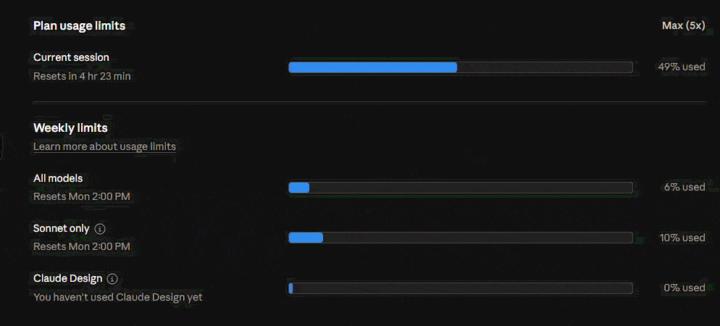
I’ve got a client call today and I’m effectively blocked because Claude Code is unusable right now. I’m on Max 5x. As you can see in the attached GIF, my current session usage was at 49% and a slow silent consumption keeps going on. So the issue doesn’t look like normal weekly exhaustion. It looks like something inside the current Claude Code session is burning context extremely fast. I’ve disconnected MCP servers, tried reducing background activity and waited for my weekly limits to reset, but the same issue keeps coming back. Even when I’m barely doing anything, the session usage climbs very quickly. I’m trying to work out whether this is caused by bloated claude.md files, duplicated project context, hidden MCP activity, background indexing, prompt injection or something else repeatedly loading into context. Has anyone built a practical way to audit what Claude Code is actually consuming? I’m not looking for generic advice like “wait for your limits to reset” or “upgrade the plan”. I need to understand what is consuming the tokens so I can fix the setup and get back to client work. Any transparent breakdown, diagnostic approach or tool/plugin idea would be really appreciated.
0 likes • Apr 28
@Imtiaz Hasan I’m only actively managing one real client deployment right now. The issue wasn’t that I had many active deployments. It was more that I have a habit of creating a new workspace for every project, often with its own CLAUDE.md, notes, and context. Combined with persistent memory/hooks, that can become risky because background observers may treat every active workspace/session as something to watch and summarise. So my takeaway is exactly what you said: I need an operating checklist.
0 likes • Apr 28
thanks @Zain Baig
Apr 10 •
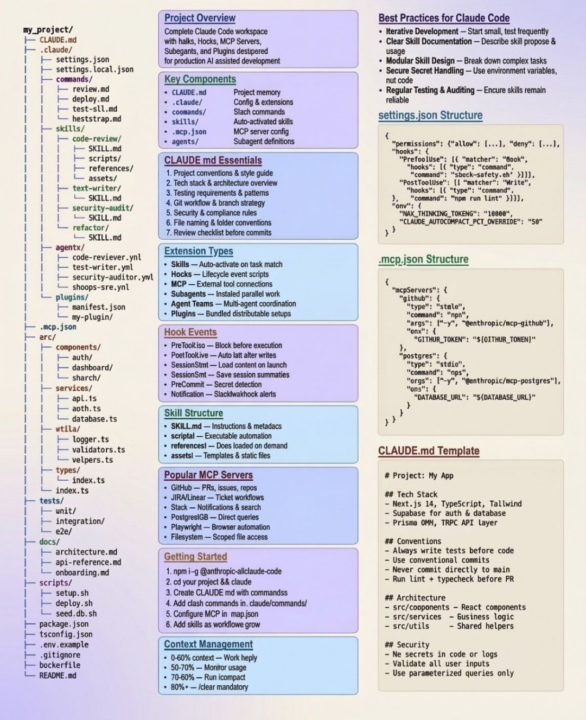
This cheat sheet lives on my wall now 😍
Honestly I kept forgetting the folder structure, the hook events, where mcp.json goes Finally someone laid it all out on one page Saved it, printed it, done If you're building with Claude Code and don't have this pinned somewhere you're making it harder than it needs to be :)
0 likes • Apr 10
thanks @Nigel Vargas enjoy it👌
1 like • Apr 11
@Just Ken Ha good catch Ken, eagle eyes definitely not a test... just proof it was made at 2am 😅

Apr 8 •
GOOD DAY FOR EVERYONE🤗
Hope everyone’s having a productive day 👊 What’s one thing you’re working on right now?
1 like • Apr 10
@Esayas Tesfaye Thanks man! The timing piece is where it gets interesting.. I'm using signal scoring to decide whether a lead gets a nudge or gets left to cool. Things like email opens, link clicks, days since last touch. Early days but already seeing better reply rates than just blasting follow-ups on a fixed schedule. What signals are you using to qualify your leads on the auto-reply side?
0 likes • Apr 11
@Esayas Tesfaye email opens and link clicks in the last 48 hours.. matters way more than budget or location since those are static. Behavioral data tells you when to reach out, which is the whole game with follow-ups 😁

Apr 9 •
7-Day Challenge Meet the Builders
I've started working my way through the 7-Day Challenge in the Classroom - Just got a first draft of a landing page re-design done which is amazing! I had what seemed like every issue in the "book" come up... I didn't have Git installed, then didn't have node installed, then there were some issues with VS Code and Claude working together nicely... but I'm learning that the way to be successful is to keep bashing my head against every challenge until the challenge gives way! QUESTION: There's a step for Day 1 that says: Meet the Builders Community Introduce yourself in the community thread. Share what you're hoping to build, your experience level, and what brought you here. You'll see other builders doing the same — these are the people you'll be sharing your work with over the next 7 days. Is the Meet the Builders Community a separate thing in this group? Or, does that just mean to post to the General Discussion?
1 like • Apr 10
@Mark Lyne Medicare/health insurance is a great niche for this. Those agencies live and die by lead capture so a solid landing page is a real deliverable, not just practice. Keep iterating on it, that could easily become a case study you use to land more clients in that space
0 likes • Apr 10
@Mark Lyne That's the move. Two sellable services from one challenge is solid
1-10 of 47

@david-barroso-2714
Turning simple ideas into systems that compound over time
Active 4h ago
Joined Apr 3, 2026
ENFJ
London
Powered by