Activity
Mon
Wed
Fri
Sun
Mar
Apr
May
Jun
Jul
Aug
Sep
Oct
Nov
Dec
Jan
Feb
What is this?
Less
More
Memberships
Builder’s Console Log 🛠️
2k members • Free
7 contributions to Builder’s Console Log 🛠️

17d •
OpenCode/AntiGravity...
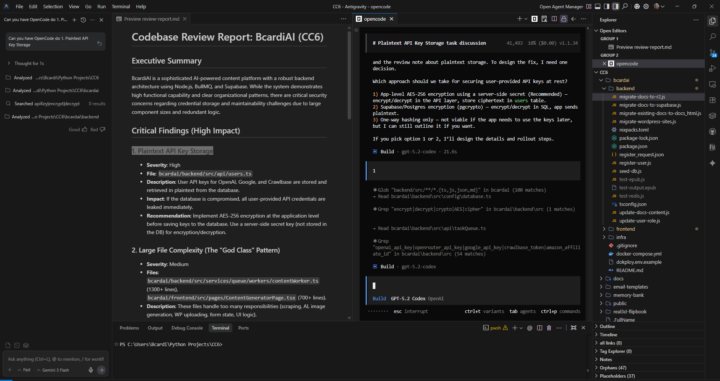
Is anyone else using both OpenCode and AntiGravity together? I have setup skills in AntiGravity and am now using AntiGravity to send tasks to OpenCode and find I am getting better code and it is much faster as I can send multiple tasks to OpenCode at the same time. AI Said it all: Yes, AntiGravity and OpenCode can be integrated so AntiGravity's agents handle high-level planning and orchestration while delegating specific coding tasks to OpenCode agents for execution. Integration Overview AntiGravity excels at agent orchestration and multi-step planning, while OpenCode provides precise code editing, repo control, and model flexibility. Users install OpenCode as an extension in AntiGravity (via the Extensions panel), enabling commands like Cmd/Ctrl + Esc to launch sessions where AntiGravity prompts trigger OpenCode runs. Setup Steps - Install AntiGravity IDE and OpenCode globally or as an extension. - In AntiGravity, search "Open Code" in Extensions and install it. - Use shortcuts (Cmd/Ctrl + Esc for new session) or terminal commands like opencode run [task] to invoke OpenCode agents from AntiGravity. - Optionally, add the opencode-antigravity-auth plugin for shared authentication and rate limits. Workflow Example AntiGravity's agent (e.g., powered by Claude Opus) creates an implementation plan and task list, then delegates via prompts like "@attach plan" or "use OpenCode to improve CSS," where OpenCode executes edits autonomously. This builds full apps (e.g., CRM dashboards) in minutes, with AntiGravity as "conductor" and OpenCode as "lead engineer." This setup is free, bypasses rate limits via local OpenCode runs, and supports multiple parallel OpenCode agents

0 likes • 16d
Hey Gerald, this was a really good tip. Thank you so much. I also discovered that I could use Claude Code within Google Antigravity so there are multiple ways to use code agents to manage token use.

26d •
How to move code from Google AI Studio / AntiGravity into WordPress?
Hey everyone, I’m looking for some technical advice. I’ve been using Google AI Studio and AntiGravity to build out some high-quality website pages. The code they generate is amazing, but I’m struggling with the deployment side. My current site is hosted on Hostinger and built with WordPress/Elementor. Is it actually possible to 'download' these pages and upload them into a WordPress environment? Or am I forced to host these specific pages elsewhere (like Vercel) and just link to them? I’d love to know if anyone has a workflow for getting custom AI-coded pages to live inside a standard WordPress site without breaking everything. Thanks!
1 like • 21d
Ask the agent in antigravity how to connect to your Wordpress CLI it will instruct you and set it up.
1 like • 21d
If the WordPress CLI doesn’t work with antigravity then you should just ask antigravity what you’re trying to accomplish and if you can think of a way to do it

Jan 12 •
I need help: Antigravity OR Cursor
I am a complete beginner and only have 50h of experience with vibecoding I have 25h a week of focused time to learn and vibe + 250,- monthly AI tools budget I really want to use Antigravity and have started learning it but I found Corbin his amazing 6 hour video and he is using Cursor. Can anyone help me make a decision? I am not in a rush and want to do this for at least 6 months. Any other info I could provide that would clarify?
1 like • 30d
I've used both. I would go for Antigravity though. It has a development environment where agents can plan and execute coding tasks for you (like on autopilot), which is especially helpful for beginners learning to build software with AI assistance. I basically started with Replit, found the cost prohibited to keep going with them so switched to Antigravity.

Jan 10 •
Model selection cursor
I was just wondering what models you guys recommended using in cursor? Do you have favorites for ask, plan, build? I dont know what model performs best....
1 like • Jan 11
Yeah, I think this is a great topic. I often wonder about this too, which model is best for this or that? I think it has something to do with price, or tokens, rather, right?

Dec '25 •
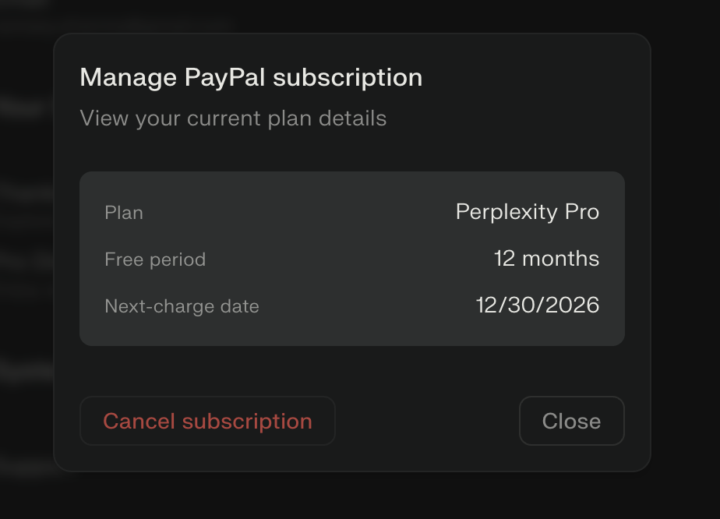
Perplexity free for 12 months via PayPal!
Perplexity free for 12 months via PayPal! https://www.perplexity.ai/join/p/paypal-subscription This is not an affiliate link I do not get any monitory rewards, or at least I don’t believe I do. Feel free to search on line to get the link from other sources. I have just signed up to it and and the offer seems legit. The offer end 31st December 2025 so you you in have one day left to sign up. Combining perplexity pro with perplexity’s ai browser gives the user access to other LLM GPT 5.2, Sonnet 4.5, Gemini three pro, Grok 4. “Pro Search usage: Pro users get “hundreds of Pro Searches per day” and the plan is described as “practically unlimited Pro Searches”, i.e., you are unlikely to hit a fixed daily cap under normal use. - Advanced model constraints: For GPT‑5.2, Claude Sonnet 4.5, Gemini 3 Pro, Grok 4 etc., Pro has generous access but heavy weeks can trigger temporary throttling (per-model rate limits to keep the service stable)” Source perplexity
1 like • Dec '25
Nice worked for me, got a free year of pro use
1-7 of 7