Activity
Mon
Wed
Fri
Sun
May
Jun
Jul
Aug
Sep
Oct
Nov
Dec
Jan
Feb
Mar
Apr
What is this?
Less
More
Memberships
Clief Notes
23.7k members • Free
23 contributions to Clief Notes

2d •
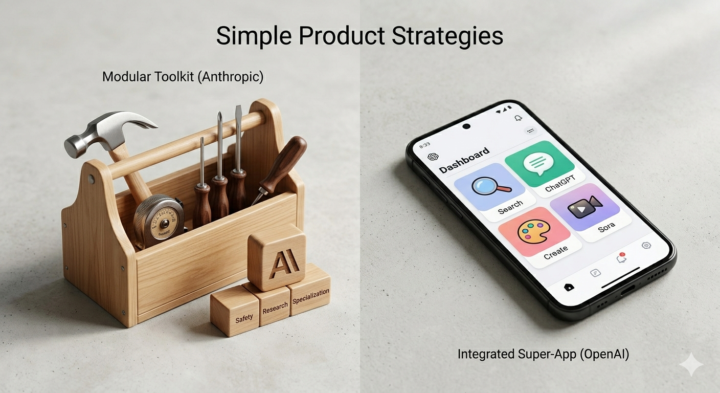
OpenAI vs. Anthropic: The Super-App vs. The WordPress Strategy 🚀
We spend a lot of time debating which AI model is smarter, but there is a massive difference in HOW these two companies are building their products. If you look closely at their recent releases, you will see a masterclass in two completely different go-to-market strategies. Here is the breakdown: 🔴 OpenAI: The Bloated "Everything App" When you think of OpenAI, you think of ChatGPT first. Sora second and maybe codex. Everything else feels like a bolted-on feature to keep you locked inside their ecosystem. OpenAI is trying to absorb every software category into their chat interface. Look at their recent Agent Builder. Instead of letting ChatGPT seamlessly connect to incredible, real-world automation tools like n8n, OpenAI tried to build their own closed version inside their app. The result? It feels clunky, restrictive, and bloated. They are trying to replace real-world tools with chat features. 🟠 Anthropic: Real-World Products & Community Anthropic is running the complete opposite playbook. They aren't trying to cram everything into a chat window. They are building real-world tools for real-world workflows. • Native Tools: Instead of forcing developers into a web browser, they built Claude Code to run natively right in the terminal, exactly where real work happens. • The Plugin Ecosystem: They use the true "WordPress" model. Instead of replacing tools like n8n, they built open standards (like the Model Context Protocol) so Claude can power them and made other tools became a plugin of Claude rather than competing with them. • Community-Driven: By letting the community build skills and integrations around the base model, everyone contributes. It stops being just an "Anthropic product" and becomes a massive, decentralized community effort. 💡 The Takeaway OpenAI wants to build a closed "super-app" that tries to do everything itself (and often gets bloated in the process). Anthropic is building standalone, real-world tools that fit into the ecosystem that already exists, while letting the community build the plugins that make it unstoppable.
Poll
1 member has voted
1 like • 2d
@Gabriel Azoulay well it worked well for apple and they are doing the same now with their chips

5d •
Genuine question - where do you get your AI news from?
i keep switching between sites and still feel like i'm missing things. by the time i find something useful, it's already old news. looking for one solid source (or a tight stack) that covers : models, tools, updates. practical stuff i can apply. not just noise. tbh this community has been one of the better ones so far. but curious what else you're reading. website, newsletter, youtube, discord, anything. what are you using day to day?
1 like • 5d
X is the best place
2 likes • 3d
@Apeksha Gadekar you just need to follow those that talk about what you need and filter the noise

7d •
Why are you here?
Jake talks about building systems that last a decade. That's a long time. What is the one thing you’re actually hoping to solve or scale with AI so you can focus on bigger things over the next 10 years? For me, it’s about mastering the technical logic so I’m not constantly chasing the next "hype" tool every six months. I want the systems to do the heavy lifting so I can reclaim my time.
1 like • 5d
For me it’s more of learning the building block behind what works
1 like • 4d
@Alex Nartey exactly

5d •
New Product Alert! → CLAUDE DESIGN
Claude Design is a conversational design tool powered by Claude Opus 4.7 You describe what you want, get a working visual. Refine it through chat, inline comments, or direct edits. WHAT CAN YOU BUILD WITH CLAUDE DESIGN? a)Interactive prototypes Shareable, clickable, no code review needed b)Wireframes & mockups PM-ready feature flows for handoff or refinement c)Pitch decks & slides Rough outline → on-brand deck in minutes d)Marketing collateral Landing pages, social assets, campaign visuals e)Frontier design Voice, video, 3D, shaders, built-in AI, all in code f)Design explorations Multiple directions, fast! KEY FEATURES - Your brand, built in → Claude reads your codebase and design files during onboarding to auto-apply your colors, typography, and components to every project. - Refine via chat or inline comments → Click on any element on the canvas to request a precise change, or use chat for broad structural edits. - Import from anywhere → Start from a prompt, upload images, DOCX/PPTX/XLSX files, link your codebase, or capture directly from a live website. - Export anywhere → Download as .zip, PDF, PPTX, standalone HTML, or send directly to Canva. Handoff to Claude Code with one click. - Team collaboration → Share with view-only, comment, or edit access. Colleagues can co-design and chat with Claude in a group conversation. HOW TO GET STARTED 1) Go to claude.ai/design → available on Pro, Max, Team & Enterprise plans 2) Create a project → it auto-inherits your org's design system (no setup needed) 3) Add context → upload screenshots, documents, or link your codebase for better output 4) Describe what you want→ Start broad, layer in detail. Ask for 2–3 variations if unsure 5) Iterate, then export or hand off to Claude Code when ready to build ENJOY!
1 like • 5d
Claude is always cooking 🧑🍳
0 likes • 4d
@Michael Steve yea
4d •
The "Compositing Engine" (The Winner)
Hey everyone! 👋 I wanted to share a massive "lesson learned" from a project I just pivoted. I was building an AI Thumbnail Generator for Inside Success TV, and halfway through, I scrapped the whole thing. Not because it didn't work but because the design was wrong. If you’re building AI tools for your portfolios or clubs, this might save you a lot of time and money. I stopped asking "Can AI do this?" and started asking "What part actually needs AI?" Now, instead of one big AI generation, I use a modular pipeline: • Real Assets: High-quality stock photography from Pexels. • Engineering: Node.js and Sharp handle background removal and layering (the "sandwich method" where text sits behind the subject for 3D depth). • The AI Role: Claude does one specific job translating a simple prompt like "Baywatch episode" into precise instructions for the machine. • The Result: Cost dropped from $0.65 to $0.003 per session, and the quality matches exactly what a human designer would build. 💡 The Big Takeaway The lesson isn't that AI is bad. It’s about leverage. AI at 85% of your pipeline is a liability. At 10%, it’s leverage.
1 like • 4d
@Ben Bruce thank you 😊
0 likes • 4d
@Roc Lee thanks
1-10 of 23

@bolaji-ilori-7396
I am a Data and autmation specialist and also an AI enthusiast
Active 2h ago
Joined Apr 7, 2026
Powered by