Activity
Mon
Wed
Fri
Sun
Mar
Apr
May
Jun
Jul
Aug
Sep
Oct
Nov
Dec
Jan
Feb
What is this?
Less
More
Memberships
AI Workshop Lite
14.7k members • Free
AI Automation First Client
1.1k members • Free
AI Money Lab
51.5k members • Free
AI Business Trailblazers Hive
12.9k members • Free
Ai Titus+
56 members • $8/m
The RoboNuggets Network (free)
27.7k members • Free
Ai Titus
885 members • Free
AI Automation Society
249.6k members • Free
Insurance Sales Success!
13.9k members • Free
4 contributions to AI Automation First Client

5d •
$20k/month in document automation - here are all my templates
📂 All my workflow templates are now in one place These are the exact automations I use to earn ~$20k/month from document processing clients. Finally organized everything into one repo: 👉 https://github.com/khanhduyvt0101/workflows Templates for n8n, Make, and Zapier. All free. No signup. Just grab what you need. Will keep adding more as I build them.

1 like • 1d
Thank you!
6d •
How I Turned a Rejected Proposal Into 3 Referrals 🔥
Got a "no" email on a Tuesday. Felt defeated. Then I sent one follow-up message that changed everything. THE REJECTION: "Thanks for the proposal but we've decided to handle this internally for now. Appreciate your time." My stomach dropped. I had spent 4 hours building a custom demo. THE OLD ME RESPONSE: Would have replied: "No problem, let me know if anything changes." Then moved on feeling sorry for myself. THE NEW RESPONSE: "Totally understand. Before I go - you mentioned you know other landscaping companies. Any of them drowning in paperwork too? Happy to help them even if we're not the right fit for you." THE REPLY THAT SHOCKED ME: "Actually yes. My buddy Jake runs a bigger operation and complains about invoices constantly. Let me connect you." One week later: $1,800 contract with Jake. But it got better. THE REFERRAL CHAIN: Jake mentioned me to his accountant Accountant had 2 other clients with document pain Both became clients within 30 days Original rejection: Led to $5,400 in new business. THE PSYCHOLOGY OF REJECTED PROSPECTS: They feel slightly guilty for wasting your time They want to help somehow Referral request gives them an easy way to reciprocate They know others with similar problems THE EXACT SCRIPT: After any rejection send this: "Completely understand and no hard feelings. Quick question before I go - do you know anyone else in [their industry] who might be struggling with [their original pain point]? Happy to help them even if we weren't the right fit for you." THE TIMING MATTERS: Send within 24 hours of rejection While you are still fresh in their mind Before guilt fades Strike while they want to help MY REFERRAL STATS FROM REJECTIONS: Proposals rejected: 12 Referral requests sent: 12 Referrals received: 7 Clients from referrals: 4 Revenue from "no" responses: $7,200 THE MINDSET SHIFT: Every rejection is a referral opportunity "No" is not the end of conversation They know other people with the same problem Ask and you receive
2 likes • 5d
What a turnaround!👍
7d •
Invoice Processing Workflow - The $47K Discovery 🔥
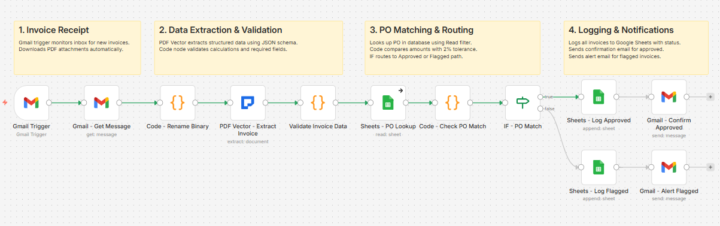
Client 3 changed everything for me. Small logistics company. 320 invoices monthly. AP clerk spending 15 minutes per invoice. Do the math. 80 hours a month. Just data entry. I quoted $1,800 for the automation. They said yes same day. THE BUILD THAT ALMOST FAILED: Built it over a weekend. Gmail trigger watching their AP inbox. Gets the message and downloads the PDF attachment. PDF Vector extracting vendor, amounts, line items into structured JSON with a schema I defined. Validation code checking if line items actually add up to the total. PO lookup matching against their purchase order database. Tested with 10 invoices. Perfect. Day 3? Broke completely. THE PROBLEM I MISSED: Some vendors put totals at top. Others at bottom. A few had multiple pages with running totals. My extraction worked for simple invoices. Complex ones? Math didn't match. Spent 6 hours fixing it. Added a validation code node that catches calculation errors before anything logs. Built 2% tolerance into the PO matching because small rounding differences aren't worth flagging. IF node routes clean invoices to approved path, problems to flagged path. Each path logs to Google Sheets with different status. Approved invoices get confirmation email back to sender. Flagged invoices alert the AP team with specific reasons why. THE UNEXPECTED OUTCOME: Two months in, client calls me. "Your workflow caught something." $8,400 duplicate payment from a vendor. The validation warnings flagged it. Nobody would've noticed manually. Year one results: $47,200 in overpayments and calculation errors caught. My $1,800 setup fee suddenly looked cheap. WHAT I LEARNED: Don't just extract data. Validate it. The validation layer is worth more than the extraction itself. Current workflow runs 12 nodes total. Gmail Trigger catches invoice. PDF Vector extracts everything with JSON schema. Code validates calculations. Sheets lookup matches PO. Another code node checks 2% tolerance. IF routes approved or flagged. Logs to Google Sheets. Sends confirmation or alert email.
1 like • 6d
Thank you for sharing this valuable information.
Sep '25 •
🚀 NEW FREE COURSE: n8n Templates That Land Clients
Hey Community! 🔥 Just launched something massive... 📚 Introducing: n8n Templates That Land Clients The complete library of document automation templates I've been using to close clients consistently. What's Inside: ✅ 15+ Production-Ready Templates (I will post each day) - Invoice processing automation - Contract data extraction - Form parsing workflows - PDF to database pipelines - Automated report generation - And much more... You'll Master: 🎯 Adapting templates to ANY industry (legal, healthcare, accounting, real estate) 🎯 Customizing workflows without breaking them 🎯 Handling edge cases and weird document formats Why This Course? I got tired of seeing you all build from scratch when proven solutions already exist. Every template in this course has: - Been tested in production - Landed real clients - Generated recurring revenue The Reality: Stop spending weeks building custom workflows. Start with templates that already work. Customize for your client. Deploy in hours, not weeks. 💡 Quick Math: One template → One client → $500-1,500/month 15 templates → 15 opportunities → Do the math 😉 📍 Find It Here: Classroom → n8n Templates That Land Clients · AI Automation First Client. 🎁 What You Get: - Complete n8n JSON files (copy & paste ready) - Setup guides for each template - Industry customization instructions - Edge case handling strategies - My exact client pitch approaches Ready to stop building from scratch? Drop a "⚡" if you're diving in today!
1 like • 7d
Thank you!
1-4 of 4