Activity
Mon
Wed
Fri
Sun
Aug
Sep
Oct
Nov
Dec
Jan
Feb
Mar
Apr
May
Jun
Jul
What is this?
Less
More
Memberships
Clief Notes
41.9k members • Free
AI Automation Society
424k members • Free
62 contributions to AI Automation Society

24d •
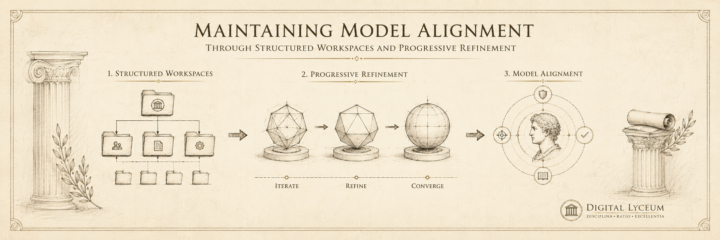
Maintaining Model Alignment Through Structured Workspaces and Progressive Refinement
What's up all. This is an article based on the SOC Lab I am building. I was thinking about adding some visuals, but before I do I wanted to post it here to see what people think. Let me know if any sections are hard to understand or written poorly. Thanks! # How to Build Anything With AI Without Losing Control of the Project Most AI-assisted projects don't fail because the AI can't do the work. They fail because nobody told it when to stop, what to check, or what "done" looks like. The model drifts. Scope creeps. You end up with a pile of generated output and no clear path from where you are to where you meant to be. The fix isn't less AI. It's more structure. I built a workflow to solve this and tested it on a home SOC lab — key management, SIEM deployment, Windows attack surface, network segmentation, firewall hardening — with an AI agent executing the bulk of the build across multiple phases. The AI rarely went off-script. Not because it couldn't, but because the structure didn't leave room for it. The SOC lab was the proof case. The workflow is the product. You can plug any project into it and get the same result: sequential, verifiable, drift-resistant execution. Here's how it works, stage by stage. --- ## Stage 1 — Project Initiation Before anything gets built, you need three things: a clear goal, an organized workspace, and a defined scope. **Define the goal in one paragraph.** Not a feature list — a statement of what success looks like and why this project matters right now. This becomes your project charter. Every future decision filters through it. **Set up your workspace.** A clean folder structure where every file has an obvious home. Project docs, reference materials, build logs, and configuration files each get their own location. This sounds basic, but it's what prevents the AI from scattering output across your filesystem and losing track of state. **Identify your reference documents.** What standards, vendor docs, or specifications govern this work? Collect them before you start building. Pin the version — not "Splunk docs" but "Splunk Enterprise 10.4.0 install guide." The AI works from these instead of its training data, which may be outdated or wrong.
0 likes • 21d
@Ahmad Khan depends on how small and how fast I guess.
0 likes • 20d
@Ahmad Khan the underlying structuring is the foundation to all my work flows, but progressive refinement is essentially just a method for executing projects (anything more then a couple tasks). It can be used for any project that you are relying on a model to complete. The workflows complexity is based to the project complexity. If its a simple project this may feel 'slower' at first, but I've found rushing into even simple project with AI leads to re-prompting and context drift. If its a complex project I think this would help get the ideation and planning phases underway quicker, while allowing you to avoid over planning the later stages and having to 'undo' work.
Jun 7 •
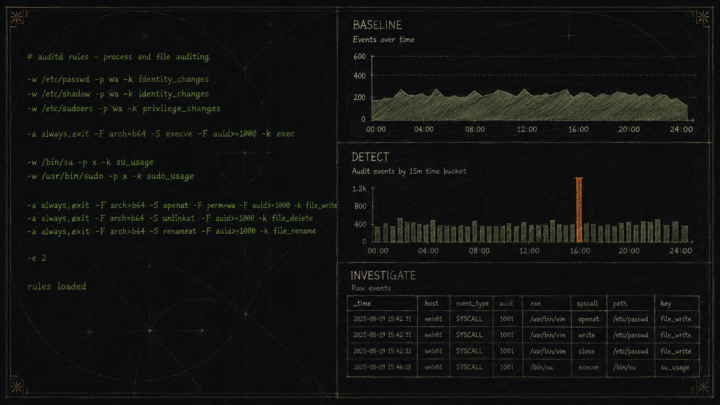
Linux Network Telemetry Dashboard
Was about to start port scanning exercises when I realized — might as well watch the scans land somewhere useful. Splunk doesn't auto-generate dashboards, so I had RIGGS knock out the config: auditd syscall rules on the ThinkPad to log every network connection at the kernel level, a monitor stanza in Splunk's inputs.conf to pull the audit log in, and a quick group permissions fix so Splunk could read a root-owned file. RIGGS drafted the dashboard XML, I pasted it into Splunk's editor. Structured the dashboard around the analyst workflow rather than data type — Baseline (7-day normal), Detect (60-min anomaly view, where scan spikes will show), Investigate (raw 15-min stream). The idea: a junior analyst should be able to open it and know exactly what question each panel is answering. Need a few days of normal traffic before the baseline means anything. But the pipeline is live and the next scan I run hits those detect panels in real time.
5
0
Jun 7 •
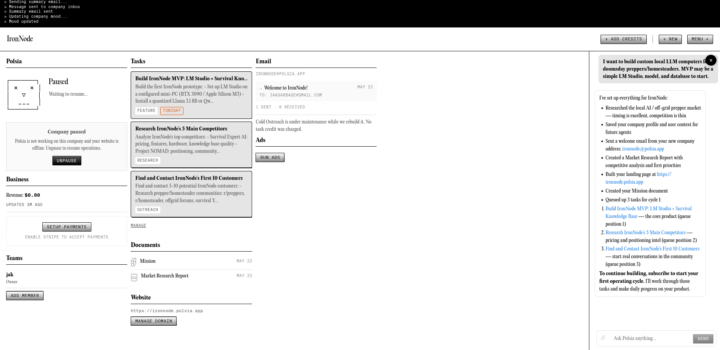
Just Came Across Polsia
I ran a random business idea I had through this software and it had some interesting results. Nothing you couldn't do solo, but it got the v1 off the ground in a lot of ways. I was impressed. Here was my v1 business output https://ironnode.polsia.app/ Referral Link https://polsia.com/?ref=VYQEYRCS

Jun 7 •
Is Claude Max worth it??
i have pro right now but my tokens they end super fast and im thinking to do the switch
0 likes • Jun 7
its worth it if you are making more then $200 with it or replacing a $200 cost with it. If you're replacing an expensive course fees and learning the same or more then yes. Kind of depends what your using it for and if you have the money to spend. I'd say you gotta give us more information to give you any solid advice.
Jun 2 •
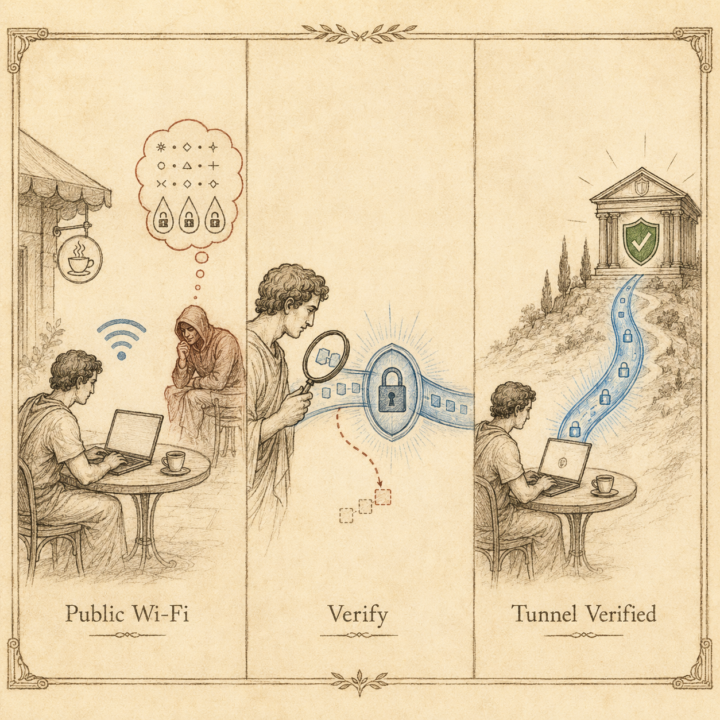
SOC Lab Day 6 - Trust But Verify
Before working from the public WiFi, I wanted to actually verify the tunnel was encrypting traffic to my home lab. RIGGS built the verification checklist with me. We went back and forth on it a few times. Early drafts were too optimized for speed, not for understanding. Rewrote it from the ground up as OJT: every step explains *why*, not just what. The goal is that I understand what I'm looking at, not just that the test passes. One thing that came out of the live run: filtering tcpdump output post-capture with grep and awk. I didn't know that workflow going in — RIGGS walked me through it on the fly when the raw output was too noisy to read on camera. ``` grep " > " /tmp/capture.txt | awk '{print $3, $4, $5}' ``` That one-liner cut through the noise and surfaced a port 1028 anomaly I'd have missed in the raw output. RIGGS identified it as Tailscale path discovery, expected behavior, not a problem. But the point is: the filtering made it visible. You can't investigate what you can't see. The human-in-the-loop piece on this session was mostly judgment calls: is this command right for a junior to run, or is it a senior shortcut? RIGGS executes the build, but the pedagogical decisions were mine. Anyone else building learning reps with AI as the instructor?
1 like • Jun 2
@Ron Davis thanks. Im trying to get back into cyber security so I figure every process I use I should test.
1-10 of 62

@bagu-hanto-1997
Been working casually with AI for 2ish years. Starting to really dive into building a custom EA, vibe coding, and leveraging AI as an instructor.
Active 2h ago
Joined Dec 8, 2025
Errff
Powered by