Activity
Mon
Wed
Fri
Sun
Jun
Jul
Aug
Sep
Oct
Nov
Dec
Jan
Feb
Mar
Apr
May
What is this?
Less
More
Owned by Annie
AI tools & workflows for solo women entrepreneurs. Automate your business, save time, and scale without a team or tech skills.
Memberships
WeScale Free Course
29.4k members • Free
AI Automation Agency Hub
315k members • Free
AI Automation Made Easy
16.7k members • Free
Skoolers
191.4k members • Free
AI Automation Society
355.7k members • Free
14 contributions to Women Who Automate I AI

7d •
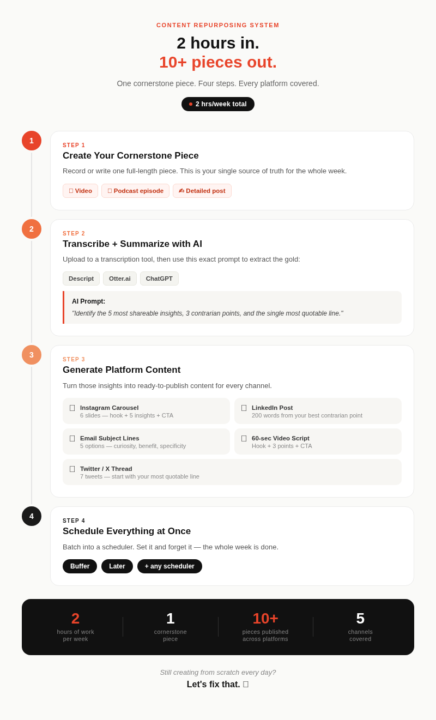
The Content Repurposing System That Turns 1 Piece Into 10+ (Step-by-Step)
Here's a real number: I spend about 2 hours creating one piece of cornerstone content per week. That content then becomes 10+ pieces across different platforms - automatically. Here's the system: STEP 1: Create your cornerstone piece • A video, podcast episode, or detailed post - record or write it in full STEP 2: Transcribe + summarize with AI • Upload to Descript, Otter.ai, or paste into ChatGPT/Claude • Prompt: 'Identify the 5 most shareable insights, 3 contrarian points, and the single most quotable line.' STEP 3: Generate platform content • Instagram carousel: 6 slides - hook + 5 insights + CTA • LinkedIn: 200-word post from the most contrarian point • Email subject lines: 5 options mixing curiosity, benefit, specificity • 60-sec video script: hook + 3 points + CTA • Twitter/X thread: 7 tweets STEP 4: Schedule everything at once • Batch into Buffer or Later for the week • Set it and forget it What's your current content process? Creating from scratch every day? Let's fix that.
1
0
12d •
Weekly AI Brief: AI Agent Updates You Need To Know
This week I want to talk about one trend I'm watching closely: AI agents. Not just chatbots. Not just "write me an email." I mean AI systems that can take actions in your business, browse the web, send emails, update your CRM, post content, on their own. The numbers from Stanford's 2026 AI Index just dropped, and this stat stopped me cold: AI agents went from a 12% success rate on real computer tasks to 66% in one year. That's not incremental progress. That's a huge leap. Here's what's new this week that actually matters to you: OpenAI just turned Codex into a full agent workspace. As of April 16th, it's not just a coding tool anymore. It now has computer use on macOS, a built-in browser, persistent memory, and 90+ plugin integrations across Notion, Slack, Jira, and Microsoft 365. Meaning: it can do things across your tools, not just talk to you about them. Quick note if you're a Claude/Cowork user wondering where this fits: Codex is still skewing technical. It's powerful but designed for people comfortable building and tinkering. Claude Cowork is designed for business owners who aren't developers. It's better suited for document work, research, managing files, and business operations without needing to configure anything. Different tools, different strengths. You don't need both. But it's worth knowing which lane each one is in. Lindy 3.0 launched, and this one is worth your attention. The update moves Lindy from "task automator" to actual digital team member. Here's what that looks like in a real solo business: - Your inbox is drowning in inquiries. Lindy reads incoming emails, categorizes them (new lead, existing client, spam), drafts a reply in your voice, and logs the details to your CRM, all without you touching your inbox. - Someone just booked a discovery call or downloaded your freebie. Lindy sends a personalized welcome email, tags them in your email platform, and queues a follow-up reminder for 3 days later. The whole onboarding sequence, handled. - You just recorded a podcast episode or published a blog post. Lindy extracts the key points and generates 3 social captions and a newsletter blurb, ready for your review and not your energy.
1
0

27d •
Let's meet each other - drop your intro here 👇
This is the intro thread. It lives here permanently so whenever someone new joins, they land here first. When you join, drop a comment with: 👤 Name + what you do 💼 Type of business (or role, if you're employed) 🤖 One task you want to automate or stop doing manually 🌍 Where you're based I'll go first. I'm Annie. Marketer and entrepreneur, living in Madrid on a Digital Nomad Visa. I run this community and take on freelance clients in fashion and beauty eCommerce. One thing I want to stop doing manually: first-draft client reports. I'm about 80% there - the remaining 20% is the perfectionist in me that keeps jumping in. Based in: Madrid 🇪🇸 (originally American, perpetually caffeinated ☕) Your turn. This community is only as good as the people in it and I can't wait to see all of the big things each of you are up to!
0 likes • 22d
So glad to have you here, @Aída Ramos and thanks for sharing what you're up to! Some of the intro posts and courses might be a great place to start learning 🙂
1 like • 12d
Welcome @Jaymie Duke - Sounds like an amazing business you run! Check out the last video I posted where I talk about setting up automations using Make.com as a starting point. I'm still offering a free 20m strategy session for the first 50 members to help jumpstart your AI journey - just message me if you want to set one up!
13d •
The Claude Design Move Most People Will Miss
Okay, I've been playing with Claude Design since it dropped last week, and there's one move I have to share because I think most people are going to scroll right past it. On the surface, Claude Design looks like just another AI tool that spits out a graphic. That is not the ah-ha. The real ah-ha: Claude Design can learn your brand one time. Your colors, your fonts, your tone, the visual motifs that show up across your work. And then it applies all of that to every asset you create from that point on. So no more graphics that feel only 70% on-brand. No more digging through your Notes app to find your hex codes every time you sit down to design something. No more Canva templates that look suspiciously like every other creator's Canva templates. You teach it your brand once. Then you describe what you need in plain English, and it gives you back work that actually looks like you.Most AI design tools will make a graphic. Claude Design makes your graphic. That is the whole difference. Your 15-Minute Quick Win: The Brand Memory Drop Do this one time. Benefit every time you open the tool from now on. Step 1. Gather your brand (3 min) Pull together 3 to 5 assets that represent you. Your logo, two past graphics you actually love, a screenshot of your website, your color palette. Drop them all in a folder. Step 2. Upload (2 min) Open Claude Design, start a new project, and upload everything in one go. Step 3. Teach it your brand (3 min) Paste this prompt: Learn my brand from these assets. Give me back my primary and accent colors with hex codes, my typography style, my overall visual tone, and any recurring motifs you notice. Save this as my brand profile for every future design. Step 4. Put it to work (5 min) Now use it on something you actually need this week. Try: Using my brand, create a 7-slide Instagram carousel teaching my audience "[fill in the blank]". Title slide, 5 tip slides, CTA slide. Step 5. Export (2 min) Export as a PNG, PDF, or push it straight into Canva to tweak.

17d •
How are you building your AI + automation tech stack?
I get asked this constantly: "What tools do you actually use?" Here's the truth. There's no one "right" stack. There are just the categories every solo founder eventually runs into, and the tools that solve each one. So instead of handing you my list and pretending it's yours, I'm handing you the categories. These are the ones that come up over and over inside Women Who Automate. Plus the tools I'd actually recommend if you asked me directly. Not exhaustive by any means, just the ones worth knowing. ✍️ **WRITING & CONTENT** - Claude — strategy, long-form, brand voice - ChatGPT — quick drafts, ideation - Notion AI — if you already live in Notion 🎬 **VIDEO & EDITING** - CapCut — free, short-form, auto-captions - Descript — edit video by transcript - Opus Clip — turns one long video into 10-15 shorts 🎨 **DESIGN & VISUAL** - Canva Pro — thumbnails, carousels, templates - Midjourney — AI imagery, mood, concept art ⚡ **AUTOMATION** - Make.com — visual builder, generous free tier - Zapier — more integrations, bigger template library 📱 **SOCIAL SCHEDULING** - Metricool — all platforms + analytics in one dashboard - Buffer — simpler, AI captions - Later — great for Instagram-first brands 📈 **ANALYTICS & SEO** - VidIQ — YouTube keyword research - SnapTik — remove TikTok watermarks for cross-posting 🤝 **CLIENT DELIVERY** - Dubsado — proposals, contracts, invoices - HoneyBook — similar, slightly simpler 📅 **TIME & SCHEDULING** - Reclaim.ai — auto-schedules tasks around meetings - Calendly — client booking automation 🔍 **RESEARCH** - Perplexity AI — cited, real-time research The real question isn't is *which category do I actually need right now?* Start there. Build forward. One tool at a time. Save the guide (PDF attached). Share it with a founder who's still doing everything manually. And drop your stack in the comments - I love learning how everyone else is working 👇.
1
0
1-10 of 14
@annie-yaker-2654
I'm Annie — ex-corporate marketer, now living in Madrid & helping solo women in business use AI to work less, earn more, and actually enjoy it.
Active 6h ago
Joined Mar 26, 2026
Madrid, Spain