Activity
Mon
Wed
Fri
Sun
Jan
Feb
Mar
Apr
May
Jun
Jul
Aug
Sep
Oct
Nov
Dec
What is this?
Less
More
Memberships
Creative 3D Community
6.1k members • Free
4 contributions to Creative 3D Community

13h •
Building cages/connecting endpoints
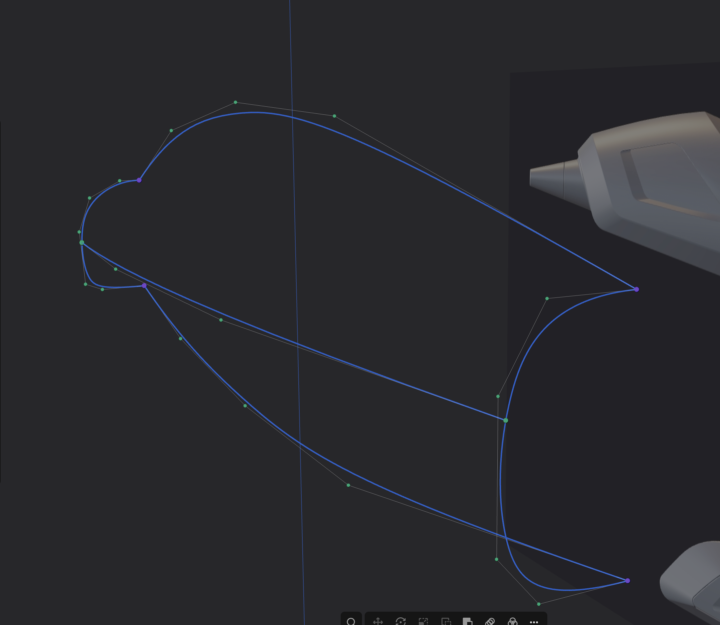
I am having a heck of a time getting endpoints to connect to curves or other endpoints. I thought they were supposed to turn purple when connected (that's worked for me), but in this case neither purple nor green endpoints indicate success. First image: cage with end guides, plus longitudinal guide that is currently showing green endpoints (purple points = failing as a loft guide). Middle image shows initial loft (using guides with purple connections??). Third image shows loft failing when longitudinal guide is added in, along with error message. I don't why I'm not getting this crucial skill down, but joining endpoints is the CRUX of cage building. I can't move forward until I figure this basic step out. Any help is appreciated!
0 likes • 8h
[attachment]
0 likes • 5h
@Christian Johnson The little things are everything in the surface modeling thing.

May '24 •
👉 START HERE
Hey, Welcome to our Plasticity Community🚀 It would be amazing to see, how your setup is looking and in which environment you are using Plasticity. Feel free to introduce yourself by doing the following: 👉 Step 1: Post a picture of your setup 👉 Step 2. Write a thing or two about the essential tools that you can't without:) 🛠️ My setup (May/24) Laptop: MacBook 16" M1 after 27 years of using Windows lol iPad: It's the extension of my brain. I literally write every day, everything that comes into my mind. Strategy, systems, ideas, business, thoughts, journaling, everything... Classic Moleskine Notebook: That's my whole to-do list which I am writing every evening for the next day. I like to keep things simple in business and not to use too many tools. Graphics tablet: For ANY creative or graphical work I prefer to use a pen tablet as I am much more comfy with a "pen" than a mouse for creative tasks. Plant: To keep the environment a bit more friendly as I am working every day all-day basically. It's very minimalistic and nothing fancy, as I am traveling constantly and live in different countries (it's the 6th country I have been living in in the last 3,5 years. So I try to keep everything to the essentials and not expand to much.

0 likes • 13h
New MacBook Air M4, space mouse, wireless mouse. That's it!

1d •
Guide issues on lofting main form of helmet.
Going through my first tutorial— the motor cycle helmet. I've been trying to get the side curve to guide the loft of the main form but an error keeps being thrown. “At least one guide is not touching one of the profiles. I have zoomed in as close as possible and the end points of the side profile seem to be connected to the top and bottom curves. Additionally, if I loft the top and bottom curves I can use the side profile as a guide so I know it is connected. Any help would be appreciated.

1 like • 13h
This helped me in my very similar question. Thank you.
2d •
Question re: the Glue Gun tutorial (Untrim and Offset not working as in the video)
Hi, All. Noob here. If I have a specific question about something in one of the courses (I'm not getting the same result as Nikita), do I ask it here and hope it gets answered (like this question itself)? This is in regards to the Glue Gun. Specifically, Untrim and Offset face. I suspect Plasticity has changed since the video was made. TIA!
1-4 of 4