Activity
Mon
Wed
Fri
Sun
Mar
Apr
May
Jun
Jul
Aug
Sep
Oct
Nov
Dec
Jan
Feb
What is this?
Less
More
Memberships
Ep - reMarkable Tablet Support
601 members • Free
8 contributions to Ep - reMarkable Tablet Support

10d •
🚀 New Update Released - version 1.0.22
☑️ Better wireless support. ☑️ Improved reliability when pushing planners to your device ☑️ Safer device connection handling to prevent sync conflicts ☑️ Better protection of handwriting/content files during updates ☑️ More stable carousel uploads ☑️ General bug fixes and stability improvements Download: MacOs: https://www.einkpads.io/api/calsync/darwin/releases/latest Windows: https://www.einkpads.io/api/calsync/win32/releases/latest

0 likes • 8d
v22 is crashing for me. ?

8d •
Can’t get the CalSync to work
Hi. I bought the CalSync a few days ago and cannot get it to work. I’ve followed all the instructions but I cannot get it to sync my public calendars. I just keep getting error messages. I contacted support but have received no response. Does anyone have advice on how to get this to work?
1 like • 8d
v22 is crashing for me as well.
Nov '25 •
🚀 CalSync Version 1.0.7 is Live!
We’ve just rolled out a fresh update for CalSync, and it’s all about smoother performance and smarter connections. What’s new: ✅ Faster Interface — your planner now loads and syncs quicker than ever. 🎂 Birthday Calendar Support — never miss another special day. 🧩 General Bug Fixes & Experience Enhancements — we’ve polished every corner for a cleaner, more reliable workflow. Your feedback continues to shape this app — every comment, every bug report, every idea. Thank you for being part of this journey as we make CalSync stronger with each release.
0 likes • Nov '25
New version downloaded. 1. Long start-up time. 2. Downloaded *.zip file still does not have an installer.. so after I extract, the program remains in the downloads folder from where I open/start the program. 3. Would be nice for each/every update, there is an installer that removes/replaces the old version. Currently I'm having to do this manually. 4. From v1.0.7, I'm able to connect to my remarkable. 5. When I go to create a calendar and sync with my iCloud calendars, I add the URL for the calendar, but the link is not working in the app. Giving me an 'unknown' error. Any fixes? If unable to get iCloud to work, then I won't be able to use this program. I'm already a couple of weeks into my Basic plan and have not yet been able to do anything with it. Appreciate the work to get me over the goal line, but I'm going to need a one month extension to see if this program will work or not. 👍
Nov '25 •
🚀 CalSync Update 1.0.6 Is Live!
A fresh new version of CalSync just dropped — bringing smoother performance, faster startup, and better reliability across the board. What’s New ✅ Faster app launch and reconnect times ✅ Improved device authorization and syncing ✅ Vault Mode updates instantly when switching plans ✅ Smarter handling for inactive or locked accounts ✅ Smoother background updates and fewer interruptions ✅ Small UI refinements and layout polish ✨ The experience should now feel lighter, faster, and more dependable. 👉 Update now or learn more: https://www.skool.com/einkpads/classroom/2bbb97ae?md=a48a1d70ffda44889cdb03c7f8c6c9bd
1 like • Nov '25
@Jason Smith Yes! v1.0.6 is up and running and I am now (for the first time) seeing these in the top right corner! Nice work fixing the bugs... now I get to play around with the planner.
Nov '25 •
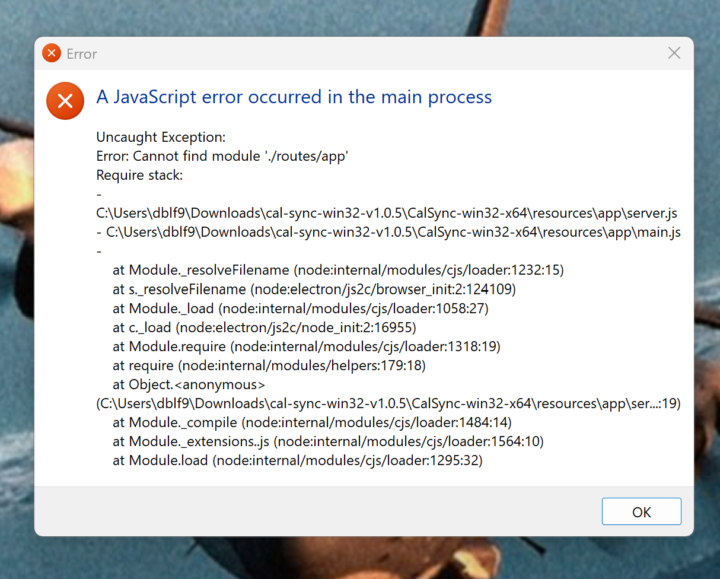
v1.0.5 Error, won't load
Having to download/extract/delete old copies is getting old. Sorry to be negative, but so far I'm glad I only bought in for a month to try. I can't get this to work as advertised. New error after downloading 1.0.5, won't load, see screenshot. (Didn't do anything different than previous four versions). The Tools I'm using: 1. Surface Pro, Win 11 2. Remarkable Pro, v3.22.4.2, USB storage on, Developer Mode, Password Confirmed, able to see files/folders in browser with http://10.11.99.1
0 likes • Nov '25
now that v1.0.5 won't open and I've already removed previous versions... can you add a post that only has links to the most current versions to download? I may just have to re-download, re-extract and re-open.... thanks.
0 likes • Nov '25
@Jason Smith Appreciate the continued help to get me over the goal line and syncing a calendar... But, I don't have this folder. ? For what its worth, when I download a new update, it goes to my Downloads folder. I then extract the files and the program runs from the extracted folder in my downloads. An installer never opens? Nothing is ever added to my desktop.
1-8 of 8

Active 7d ago
Joined Nov 3, 2025
Powered by