Activity
Mon
Wed
Fri
Sun
Jun
Jul
Aug
Sep
Oct
Nov
Dec
Jan
Feb
Mar
Apr
May
What is this?
Less
More
Owned by Michael
To-the-point posts and single-thought AI lessons you can read in under 3 minutes and apply in everyday work and life.
Memberships
Jacked Entrepreneurs
366 members • Free
AI Automation Society Plus
3.6k members • $99/month
AI for Life
28 members • $297
82 contributions to AI for Life

20h •
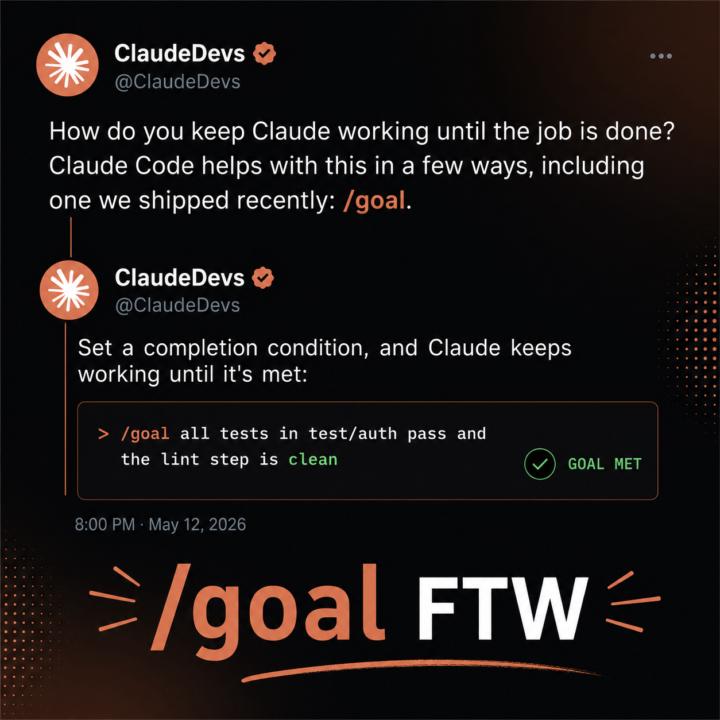
Claude Code /goal
The /goal command in Claude Code sets a completion condition that keeps Claude working autonomously across multiple turns until that condition is met. After you type /goal followed by your desired end state (like "all tests pass" or "build exits 0"), a small fast model checks after each turn whether the condition holds. If not, Claude automatically starts another turn without waiting for you to prompt it, effectively creating a persistent loop—plan, act, test, review—until your goal is verifiably complete. This transforms Claude from responding to individual prompts into an autonomous agent that can work on substantial tasks with measurable outcomes, like migrating code until tests pass or refactoring until the build succeeds. @Diane McCracken @Michael Wacht @Mike Thomson @Mike AI Consultant @Nick Mohler @Antonio Capunzo @Pacita Florida @Dimi Tse @R S @John Romano @Kesnel Chery @Matt Kaplan

🔥
1 like • 5h
I need to give this a try. Thanks for the continued insights.
20h •
Open Claw Try it!
Know when your parents told you not to do something and you did it anyways? That's how I feel about people who aren't security experts that play with open claw. @Diane McCracken and I were having fun with this discussion so I thought I would share my artistic interpretation of what will most likely happen to the casual user. 😆

🔥
2 likes • 18h
Very apropos illustration
3d •
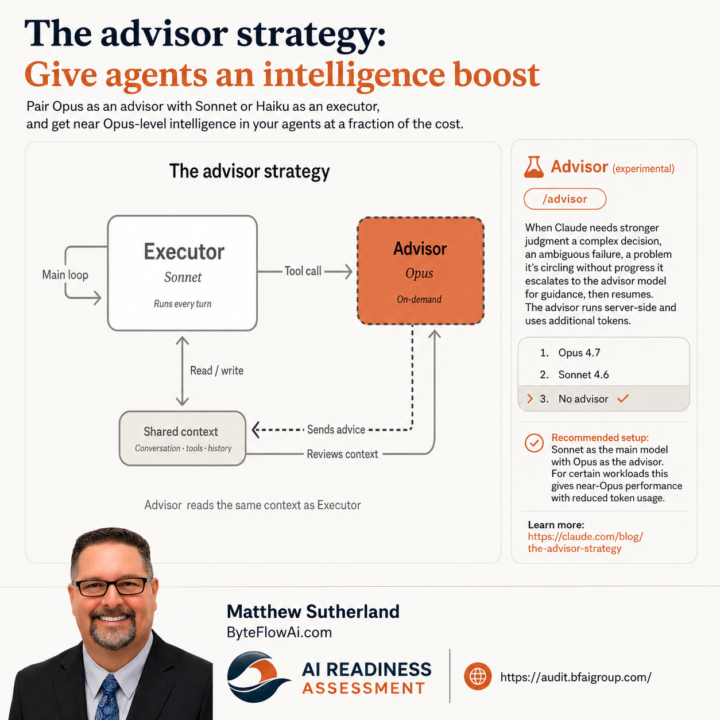
Claude Code /advisor
/advisor (experimental) When Claude needs stronger judgment a complex decision, an ambiguous failure, a problem it's circling without progress it escalates to the advisor model for guidance, then resumes. The advisor runs server-side and uses additional tokens. 1. Opus 4.7 ❯ 2. Sonnet 4.6 3. No advisor ✔ Recommended setup: Sonnet as the main model with Opus as the advisor. For certain workloads this gives near-Opus performance with reduced token usage. ✅ Glad to see I'm contributing to Anthropic's build philosophy. 😆
🔥
1 like • 2d
How does it know when to leverage the advisor.
3d •
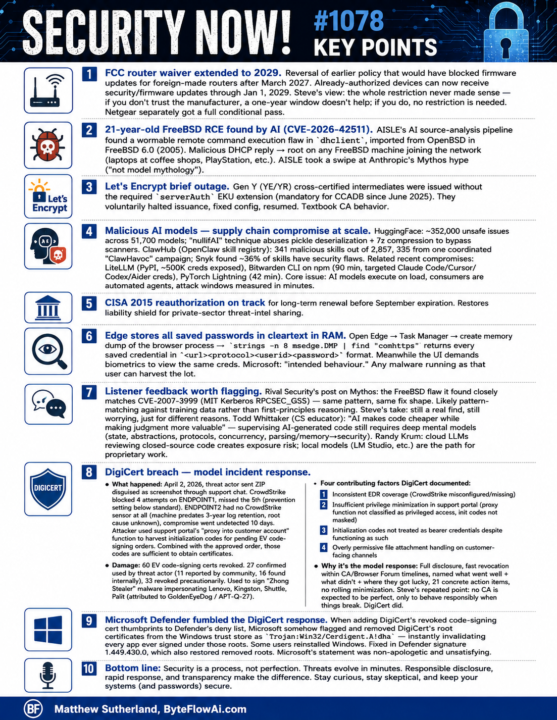
Security Now episode #1078 Key Points
Security Now! #1078 — Key Points ================================= FCC ROUTER WAIVER EXTENDED TO 2029 Reversal of earlier policy that would have blocked firmware updates for foreign-made routers after March 2027. Already-authorized devices can now receive security/firmware updates through Jan 1, 2029. Steve's view: the restriction never made sense — if you don't trust the manufacturer, a one-year window doesn't help; if you do, no restriction is needed. Netgear separately got a full conditional pass. 21-YEAR-OLD FREEBSD RCE FOUND BY AI (CVE-2026-42511) AISLE's AI source-analysis pipeline found a wormable remote command execution flaw in dhclient, imported from OpenBSD in FreeBSD 6.0 (2005). Malicious DHCP reply -> root on any FreeBSD machine joining the network (laptops at coffee shops, PlayStation, etc.). AISLE took a swipe at Anthropic's Mythos hype ("not model mythology"). LET'S ENCRYPT BRIEF OUTAGE Gen Y (YE/YR) cross-certified intermediates were issued without the required serverAuth EKU extension (mandatory for CCADB since June 2025). They voluntarily halted issuance, fixed config, resumed. Textbook CA behavior. MALICIOUS AI MODELS — SUPPLY CHAIN COMPROMISE AT SCALE HuggingFace: ~352,000 unsafe issues across 51,700 models. "nullifAI" technique abuses pickle deserialization + 7z compression to bypass scanners. ClawHub (OpenClaw skill registry): 341 malicious skills out of 2,857, 335 from one coordinated "ClawHavoc" campaign. Snyk found ~36% of skills have security flaws. Related recent compromises: - LiteLLM (PyPI, ~500K creds exposed) - Bitwarden CLI on npm (90 min, targeted Claude Code/Cursor/Codex/Aider) - PyTorch Lightning (42 min) Core issue: AI models execute on load, consumers are automated agents, attack windows measured in minutes. CISA 2015 REAUTHORIZATION ON TRACK Long-term renewal expected before September expiration. Restores liability shield for private-sector threat-intel sharing. EDGE STORES ALL SAVED PASSWORDS IN CLEARTEXT IN RAM
🔥
2 likes • 2d
Ok, this is a feels a little over my head. More context please. Is this general news, or vulnerabilities found and fixed?
17d •
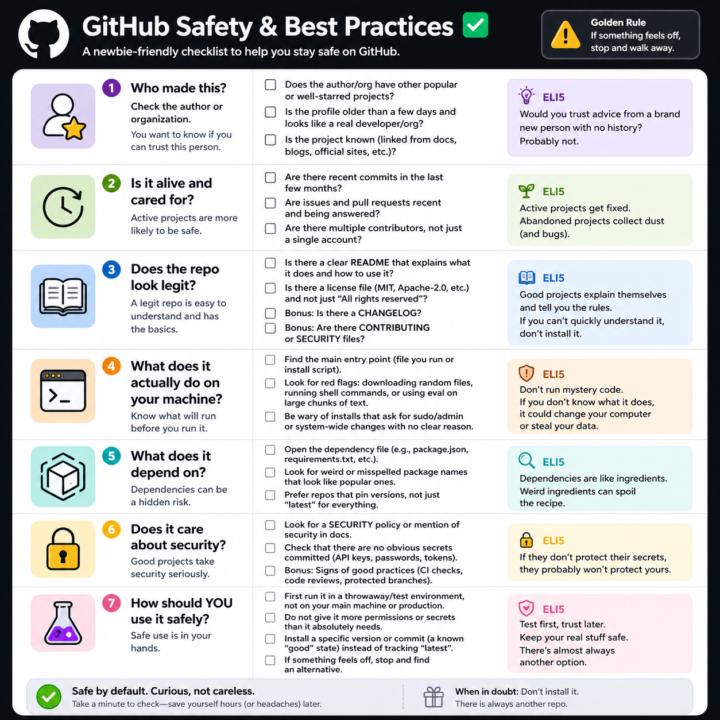
GitHub Safety and Best Practices Checklist
Here’s a simple, newbie‑friendly safety checklist you can run through every time you look at a GitHub repo. ## 1. Who made this? - Does the author or org have other popular or well‑starred projects? - Is the profile older than a few days and look like a real developer/org? - Does the project feel “known” (linked from docs, blogs, official sites, etc.)? If it’s a totally new account with one flashy repo, be extra careful. ## 2. Is it alive and cared for? - Are there recent commits in the last few months? - Are there recent issues and pull requests being answered? - Do you see multiple contributors, not just a single throwaway account? Abandoned projects aren’t always bad, but they age poorly from a security angle. ## 3. Does the repo look legit? - There is a clear README that explains what it does and how to use it. - There is a license file (MIT, Apache‑2.0, etc.), not just “All rights reserved”. - Optional but nice: CHANGELOG, CONTRIBUTING, SECURITY files. If you can’t quickly understand what it does, don’t install it. ## 4. What does it actually do on your machine? - Find the main entry point (the file you run, or the install script). - Look for obvious red flags: downloading random files, running shell commands, or calling `eval` on big chunks of text. - Be wary of “install” steps that ask for sudo/admin or system‑wide changes with no clear reason. If you don’t understand the install steps, don’t run them yet. ## 5. What does it depend on? - Open the dependency file (like `package.json` for Node, `requirements.txt` for Python). - Scan for weird or misspelled package names that look like popular ones. - Prefer repos that pin versions (not just “latest everything forever”). If the dependency list looks messy or huge for a simple tool, treat it carefully. ## 6. Does it care about security? - Look for signs of security features: security policy, mention of security in docs, or badges for scans/CI. - Check that there are no obvious secrets committed (API keys, passwords in plain text).
🔥
1 like • 3d
This is awesome!!
1-10 of 82

Online now
Joined Feb 19, 2026
Mid-West United States