Activity
Mon
Wed
Fri
Sun
Jun
Jul
Aug
Sep
Oct
Nov
Dec
Jan
Feb
Mar
Apr
May
What is this?
Less
More
Memberships
Clief Notes
26.7k members • Free
88 contributions to Clief Notes

14h •
Running everything locally
Has anyone here tried to make everything run locally similarly to how they do with Claude? While I enjoy Claude having a way to not be reliant on it (like with Ollama and Qwen/Gemma) might not be a bad idea. If you have done this what does your workflow look like? What was your process?

0 likes • 3h
I'm in the process of building a local LLM machine, but to specifically offload lower level tasks to keep the could model focused on higher level tasks.
10h •
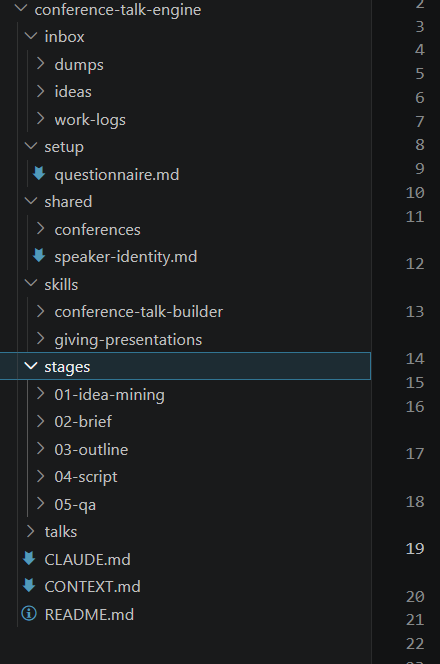
How to design a workflow - Conference Talk Engine (WIP) - update 5/3/2026
Practicing building in public and wanted to share what I've built with help from my other writing brainstorming thread from @Deacon Wardlow and @Siv Darmalingum @E G and @David Trammel Using some of their ideas I did research on the writers and topics they suggested using Notebook LM. I synthesized that research into digestible artifacts for claude to extract themes and guidelines for developing conference talks. I then described to Claude the workflow I wanted to build, can share that prompt if people are interested. And then I also used the workspace-builder as a model for the scaffolding for the conference-talk-engine and my own workspace as models for schema in the Claude and Context mds. The output of all of this was a spec document to build the workspace. I incorporated guidelines to use SOLID principles for coding to allow a built workspace to be extended and improved upon over time without having to rebuild the whole workspace, this is because I think it's better to build a prototype fast and then iterate rather than be 100% perfect. You want to spend time to make sure that the spec doesn't produce errors, but some things will only show up with actual use cases. I then researched existing skills relevant to my use case and came up with 2: conference-talk-builder and giving-presentations. I asked claude to evaluate my research and the existing skills to see what gaps could be improved in the existing skill. I then asked it to write the spec After first draft of the spec I ran a reader-test which is a custom skill derived from @Ari Evergreen 's 6 phase workflow. A rough breakdown would be: 1) research data inputs and relevant skills, compile any useful context relevant to your workflow; 2) analyze inputs with claude; 3) describe your ideal workflow and any models you want to emulate, make sure to mention you are building a spec first; 4) review plan for spec; 5) draft the spec using claude; 6) reader-test to qa the spec.
1 like • 7h
@Siv Darmalingum here was the first prompt to kick start: ``` we want to describe an end-to-end pipeline for generating ideas for conference talks, capturing day-to-day activities for later analysis for talks, outlining, creating a brief, and finally writing and proof reading. The final output for the workflow will be something like this directory: P:\GitHub\Interpreted-Context-Methdology\workspaces\course-deck-production that was generated using P:\GitHub\Interpreted-Context-Methdology\workspaces\workspace-builder The final directory will be a conference-talk-engine directory that will generate one or multiple directories to handle different stages of the conference talk pipeline and each stage of the pipeline may have it's own steps. We may also develop specialized skills for each stage or directory. Our goal is to design the spec that contains the steps of the new workflow and the structure and content of the directories and files that will be used to create the final output directory and files. research on guidelines from experts in the field on this process: P:\GitHub\RL_MAP\RL_MAP\BizDev\resources\conference-skill-research relevant skills to use or model in designing our own skills: P:\GitHub\RL_MAP\RL_MAP\BizDev\skills\conference-talk-builder P:\GitHub\RL_MAP\RL_MAP\BizDev\skills\giving-presentations Start by getting the context, then we will spec the workflow ``` as part of the conference-talk-builder skill which is from https://github.com/nicknisi/claude-plugins, it already included 22 frameworks and during intake it maps your idea onto one of the frameworks, included a picture of what it said. False start and Spiral are already in there, I imaging you could force the engine to use a framework of your choice. It's meant to be extendable so if you have another framework not in there you can just drop one in to that folder
0 likes • 3h
@Siv Darmalingum if you use it let me know how it works for you!
6d •
Do you use AI for your hobby?
I'm curious what everyone here likes to do for fun (of course building stuff with Claude is fun too lol), and if you've applied any AI to your hobby. For me it's been super useful for DND planning and I find I get to stay in creative flow more. Curious what other people are doing
0 likes • 3h
@Jerome Renard thats a great use case! HOw did you set it up? Did you gather training programs from lots of different trainers?
0 likes • 3h
@Kevin Young I didn't know different lures were better for different weather conditions, my friend LOVES fly fishing, what kind of fishing do you do?
3h •
Open Source Apps List
I was looking for an opensource uninstaller and came across a useful reddit thread: https://www.reddit.com/r/software/comments/1sxyvkr/best_opensource_software_that_everyone_needs_to/?share_id=GEC4GZm0KCSOXMv1EOzDZ&utm_content=2&utm_medium=ios_app&utm_name=iossmf&utm_source=share&utm_term=22 A few call outs that I'm going to use for my next workflow: Local Send - cross platform app to send files device to device over LAN, what I wish Windows had from MacOS Everything - search everything on your computer fast and what i was actually looking for originally: Geek Uninstaller - opensource uninstaller that gets rid of registry keys too can see the rest of the list at this claude artifact: https://claude.ai/public/artifacts/d8aa9044-71b9-4d24-9346-75d4f6d85c59
3
0

11h •
Using the folder system to build Elementor pages in WordPress
Here's how we build new pages for client's now. Takes about 25% less time. First: an interview. We get the client on a call, follow a structured intake, get everything we need. Claude ingests the transcript and maps the requirements — buyer, intent, conversion action, messaging priorities. That's the foundation. Then Cash, our copywriter agent, writes the copy. Then Ruby, our front-end designer, takes the copy and the client's identity system and builds a clean HTML/CSS mockup. We hand it to the client. They give us feedback. We collect assets — photos, logos, screenshots. Then Cody. Cody has access to the Elementor JSON templates our human designer originally built for this client's site. He reads the approved HTML. He generates a new JSON file in the same structure — same design system, same component logic, same brand patterns. We import that JSON into Elementor. The page is 90% built. The humans still do the review. The humans built the original templates. The humans ran the interview. But the production time? It collapsed. Jake's folder system didn't replace the agency. It restructured where the human work actually lives.
0 likes • 3h
i love this break down and shows how smart thinking can accelerate a business' workflow and still keep humans in the loop
1-10 of 88
Online now
Joined Apr 6, 2026
Powered by