
Write something

May 25 •
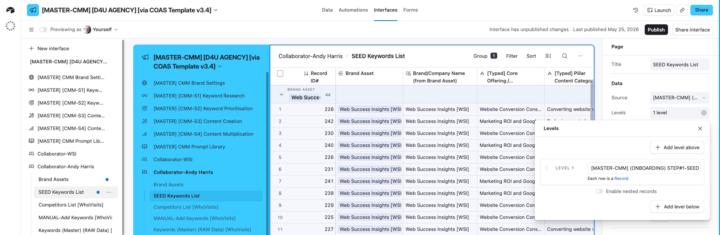
Understanding Interface Page Levels
Can anyone help me understand how I might use Page Levels in my shared interfaces? My use case is I have a 'Master' keywords research database that is linked to multiple tables and I'm looking at more efficient and effective ways to share the data with collaborators. I've asked Omni to explain them to me and there are nuggets of interest on my part, but I still don't really understand the reality. Definitely need a 'show and tell' example for the penny to drop! (Can't find anything on YouTube specific to Levels either). This is what Omni told me: Key Points About Levels What They Do: - Levels help display relationships between data across different tables in a visual hierarchy - They allow you to show nested records (e.g., Projects → Tasks → Subtasks) on a single interface page - Users can drill down through the hierarchy to see related information - This interests me but I don't I can't visualise a use case even though I realise many must exist. Available For: - List visualization - Has a "Hierarchy" section with Levels configuration - Dashboard layout - Also supports adding levels of hierarchy - (Both the above interest me if I can find a way to share information more easily with our collaborators. But again, I can't visualise how this looks in reality. When Levels Are Enabled: (The last two interest me but again I can't visualise the use case). - Any existing list configuration moves to the page level - This allows dropdown filters to be created for any of the tables within the hierarchy - Users can collapse or expand levels to focus on specific parts of the data Levels are especially valuable when you need to display related information from multiple linked tables in a single, organized interface page rather than requiring users to navigate between separate pages. [https://support.airtable.com/docs/getting-started-with-airtable-interface-designer]
Apr 28 •
Can I use webhooks to create new records directly into Airtable?
UPDATE: There is a related follow-up task to this post here; 'Two-step record creation process?'. But as I articulated the follow-up task it slowly dawned on me I may have got the solution to what I'm asking below! ##Original post I'm adding a range of targeted forms to my website with a view to using webhooks to add new records to a range of tables. I'm using ConvertBox as my form tool (lets me split test different forms) and though I've used webhooks with ConvertBox before, I've only used them to trigger a Make scenario. But for this use case, I don't need a scenario to fire. I just need the form inputs passed to my corresponding tables. So wondering what I need to do make that happen. PS. By way of a backup I know I can fire a Make scenario to create a record so feeling like I already have my plan B if no quick and easy Plan A option exists?
Apr 20 •
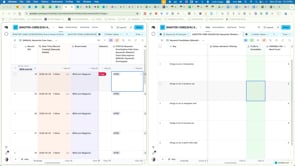
How to automatically remove ONE multi-select tag without removing all the other multi-selected tags
I didn't say this out loud when I was recording the video, but as I thought more, the question became: "How to automatically remove ONE multi-select tag without removing all the other multi-selected tags?" PS. My interim solution will be to separate the Status and the Tag relationship for that tag. I'll simply remove the automation update that extends the array with the 'Auto Exclude' tag. In other words, the status can change and the tag (I want removed in the video example) won't even be applied in the first place. On reflection this may be a more appropriate solution. My question then loses it's priority business need and becomes more of a curiosity-based "I wonder how you do that" question.
Nov '25 •
Merging bases workflow?
What is best practice when you want to merge two independent bases together? I have two working 'prototype' bases and the time has now come to join them together. What's the best way to do this?
Nov '25 •
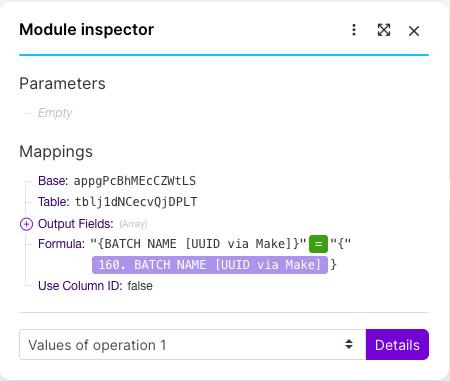
Make.com Airtable 'Search Records' module filtering challenge
Can any of you bright folks help me format a filter formula correctly in a Make.com Airtable 'Search Records' module? I realise now that four of my efforts were completely off the mark, but I still am going round in circles with the proper syntax needed to make this formula work. I'm just getting error after error every time I run this scenario and it reaches this module. I've tried different AI models but their very confident answers have just lulled me into a false sense of hope! So time to ask the real experts! In a nutshell my goal is that when I search records at this point in the scenario, I only want those records with the UUID we set earlier in the workflow (that was subsequently mapped to Airtable).
1-19 of 19
powered by

skool.com/7-figure-real-estate-investors-1267
Ran by a certified Airtable builder. Solve Airtable problems faster with support alongside other problem-solvers.
Suggested communities
Powered by