Activity
Mon
Wed
Fri
Sun
Aug
Sep
Oct
Nov
Dec
Jan
Feb
Mar
Apr
May
Jun
Jul
What is this?
Less
More
Memberships
AI SEO Engine
38 members • $47/month
11 contributions to Airtable Community

May 25 •
Understanding Interface Page Levels
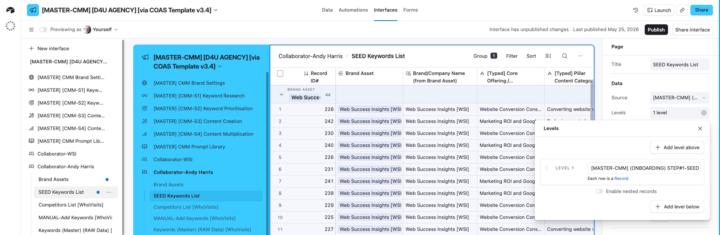
Can anyone help me understand how I might use Page Levels in my shared interfaces? My use case is I have a 'Master' keywords research database that is linked to multiple tables and I'm looking at more efficient and effective ways to share the data with collaborators. I've asked Omni to explain them to me and there are nuggets of interest on my part, but I still don't really understand the reality. Definitely need a 'show and tell' example for the penny to drop! (Can't find anything on YouTube specific to Levels either). This is what Omni told me: Key Points About Levels What They Do: - Levels help display relationships between data across different tables in a visual hierarchy - They allow you to show nested records (e.g., Projects → Tasks → Subtasks) on a single interface page - Users can drill down through the hierarchy to see related information - This interests me but I don't I can't visualise a use case even though I realise many must exist. Available For: - List visualization - Has a "Hierarchy" section with Levels configuration - Dashboard layout - Also supports adding levels of hierarchy - (Both the above interest me if I can find a way to share information more easily with our collaborators. But again, I can't visualise how this looks in reality. When Levels Are Enabled: (The last two interest me but again I can't visualise the use case). - Any existing list configuration moves to the page level - This allows dropdown filters to be created for any of the tables within the hierarchy - Users can collapse or expand levels to focus on specific parts of the data Levels are especially valuable when you need to display related information from multiple linked tables in a single, organized interface page rather than requiring users to navigate between separate pages. [https://support.airtable.com/docs/getting-started-with-airtable-interface-designer]
0 likes • Jun 3
@Ryan Plummer Hi Ryan. Hope you and the household all get better soon. I don't use Notion so doesn't mean much to me.
0 likes • Jun 5
@Ryan Plummer Thanks Ryan. I can't say I've used List views extensively. I've added them to a couple of views but I don't really know the difference between Lists and Grids? When or I why would you use one over the other. I still don't understand Levels.

May 6 •
Using Ai in Simple But Helpful Ways in Automations
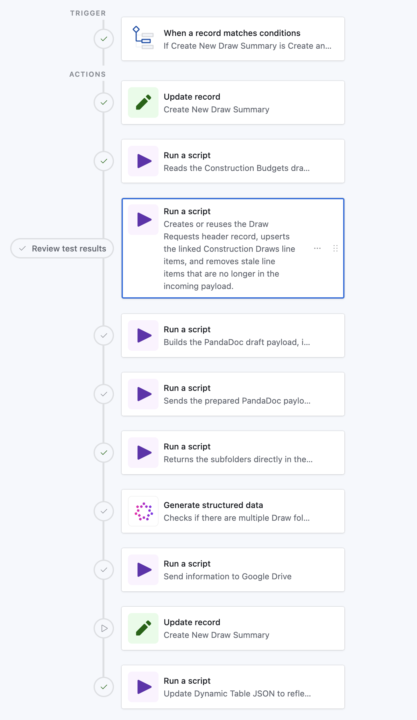
I would MUCH rather have Ai focus on a small bit of information over handling large tasks. Here's a look at what that means (See Pictures) In this automation, we’re trying to create a clean "draw-request folder flow" (client specific language) in Google Drive for each draw against a Construction Loan, then link those exact folders back to Airtable so the team can go straight to the right draw, photos, and invoices. BUT, the problem is that historical loan folders are messy. Some loans already have a draw folder, some do not, some use names like `Draws` or `Draw Requests`, and some even have duplicates. We could hard-code a lot of matching logic, edge cases, and fallback rules, but that becomes brittle... fast. The AI step gives us a much simpler layer. The script just returns the loan subfolder list, very specific and narrowed down data. I don't want Ai digging into everything in Google Drive when a script can just do it QUICKLY. After we get the subfolder list (See Dark Photo), AI interprets that list: - Does a draw-related folder exist? - Are there multiple, and which existing one should be treated as the oldest valid candidate? - That gives the next Google Drive script a clean decision input instead of forcing all that fuzzy logic into code. The win is that the rest of the automation stays deterministic! Scripts do the heavy lifting, AI handles the naming ambiguity, and the folder-creation step can reliably decide whether to reuse a folder or create a new one without a giant pile of special-case code. I KNOW this is a little advanced, but hopefully this opens up the sandbox for you a little!
Poll
1 member has voted
1 like • May 7
I can see why you've scaled back from Make when your automations look like this!
Apr 28 •
Can I use webhooks to create new records directly into Airtable?
UPDATE: There is a related follow-up task to this post here; 'Two-step record creation process?'. But as I articulated the follow-up task it slowly dawned on me I may have got the solution to what I'm asking below! ##Original post I'm adding a range of targeted forms to my website with a view to using webhooks to add new records to a range of tables. I'm using ConvertBox as my form tool (lets me split test different forms) and though I've used webhooks with ConvertBox before, I've only used them to trigger a Make scenario. But for this use case, I don't need a scenario to fire. I just need the form inputs passed to my corresponding tables. So wondering what I need to do make that happen. PS. By way of a backup I know I can fire a Make scenario to create a record so feeling like I already have my plan B if no quick and easy Plan A option exists?
0 likes • Apr 29
@Ryan Plummer Thanks for the nudge that webhooks are a native Airtable automation trigger! So in the weeds, hadn't even crossed my mind to check that!
Apr 28 •
Two-step record creation process?
This is effectively a follow-up task to my previous post; 'Can I use webhooks to create new records directly into Airtable?' I know the easiest way to create a new record would be to create an Airtable form. But I prefer to use ConvertBox due to it's simplicity and it's ability to split-test form variations. The only problem in this use case, is it would be nice to have a user submit one or more images at the time they complete the form. But ConvertBox doesn't facilitate uploads. However, it does facilitate multi-step forms. And I see I can embed an Airtable form into a ConvertBox step. So that does give me some options. So my question is if a user submits all the text-based information in the first step, how do I make sure the record is created so that the optional image upload step that follows is attached to the newly created record. Mmmm... I think that just writing this post out, I've realised the 'text' form I created in ConvertBox could be redundant if I just embed the Airtable form instead. That way the image field is there right at the time of record creation! PS. I'm leaving this post up as I know the community is always discovering new and interesting ways to use Airtable and this might be of value to someone else one day! PPS. I'll report back on whether my epiphany comes to pass and I nicely marry up ConvertBox and Airtable. If so, that will be a huge win. (And as I think out loud, it also provides a solution to my previous post!).
0 likes • Apr 29
@Ryan Plummer What don't you like about Airtable forms? What features draw you to fillout. (How do you integrate it with Airtable?). My use cases for forms are pretty rare and in most cases, I can adapt a ConvertBox to do what I need. Whilst ConvertBox is not a 'form' tool (nor free but I have a lifetime account), it's lead generation focus and A/B-testing features mean I can nearly always use it trigger a form and get feedback on whether or not my CTA for the form actually works. Previously I've embedded Google Forms in a ConvertBox step sequence and I've even embedded my Calendly pop-up so I can see how many people use that. Now I'm trying to integrate record creation in Airtable, all I really need is the embed feature. So I don't need it to look pretty. In fact quite the opposite as it will sit inside a ConvertBox that is already on brand. So I just need the field populated. I got Omni to create a form for a new table and it obviously created it as a shareable interface. So I'm going to strip it back to basics now and see what it looks like in my ConvertBox.
Apr 20 •
How to automatically remove ONE multi-select tag without removing all the other multi-selected tags
I didn't say this out loud when I was recording the video, but as I thought more, the question became: "How to automatically remove ONE multi-select tag without removing all the other multi-selected tags?" PS. My interim solution will be to separate the Status and the Tag relationship for that tag. I'll simply remove the automation update that extends the array with the 'Auto Exclude' tag. In other words, the status can change and the tag (I want removed in the video example) won't even be applied in the first place. On reflection this may be a more appropriate solution. My question then loses it's priority business need and becomes more of a curiosity-based "I wonder how you do that" question.
0 likes • Apr 20
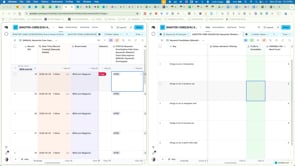
@Ryan Plummer Hi Ryan. 1. I have only used scripts in my automations to fire webhooks. No other experience of using them to date. 2. The tag automations don't use scripts and are all separate as they can happen at various times for various reasons. As per the attached, they all start with 'when a record matches', and all follow the same pattern...
0 likes • Apr 23
@Ryan Plummer First things first... a big thank you for putting that effort into showing me a way forward. It was interesting to see someone start a script as a blank canvas and talk through the logic. Conceptually my brain gets the process. And when I think about what I learned when getting my webhook scripts configured you've added another layer of understanding for me to consider. On the flipside, coding and scripting is simply not something I enjoy or have any passion for! So I only tend touch it when I see templates and can reverse engineer them for my needs. That's how I learned to tweak certain html blocks on my website and the same applied when I configured my webhooks. But your video has helped me understand I can use my trusted AI/LLMs to get those starting script templates if I explain the logic. In other words, I can now see scripts as problem solvers. Which seems obvious now, but until I saw your video, I hadn't intellectualised that in my head! In this particular use case, my earlier edit was that the value of adding that tag in the first place was limited and the easiest solution was to disable that automation. But I'm glad I shared the problem and I'm grateful you took the time to show me the logic approach to scripts. I have a very logical brain and I wouldn't have learned there are alternatives if you hadn't tapped into it!
1-10 of 11
@colin-clapp-1624
Growth enabler behind the 'one-click' SEO/AEO/GEO philosophy: Systemised content optimization that compounds content ROI 🚀
Active 1d ago
Joined Oct 10, 2025