
Write something

Apr 5 •
Lazy Publisher Profits: How to Make Money on Substack
From Nick Laight Today I want to return to something I wrote about a while back. But this isn’t to re-tread old ground. You see, every now and then, I report on an online business tool, platform or strategy that I like the look of while it’s in its early stages… Then it goes METEORIC! As months pass it becomes even more exciting…. even more accessible… and even more potentially profitable. In this case, the explosion in popularity does NOT mean there’s now too much competition or that it’s too late to get in. Far from it… It actually means that there is more scope to attract customers and make money than there was when I first wrote about it. Best of all, you can get involved in this without needing any of the skills, time, experience or expertise that you might expect. Okay, so let’s dive back into… SUBSTACK! How to Get Paid to Share Information On this Booming Platform WRMM Friday Substack Redux.docx - Google Docs
Mar 2 •
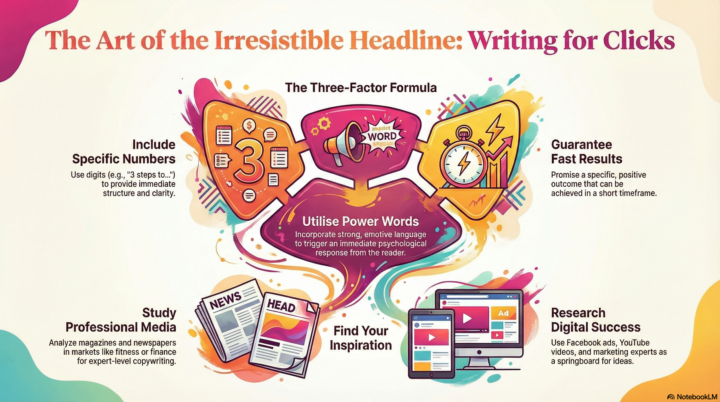
The Art of Irresistible Headlines
I saw a tip about this earlier, and after discovering Notebook's amazing new infographic feature recently, I got it to create this. Inspiring and vibrant, I hope it helps you create great headlines
Mar 31 •
Turn Simple Images Into Income
From the Wealthy Affiliate bog. You have probably seen posts talking about selling templates and making passive income. Some of that is real. A lot of it skips the part that actually matters. It is not about templates. It is about attention. If you can create images that stop someone mid-scroll, you have something valuable. That attention can turn into clicks, traffic, and revenue. That is the real opportunity here. What You Are Actually "Visually" Creating: Turn Simple Images Into Income (Even If You Have Never Designed Before)
4
0
Mar 22 •
Why People Stop Reading Your Stuff (And What To Do About It)
From Amanda Craven. whether you’re writing a book, a newsletter, a blog post or a sales email. Most people lose their readers in the first paragraph. Not because the content isn’t good or it’s the wrong topic… But because the opening doesn’t do the one job it’s supposed to do – make it impossible to stop. Today’s readers aren’t loyal. They have tabs open, phones buzzing and any number of other distractions. Your first few sentences are competing with all of that. And if those sentences don’t create a feeling in them, whether it’s curiosity, recognition, unease or something else, then they’re gone. So what actually keeps them reading? Read on the find out…https://www.trustymarketer.com/why-people-stop-reading-your-stuff-and-what-to-do-about-it
4
0
Mar 19 •
Change the Color of an Image in Canva (4 Easy Ways)
A great tutorial from Karon Thackston. Sometimes you find the perfect image in Canva… except for the color. Maybe the graphic fits your design perfectly, but the colors don’t match your project’s palette. The good news is that Canva includes several tools that allow you to adjust colors quickly and easily. Whether you're creating social media graphics, digital products, printable designs, or website visuals, knowing how to recolor images in Canva is a useful design skill. Below are four simple ways to change the color of images and graphics in Canva. Quick Answer: How Do You Change the Color of an Image in Canva? There are several ways to change image colors in Canva depending on the type of image you're using. The most common methods include: • applying the DuoTone effect: Change the Color of an Image in Canva (4 Easy Ways) - Marketing Words Blog : Work Less, Convert Better, Sell More
2
0
1-30 of 176
powered by

skool.com/zamboni-inner-circle-8300
Zamboni's Inner Circle is the most premium place to find lessons about product launches, affiliate marketing, and other online businesses.
Suggested communities
Powered by