

🔥
19d •
🔌 Your Lovable App Is Built… Now How Do You Connect Everything?
Forms, email collection, databases, authentication, APIs, connectors 😵💫 — this is the part of building in Lovable that can get overwhelming fast. You know what you want to build. You may even have most of it built. But then you need the form to actually save somewhere. 🧠 Use AI to THINK. Use Lovable to BUILD. Before you start prompting inside Lovable, take the problem to your favorite AI platform first — ChatGPT, Claude, Gemini, whichever you prefer. Explain what you’ve built, what you need to happen and where you’re stuck. Have it help you: Understand what needs to happen → determine what needs to connect → identify the best option → create your implementation prompt. Then take that prompt and paste it into Lovable and use your credits to actually build it. But before building anything custom, check whether what you need can already be handled with an existing integration, connector, API or native Lovable feature. That one habit can help you save a LOT of credits. 🔥 I added a new Lovable Made Simple resource inside the classroom to help you through the building process. Inside, I break down: Forms → Email collection → Databases → Authentication → APIs → Connectors → Integrations Including how to figure out which one you actually need, example workflows, prompts you can use, and my credit-saving process for working through implementation problems.😉 📚 Head into the Classroom → Click How To Use Lovable Support App → open How to Connect the Functional Parts of Your Lovable App. And remember, you also have the interactive Lovable Made Simple App to keep open while you build: Here’s the link to try the Lovable Made Simple app (built for YAMS members). —Whit 🫶🏽

🔥
26d •
You Built the AI App… Now How Do You Actually Finish It?
Finishing an AI app means taking it beyond preview mode and turning it into something people can actually access, trust, and use—whether you are building it for yourself, your audience, your business, or a client. That may include publishing it, connecting a domain, adding payments, improving SEO and AEO, checking security, and connecting the tools that make the app fully functional. Because let’s be real…You can build the app. You can get the design looking good. You can create the AI agent. The buttons are buttoning. 😂 Everything works perfectly inside the preview. And then you sit back and think: Okay…now how do I actually finish this thing? How do I publish it? How do I put it on a real domain? How do I make sure it is secure? How do I connect payments? How do I help people find it through Google and AI search? How do I connect outside tools, automations, phone systems, calendars, or databases? And how do I make sure the person using it—whether that is you, your customer, your community, or your client—actually understands what to do next? 😭 That final stretch is where a lot of builders get stuck. And honestly, that is one of the main reasons I decided to focus so heavily on Lovable. Lovable Can Be Your Build-to-Launch Home Base Lovable is not only where you create the front of the app. You can use it to build, publish, host, connect a custom domain, improve your SEO, connect payments, review security, manage your database, and add outside integrations. So instead of thinking: “What seven platforms do I need to finish this?” You can start asking: “How much of this can I complete inside the same platform where I already built it?” That is a completely different workflow. No more building the app over here… Finding hosting over there… Connecting payments somewhere else… Looking for another tool to check security… You can keep more of the build, launch, and management process under one roof. What Does “Finished” Actually Mean? Finished does not mean the app is perfect or that you will never update it again. It means the app is ready for its intended purpose.

🔥
Jun 25 •
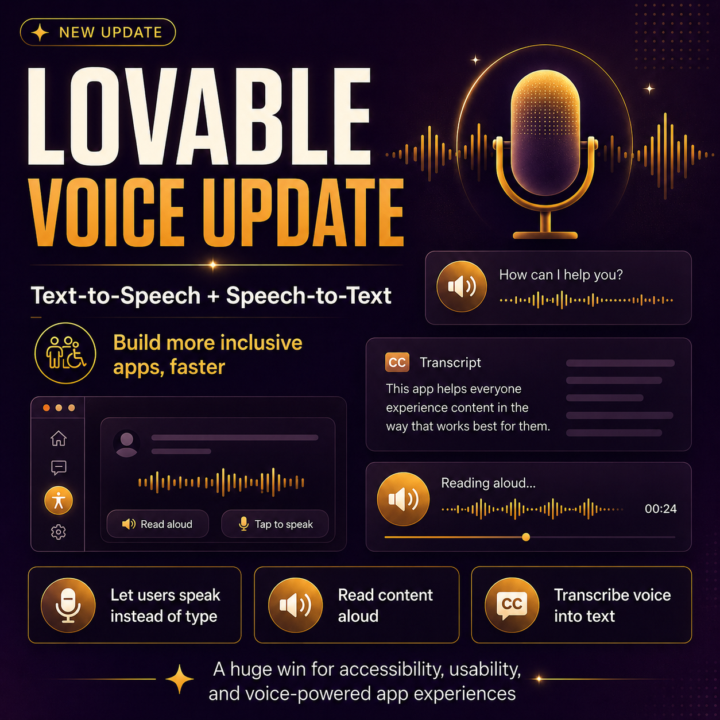
How To Add Voice Features To Your Lovable App With Text-To-Speech And Speech-To-Text
Lovable AI just released a major update that lets builders add text-to-speech and speech-to-text features to their apps. That means your Lovable app can now let users speak instead of type, read content aloud, transcribe voice notes, and even create more voice-powered app experiences. This is huge for app builders! But what excites me most is the accessibility piece. One of my biggest goals as a builder is to create apps that are more inclusive and easier for different types of users to use. Not everyone wants to type. Not everyone can type easily. Some folks rely on accessibility tools. Some folks process information better by listening. Some folks need a faster, hands-free way to interact with an app. With this update, Lovable can help wire up voice features like: 🎙️ A “read aloud” button for an article, lesson, or summary 🔊 Narration for AI-generated stories, lessons, or briefings 📝 Voice input or dictation so users can speak instead of type 🎧 Transcription for voice notes, calls, meetings, or uploaded audio 🤖 Voice assistants that respond with spoken audio 💬 Two-way voice experiences like translators or hands-free helpers From a business standpoint, this is also a strong selling point. You can now build apps with: “Voice input included.” “Read-aloud mode.” “Speech-to-text support.” “Audio transcription.” “Accessibility-friendly experience.” “Hands-free workflow.” And if you want to take it even further, you could explore connecting tools like ElevenLabs for a more custom branded voice experience. I added a deeper breakdown inside the Lovable Made Simple classroom page here: https://www.skool.com/yams/classroom/31ea609a?md=10d2b647020348bb849a89601944945c Would y’all want a walkthrough on how to add voice features to a Lovable app?👀
🔥
Mar 20 •
It’s Finally Here 👀 Lovable Walkthrough (Start here)
First — thank you for being patient with me on this one. I know a lot of you have been waiting for a Lovable walkthrough, and I didn’t want to rush it. I took a little longer on purpose because I wanted this to actually make sense — not just show buttons, but give you a real overview of what you’re looking at and how to think about it before you start building anything. This video is your starting point. If Lovable ever felt confusing, overwhelming, or like “where do I even begin?”… this is for you. 🎥 Watch it here: https://youtu.be/J3KJrfmGQGw?si=gb2Wi_u-NyhjSCsW After you watch, I want you to: • Notice what feels clearer • Pay attention to how the platform is structured • Start thinking about what YOU would want to build (don’t overthink it yet) We’ll get into building next — this is just laying the foundation so when we do, it actually clicks. And as always… if something still feels confusing after watching, drop it below. That helps me shape the next walkthroughs for you. More Lovable walkthroughs on the way 😏 - Whit 🫶
🔥
Jan 11 •
🚧 Early Access: The 9-5er Work OS™ (You’re In)
I wanted to give you access to something brand new before it goes public. I just opened up The 9-5er Work OS™, a simple AI-powered system designed to help with the actual work part of work: - emails - meetings - prep + recaps - daily priorities - mental load This isn’t a “final” product yet — and that’s intentional. I want you to: - use it - break it - tell me what feels confusing - tell me what feels helpful - tell me what you wish it did next Your feedback here will directly shape how this evolves. 🔓 Why you’re getting access: You joined YAMS early. You value simplicity. And you understand that the best systems are built with the people they’re meant to support. 👉 Access it here: https://the95workos.lovable.app/ Use it however feels natural: - drop in messy thoughts - prep for a meeting - rewrite something you’ve been overthinking - test it on a real work situation Then come back here and tell me: - what worked - what didn’t - what you’d love to see added - This is another one of those “we’re building this together” moments — and I really appreciate you for your help making this web app the best it can be not just for yourself but for other 9-5ers. — Whit 🤍

1-19 of 19

Leaderboard (30-day)
1

🔥
+521
2

🔥
+484
3

🔥
+229
4

🔥
+154
5

+32
Powered by