
Write something

May 6 •
Are You Living in an AI Bubble?
We spend so much time inside the AI bubble that I think we forget something important: Most of the world is still trying to figure out how to use AI for everyday life. @Aubrey Kerr (the podcast we recorded today!!!) Executives, managers, and professionals are not really actually using AI right now. 𝘕𝘰𝘵 𝘣𝘶𝘪𝘭𝘥𝘪𝘯𝘨 𝘢𝘨𝘦𝘯𝘵𝘴. 𝘕𝘰𝘵 𝘤𝘰𝘥𝘪𝘯𝘨 𝘢𝘱𝘱𝘴. 𝘕𝘰𝘵 𝘤𝘳𝘦𝘢𝘵𝘪𝘯𝘨 𝘷𝘪𝘳𝘢𝘭 𝘱𝘳𝘰𝘮𝘱𝘵𝘴. They’re using it to: • 𝘰𝘳𝘨𝘢𝘯𝘪𝘻𝘦 𝘴𝘱𝘰𝘳𝘵𝘴 𝘴𝘤𝘩𝘦𝘥𝘶𝘭𝘦𝘴 𝘧𝘰𝘳 𝘵𝘩𝘦𝘪𝘳 𝘬𝘪𝘥𝘴 • 𝘮𝘢𝘯𝘢𝘨𝘦 𝘢𝘨𝘪𝘯𝘨 𝘱𝘢𝘳𝘦𝘯𝘵 𝘱𝘢𝘱𝘦𝘳𝘸𝘰𝘳𝘬 + 𝘱𝘰𝘸𝘦𝘳 𝘰𝘧 𝘢𝘵𝘵𝘰𝘳𝘯𝘦𝘺 𝘥𝘦𝘵𝘢𝘪𝘭𝘴 • 𝘳𝘦𝘴𝘱𝘰𝘯𝘥 𝘵𝘰 𝘥𝘪𝘧𝘧𝘪𝘤𝘶𝘭𝘵 𝘦𝘮𝘢𝘪𝘭𝘴 𝘧𝘳𝘰𝘮 𝘣𝘰𝘴𝘴𝘦𝘴 • 𝘴𝘶𝘮𝘮𝘢𝘳𝘪𝘻𝘦 𝘮𝘦𝘦𝘵𝘪𝘯𝘨𝘴 𝘢𝘯𝘥 𝘱𝘳𝘰𝘫𝘦𝘤𝘵𝘴• 𝘰𝘳𝘨𝘢𝘯𝘪𝘻𝘦 𝘤𝘢𝘭𝘦𝘯𝘥𝘢𝘳𝘴 𝘢𝘯𝘥 𝘵𝘦𝘢𝘮𝘴 • 𝘵𝘩𝘪𝘯𝘬 𝘵𝘩𝘳𝘰𝘶𝘨𝘩 𝘥𝘦𝘤𝘪𝘴𝘪𝘰𝘯𝘴 𝘧𝘢𝘴𝘵𝘦𝘳 𝗠𝗲𝗮𝗻𝘄𝗵𝗶𝗹𝗲, 𝗺𝗮𝗻𝘆 𝗰𝗼𝗺𝗽𝗮𝗻𝗶𝗲𝘀 𝗮𝗿𝗲 𝘀𝘁𝗶𝗹𝗹 𝘄𝗮𝗶𝘁𝗶𝗻𝗴 𝗳𝗼𝗿 𝗜𝗧 𝗮𝗽𝗽𝗿𝗼𝘃𝗮𝗹, 𝗴𝗼𝘃𝗲𝗿𝗻𝗮𝗻𝗰𝗲 𝗿𝗲𝘃𝗶𝗲𝘄𝘀, 𝗹𝗲𝗴𝗮𝗹 𝘀𝗶𝗴𝗻-𝗼𝗳𝗳, 𝗮𝗻𝗱 𝗲𝗻𝘁𝗲𝗿𝗽𝗿𝗶𝘀𝗲 𝘀𝘆𝘀𝘁𝗲𝗺𝘀 𝗯𝗲𝗳𝗼𝗿𝗲 𝘁𝗵𝗲𝘆 𝗳𝘂𝗹𝗹𝘆 𝗲𝗺𝗯𝗿𝗮𝗰𝗲 𝗔𝗜. Which means… There is a MASSIVE gap between where AI creators are… and where most humans actually are. I honestly think many of us in this community are in the top 2% of adoption. And because we’re so deep in it, we start believing: “ᴇᴠᴇʀʏᴏɴᴇ ᴀʟʀᴇᴀᴅʏ ᴋɴᴏᴡꜱ ᴛʜɪꜱ.” “ᴛʜᴇʀᴇ’ꜱ ɴᴏᴛʜɪɴɢ ʟᴇꜰᴛ ᴛᴏ ᴍᴏɴᴇᴛɪᴢᴇ.” “ᴛʜᴇ ᴍᴀʀᴋᴇᴛ ɪꜱ ꜱᴀᴛᴜʀᴀᴛᴇᴅ.” I don’t think that’s true at all. I think the world is still 2-5 years behind in many ways. Which means there are still enormous opportunities to help simplify people’s lives, work, communication, organization, decisions, and daily overwhelm. You are probably sitting on skills that feel “basic” to you now…… but would completely change someone else’s day. So here’s the question: What are you making “𝘁𝗼𝗼 𝗮𝗱𝘃𝗮𝗻𝗰𝗲𝗱” that people actually need made simpler?

Apr 5 •
The Claude family... (chat, cowork & code)
I noticed my conversations with Claude in chat weren't carrying over to Cowork or Code. They're all separate. So I asked about it. Here's the answer I got... sharing in case it saves you time too. -------------------------------------------------------------------------------------------------------------------------------------------------- Great question, and your frustration is completely valid — this is a genuine gap in the current product. Let me break it all down clearly. The Three Tools ➡️ Claude Chat (claude.ai) This is where you are right now. It's a conversational interface — you type, Claude responds. It's best for thinking, planning, writing, analysis, and brainstorming. Memory is rich within a conversation but doesn't persist across sessions by default, and the model has no access to your local files unless you explicitly paste content in. Medium ➡️ Claude Code Claude Code is a command-line autonomous agent that operates on your local file system, reads your entire codebase, and performs multi-file coding tasks with deep architectural context. The key difference from Chat is execution: Claude AI produces text, while Claude Code takes action on your actual code. Medium It lives in your terminal (or VS Code/JetBrains plugin). It can read files, run tests, manage git, and edit code directly on your machine. ➡️ Claude Cowork Cowork is the newest tool — it lets people complete non-technical tasks in the same asynchronous way they use Claude Code. It's designed for non-developers who want to automate repetitive file management and cross-application desktop workflows without code. VentureBeat Think bulk file sorting, extracting data from PDFs, managing documents across apps — all from a chat-like interface.

Mar 23 •
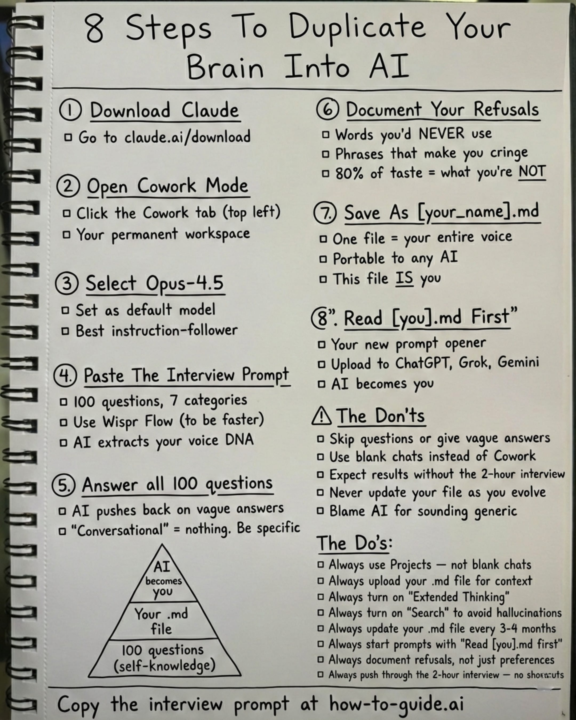
Duplicate your brain with AI
This is how you can really train Claude on your brain and your business. Credit: Ruben Hassid

Feb 10 •
Ever notice your AI buddy starts getting weird in super long chats?
I totally did. I’ll have the same chat open for weeks, adding more and more stuff, and then bam, it starts acting like it forgot files I uploaded or stuff we talked about forever ago. I kept pushing it, like "c'mon, you know this!" but nope. Lesson learned 😅 Turns out, it's not a bug. It's how these LLMs are built. They have something called a context window think of it like a super focused spotlight on your chat. As your convo gets longer, that spotlight slides forward. The oldest stuff at the start? It just slides out of the light and into the dark. The AI literally can't "see" it anymore to remember. Important: Your files and chat history aren't deleted. They're saved! The AI just loses its working memory of them in that specific super-long chat. It's "forgetting," not "deleting." The fix is stupid simple (and it works): When a chat gets super long and the AI starts seeming confused... just start a fresh chat. Seriously. It gives the AI a clean slate and that full spotlight back. It’s the easiest way to avoid the headache. Also, a pro tip: if you're doing something really involved, it's worth a quick Google to check the specific context window limit for the model you're using (like, is it 8k tokens? 128k?). It helps you know when you're pushing the limits. Anyone else run into this? What's your go-to move when the AI starts losing the plot?

Feb 3 •
Sabrina says: Do Tik Tok!
Please watch the Youtube video for the full hands-on tutorial. (These are her words) 1. Why Tiktok? I agree with Gary Vee on this one… 🤡Tiktok remains the #1 social platform in the world and the only platform where A SINGLE post can dramatically transform your life/business overnight.🤡 It's also the best platform for new creators because you don't get punished for posting multiple times per day. This means you can post multiple times daily, collecting the data you need faster to iterate on what's working. TikTok teaches you how to be a good creator faster than if you were to start on other platforms. Because you get more reps in. More feedback, faster. So you can double down on what’s working. And Tiktok does not care how many current followers you have. Every single post gets a fair shot at virality, even if you have ZERO followers today. 2. Which AI Tool Should I Use? It does NOT matter which AI tool you use. There is no right one. Honestly, you don’t need AI when you’re just starting out. 🤡The most important thing is consistency over a long time horizon. I don’t want to recommend any specific AI tool and imply it guarantees success.🤡 In my YouTube tutorial, I’ll show you how to use ChatGPT for free to help write hooks and scripts. But it is NOT a magic bullet. You must still put in the work, lots of trial and error, pushing through moments of self-doubt. However, I assure you it is 1000% worth it. My background is tech and I laughed off “influencer” stuff for a long time. But I was wrong. Creating content is an incredible source of leverage (for my own projects) and an incredible opportunity to serve/teach millions of people around the world. 3. But what if my audience isn’t on TikTok? I still encourage starting with TikTok even if you don’t think your audience is on it because of question #1 one above. 🤡 TikTok teaches you to be a good content creator faster than any other platform.🤡With that said, you’re probably mistaken believing nobody in your audience is on TikTok.
1-23 of 23
powered by
skool.com/unleash-unrepeatable-you-4228
For the stuck professional ready to execute. We guide you from idea to income, blending mindset with actionable strategy & accountability to launch.
Suggested communities
Powered by