
Write something
Pinned

Jun 16 •
1,500 free Weave credits and discount code for this group.
I joined the Teach With Weave program from the Figma Weave team, and honestly, the first thing I wanted to do with it was bring something back here. So: ten times the standard free credits, through my sign-up link: http://app.weavy.ai/signin?promotion=jvodegel&ref=jamy76 For anyone going paid use this code: JVodegel20 20% off your first purchase. One time per person, so put it on an annual plan, not a month. Capped at 50, then it's gone. Transparency: runs through my affiliate. More of this coming. This community is the reason I push for this stuff.

Pinned
Apr 2 •
Small ask, big impact, let's help each other.
I need your help. If you want to support me and this community, a follow on @thatweavyguy on Instagram makes a real difference. More followers means more visibility, which means more creatives find The Weavy Way. It's a small thing that helps a lot. 🙏 We're all here because we build workflows and create visual work. But most of us have no idea what the rest of the community actually makes outside of this group. This weekend you've got some time (I hope) 🐣. Let's use it. Drop your website, portfolio, or socials below. Let's inspire each other and connect beyond Skool. I'll go first: → ▶️ YouTube: https://www.youtube.com/@ThatWeavyGuy → 📸 Instagram: https://www.instagram.com/thatweavyguy → ▶️ Linkedin: https://www.linkedin.com/in/jamyvodegel/ Now your turn — drop your links below. Let's discover what everyone's building and connect outside of here. 👇

12d •
I got early access to a new Weave node. That's all I can tell you.
In between packing bags, I've got something to share. There's a new node coming to Weave, and probably way more, but that's for later. I've had my hands on it. It's good. It changes how you'd approach a certain part of your workflow, and once you've used it, you don't really want to go back to the old way. That's genuinely all I can say. I was asked not to share details, and I'm going to respect that (but I think the screen captures gives a pretty decent hint :). But when the embargo lifts, this group gets my breakdown first. Consider this a heads up. Something's coming.

12d •
I've been off balance for months. Here's the honest version.
Time for an honest post before I disappear for a bit 😎. The last few months got away from me. Client work took over completely, and this community got whatever was left. Which wasn't much. That's the flip side of doing AI work right now: the demand is real, and it eats everything if you let it (Lesson learned...) You're all here paying attention, and that deserves better than silence. Good news: the work wasn't wasted. I built a workshop, one version for agencies and one for LABASAD (Barcelona school of Arts & Design), and every finding from both is coming here. All of it. I'm off until mid-August. When I'm back, this is what I'm picking up first. And to be clear: keep posting while I'm away. Questions, work you want to show, a workflow you want feedback on, anything. I read everything that lands here and I'll answer. Don't sit on it until I'm back. What I don't know yet is the shape. One-off, monthly, live, recorded, free, paid. That's a real question, not a rhetorical one. Drop your thoughts below.

27d •
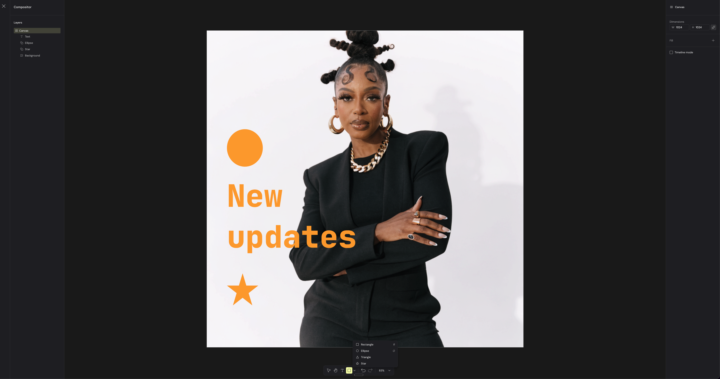
Compositor now does shapes and text. Fewer nodes for you.
New in the Compositor node: you can now add shapes and text directly inside it. Rectangle, ellipse, triangle, star, plus text layers, all in one place. Perfect for annotations and labels. The quiet win here is node count. Stuff you used to wire up with separate nodes now lives inside the Compositor. Fewer nodes on the canvas, cleaner workflow, less to untangle later. Small feature, less clutter.
3
0
1-30 of 49
powered by
skool.com/the-weavy-way-3948
Master Figma Weave. Turn your vision into scalable node-based workflows. Move beyond prompting, start architecting. Free course + community inside.
Suggested communities
Powered by