
Write something

Jun 3 •
Did you SEE about IG?
🚨 DID YOU SEE THIS?! 🚨 I literally predicted this 2 years ago and it's finally here. I had my call with META yesterday and we chatted about this.... I kept saying that social media platforms were moving toward becoming shopping platforms. Not just places to post content, but places where creators can influence purchasing decisions and get paid for it. We saw HUGE success on TikTok from TikTok Shop and now... Instagram Shop is officially making its move. Right now, it's in EARLY ACCESS, which means not everyone has it yet. But if history tells us anything, the people who get in early, right when it becomes available, and learn the platform first usually have the biggest advantage. Remember when people said TikTok Shop was saturated? Meanwhile, creators are STILL making substantial amounts of money years later. New people join every day and are generating commissions, affiliate sales, UGC opportunities, and brand partnerships off of posting product recs (even faceless!) So if Instagram Shop shows up for you... don't wait. Here's what we know so far: ✔️ You need a Professional Account (Creator or Business) ✔️ You must be 18+ and have a min of 1k followers. ✔️ Your account needs to be in good standing with Instagram's monetization policies ✔️ Most creators who qualify are seeing an "Add Products" option or access through their Professional Dashboard ✔️ The rollout is still limited, so if you don't have it yet, keep checking back regularly How to check: 1️⃣ Go to your Instagram Profile 2️⃣ Open your Professional Dashboard 3️⃣ Look for monetization, affiliate, creator marketplace, or shopping opportunities 4️⃣ If available, follow the prompts to apply or activate access Here's my advice after 12 years as a professional content creator who's worked with global brands and built multiple 6-figure businesses online through affiliate marketing, brand partnerships, UGC work, covering events, Tiktok shop & Lives, and digital products – just learn how to post consistently, be authentic, and then start adding on. All these above coincide. They use the same skills and partner together!

Apr 26 •
How I'm gaining 100+ followers a day!
I’ve been getting a lot of questions lately, like, how are you growing so fast right now? So I figured I’d just break it down for you. Lately, I’ve been gaining 100+ followers a day… and no, it’s not luck, a viral fluke, or some secret hack. It’s a few simple things done consistently, and I ramped up some other things over the last month. Here’s what’s actually working: First, I’ve been focusing heavily on shareable content. Not just “good” content… but content that makes people think “I need to send this to someone.” I also test a lot of content in Trial Reels. Different hooks and meme-type content to gain attention for my account. I’m also actually engaging like a human. Replying to comments with real connection, answering DMs, and starting conversations. Growth isn’t just about posting… it’s about connection. Lastly, I've been posting 10-14 times a week. I made a commitment to do it on my lifestyle page, and now starting on my coaching page to build it back up from being sparse the last few months. That’s it. It's WORKING! Try these out and let me know how it works for you. Hols xo

May 9 •
I'm mostly using the EDITS App Now & Here's What I LOVE!
Myyyy how far the EDITS App has come in the last year! Ha! I was a CapCut girly through and through but I slowly started loving the EDITS app more! Here are my fave features and why I love them. Let me know in the comments, are you and EDITS or a CAPCUT girly? Top 2026 Edits App Features: 1. Interactive Reel LinksYou can now add clickable links directly inside your Reel to: - another Reel - a product - or another creator’s account I like to add my own IG account at the end for easy following tool This is HUGE for: Storytelling series, funneling viewers to another video, collaborations, driving people to proof/testimonials. Think of it like a mini content funnel inside your Reel. 2. Weekly Idea Engine! The app now studies your content patterns and generates personalized content ideas weekly based on: - your niche - top-performing topics - trending formats Instead of staring at a blank screen, use this to: spark hook ideas, test new formats, stay consistent faster. Most creators are sleeping on this feature. 3. Advanced Text Controls! This feature alone saves SO much editing time. You can now: - highlight words for emphasis - save your favorite font combinations - use “find and replace” for captions - Example: Need to replace “followers” with “community” across an entire Reel? One click. This keeps branding and messaging consistent. 4. Color Grading + Pro-Level EditingEdits now has advanced controls like: - curves - shadows - highlights - saturation adjustments Translation: Your content can look WAY more cinematic and polished without leaving Instagram’s ecosystem. Plus the new effects are actually good now: fisheye, bounce, motion blur, zoom distortions, dreamy overlays. 5. Multi-Track EditingYou can layer: - voiceovers - music - sound effects - B-roll audio This is HUGE for storytelling and educational Reels. It makes your content feel more dynamic and keeps retention higher. 6. Creator Templates (Underrated Feature) You can now open templates and actually SEE:
2
0

Apr 14 •
Instagram Posting For Growth Guidelines
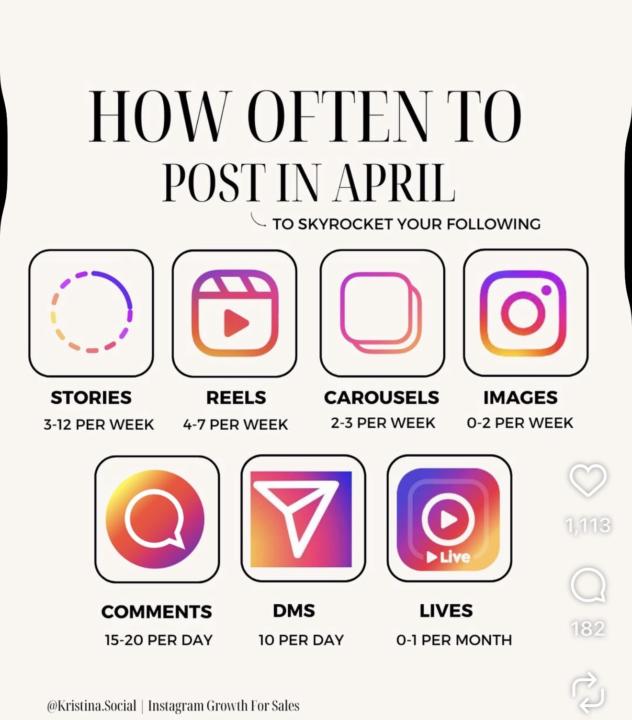
The CEO of IG recently did a reel sharing how to grow on Instagram TODAY. I've been testing his advice since March 23 and it actually worked! I grew 1500 followers. Here's the gist for ORGANIC growth: Post - 3 times minimum a week to keep your account "active" but you most like will lose followers Post - 1x a day and you'll gain followers but will lose as well so slow growth to break even. Post - 10x a week and you'll see steady growth compound over time I did 10-14 posts a week for almost a month and I grew net 1500 followers. I lost about 400 so I gained (technically) almost $2k. This is on my hollydays_chicago account. I have 40K followers so the growth is a little more obviously, but as a small creator page, this could translate to 100 or so then continue to gain. I found this graphic from an account I love @Kristina.Social and I think it's a great framework to challenge yourself! Who's trying this and let me know how it goes. Commit for 30-60 days before you give up and watch what happens!
Sep '25 •
Wednesday IG Tip
If you don't want to pay for automation yet (ex: manychat), Instagram just launched the update to their AI assistant. You can actually create an avatar and have it send links for you to DMs. It's a free way to start automating if you're just getting started or don't want to pay yet for a service like ManyChat. I talk more about it here and also show a tutorial on how to use it after my last META strategy call. RECAP Tutorial Hope this helps!
1-14 of 14
powered by

skool.com/the-content-to-cash-club-7317
Welcome to Content to Cash Club, a FREE community where creators and digital entrepreneurs learn how to turn their content into income. Join Us!
Suggested communities
Powered by