
Write something

🔥
Feb 21 •
How Much Does It Cost to Host a Skool Community?
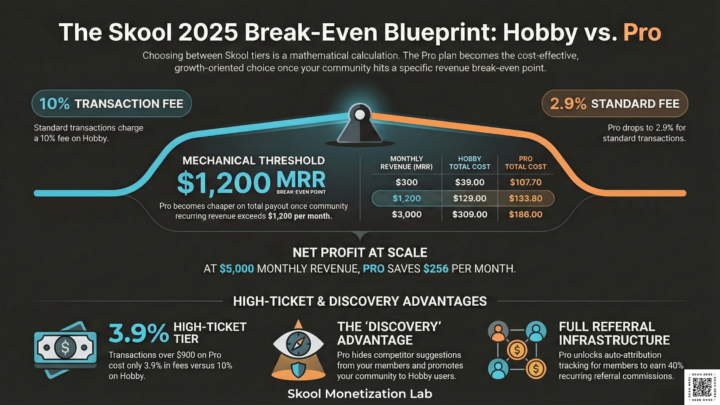
The complete 2025 breakdown — including the transaction fee maths most guides skip Since the Skool Hobby plan rollout in Q3 2025, the platform cost calculation for community owners has shifted materially. I run a paid Skool community — Skool Monetization Lab — on the Pro plan, with 33 members, 100% retention, and recurring membership revenue across Standard, Premium, and VIP tiers. The $99/month Pro plan fee is one of the first questions prospective community owners ask me about. Here is the complete answer, including the transaction fee maths that most pricing breakdowns either skip or get wrong. The choice between Hobby and Pro is a mechanical calculation of Stripe-integrated MRR and LTV preservation. The break-even point lands at $1,000–$1,200/month in community recurring revenue — closer than most community owners expect, and lower than competitor platform comparisons typically show. There is no free plan. Both plans include a 14-day creator trial. Both include unlimited members, unlimited courses, and all core Skool features. The differences are strategic, not cosmetic. THE TWO PLANS AT A GLANCE Hobby Plan — $9/month Transaction fee: 10% + $0.30 per transaction Admins: 1 only Branding: "Powered by Skool" badge on your community Suggested communities: Shown to your members in the sidebar Affiliate auto-attribution: Limited / restricted Free trial: 14 days Members and courses: Unlimited ───────────────────────────── Pro Plan — $99/month Transaction fee: 2.9% + $0.30 (transactions up to $900) / 3.9% + $0.30 (transactions above $900) Admins: Unlimited Branding: Fully white-labelled, no badge Suggested communities: Hidden from your members (your community gets promoted to Hobby users instead) Affiliate auto-attribution: Full auto-tracking Free trial: 14 days Members and courses: Unlimited Transaction fees are deducted before your weekly Stripe Express payout. You do not pay Stripe separately.
0
0
🔥
Feb 12 •
Why Your Skool Community is Stuck (and How a "Personal Monopoly" Fixes It)
Most community owners are fighting a losing battle. They try to monetize by being "better" than their competitors - working more hours, filming more videos, and offering more "bonuses." But as Andrew Kirby explains in his latest video, "Skool Is Hard, Until You Do This," trying to be better is a trap. In a saturated market, there’s always someone with a bigger brand or a longer track record. If you’re being judged on the same metrics as everyone else, you’re forced to compete on price, which keeps your revenue stuck in the $0–$500 range. The Problem: The Comparison Trap The mistake most Skool owners make is entering "head-to-head" competition in broad niches like fitness, relationships, or wealth [00:42]. When you launch a "generic" community, your prospects naturally compare you to the industry leaders. They look at your group and think, "Why should I pay $50 for this when the expert with 1M followers charges $30?" Because you haven't differentiated your offer, you’re being viewed as a commodity. This lack of unique positioning creates massive sales resistance. You have to work twice as hard to convince someone to join because you are just another option in a crowded market, rather than the only solution to their specific problem. The Better Way: Building Your Personal Monopoly The shortcut to consistent $1K–$5K/month revenue isn't working harder; it's being different [00:15]. Kirby introduces the concept of a Personal Monopoly: owning a specific category or sub-niche so completely that you are no longer compared to anyone else [01:21]. When you are unique, the buying decision shifts from "Should I buy from Person A or Person B?" to "Do I want the specific result that only this person provides?" - The "Synthesizer" Example: Andrew Kirby created a personal monopoly by claiming the term "Synthesizer." He doesn't just teach "content creation"; he teaches a specific method that he owns [01:41]. If you want to learn that specific framework, you have to go to him. - Fitness Community Example: A generic "Weight Loss for Moms" group struggles to charge $27/month. However, a community focused on "Post-Partum Strength Training for Crossfit Athletes" can easily charge $150/month. The latter has a personal monopoly over a specific, high-stakes problem. - Business Community Example: Instead of "General Sales Coaching," imagine a community titled "High-Ticket Sales for Introverted SaaS Founders." By narrowing the focus, you eliminate 99% of your competition and can charge premium rates with 50 members that a generalist couldn't get with 500.
0
0
🔥
Feb 10 •
Your marketing budget is funding platforms, not your business.
Here is a link to my latest LinkedIn post. Your marketing budget is funding platforms, not your business 🔗 Connect with Des: LinkedIn • Facebook • Instagram • Instagram 2 • Substack • Pinterest • Des Dreckett YouTube • Skool Monetization YouTube • The Authority Engine Community • The Authority Engine YouTube
0
0
🔥
Feb 6 •
Why YouTube Drives More Skool Members Than Any Other Platform
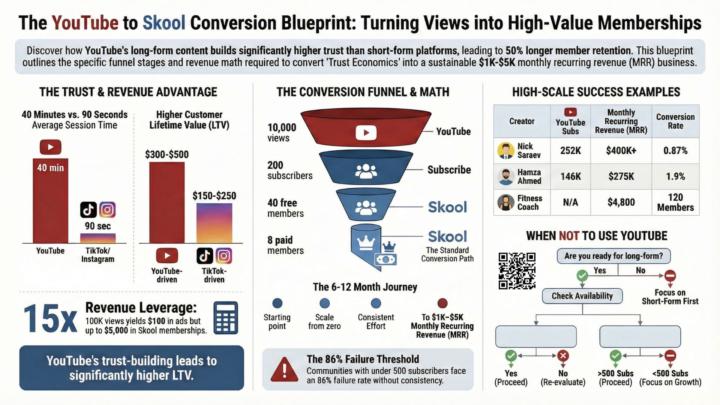
If you're trying to grow your Skool community, you've probably heard the advice: "Just post on social media." But here's what nobody tells you - YouTube converts to Skool memberships at 3-5x higher rates than Instagram, TikTok, or LinkedIn. Most community owners waste months posting short-form content that gets views but zero paying members. Meanwhile, creators using YouTube are building communities of 50-100 paying members in 3-6 months, generating $1,500-5,000 monthly recurring revenue. This post breaks down exactly why the YouTube to Skool funnel works so well, backed by real conversion data and case studies. By the end, you'll know whether YouTube is worth your time investment and how to make it work for your specific situation. In this post, you'll learn: • Why YouTube viewers convert to paid members 50% better than other platforms • The actual conversion benchmarks (views → subscribers → Skool members) • Real creator examples generating $20K-200K/month using this funnel • When YouTube is a terrible strategy (and what to do instead) YouTube Builds Trust That Short-Form Content Can't Match Here's the fundamental difference: YouTube viewers spend an average of 40 minutes per session watching content. Compare that to Instagram where people scroll for 90 seconds and move on. When someone watches you explain a concept for 15 minutes, they're not just consuming content—they're building a parasocial relationship with you. They hear your voice, see your face, understand your thinking process. This creates perceived expertise that short-form platforms simply can't deliver. The data backs this up. Studies show video content increases perceived expertise by 40-50%, leading to higher conversion intent. More importantly, Skool members from YouTube retain 50% longer than those from TikTok or Instagram, with average lifetime values of $300-500 versus $150-250 from other platforms. Why? Because by the time someone joins your Skool from YouTube, they've already "auditioned" you through multiple videos. They're pre-qualified, not impulse sign-ups from a viral reel.
🔥
Feb 3 •
Why Skool's New Spam Filter Could Save You 10+ Hours Every Week
If you're running a free Skool community, you know the pain: fake profiles, scam DMs, and drop-shipping bots flooding your membership requests. You're spending hours every week manually screening members instead of building revenue. Here is the video replay - https://youtu.be/kyFy567zACk?si=lNk1sDEFJLX6V5AR Skool just fixed this. Their new Auto-Mod spam detection system doesn't just flag suspicious accounts—it routes them to a spam folder automatically, sends you zero notifications, and works 24/7 without you lifting a finger. Here's why this matters for monetization: time is money. Every hour you spend blocking spammers is an hour you're not running Roadblock Calls, creating paid products, or engaging with real members who might upgrade to premium tiers. What Auto-Mod Actually Does Skool's spam risk score now appears on: - Membership requests (with one-click block) - DM conversations (massive red warning before you engage) - Posts and comments (auto-flags suspicious content) The system analyzes multiple signals—account age, contribution history, posting patterns—to identify high-risk users. When it detects spam, it doesn't just warn you. It disappears the content entirely. For community owners with 1,000+ free members, this is game-changing. You can finally enable auto-approve on membership requests and let Skool handle the filtering. The Traffic Source Feature Everyone's Waiting For Skool also teased their traffic source tracking tool (launching early February 2026). You'll finally see exactly where members come from: Instagram, YouTube, Facebook ads, Google search—broken down by percentage. @Shaz Jones from Onliners nailed why this matters: "You want to know where is the best place to spend most of my time and where am I going to make the most money from spending that time."
1-30 of 37
powered by

skool.com/skool-monetization-strategies-2218
Skool community monetization strategies for creators who want real revenue, not hype. Free-to-paid systems that actually work.
Suggested communities
Powered by