
Write something

🔥
18d •
Skool Extension Checklist as of Sept. 28, 2026
Hello Extensioners! We have another perk for you as the Skool Extensions community reached another milestone of 1k members! Here is a Skool Extension Checklist as of Sept. 28, 2026. Feel free to print it and use it to take notes on features to explore for standard, premium and VIP plans. It is a copy of features from the settings bar. As always, be sure you are updating your Skool Extensions to the latest updates and watching the Guided tour for more details on features. Let us know how you like tools like this to help you explore all the possibilities in Skool Extensions. From Your Extension Team @Marco Berlin, @Kristine Alise and myself @Kimberly Armatys

🔥
Jul 8 •
Screen Recording (Premium Feature 👑)
𝗦𝗰𝗿𝗲𝗲𝗻 𝗥𝗲𝗰𝗼𝗿𝗱𝗶𝗻𝗴 — 𝗖𝗮𝗽𝘁𝘂𝗿𝗲 𝗬𝗼𝘂𝗿 𝗦𝗰𝗿𝗲𝗲𝗻, 𝗪𝗶𝘁𝗵 𝗼𝗿 𝗪𝗶𝘁𝗵𝗼𝘂𝘁 𝗬𝗼𝘂𝗿 𝗪𝗲𝗯𝗰𝗮𝗺 The same recorder that sends voice and video in your DMs, comments and post window can now record your screen instead of your camera. Open the source dropdown in the recording popup and you'll find your cameras alongside two new choices: Screen records just your screen, and Screen + Camera gives you a Loom-style clip where your webcam rides along in a round bubble. Your browser's own picker asks whether to share your whole screen, a single window or a tab — no extra permission is added to the Extension. In Screen + Camera mode the webcam bubble sits in a corner of the recording, and you can drag it anywhere and resize it to frame yourself the way you like. The moment you start sharing, the big popup shrinks to a small control pill near the top of the page — Start before you record, then a red stop dot and a running timer while you record — and you can drag that pill out of the way. It never covers the screen you're capturing, and it never films itself into an infinity-mirror. The recording takes the tab or system audio from whatever you're sharing and mixes your microphone in on top as a voiceover, so you can talk over what's on screen. Pick which microphone (and, for Screen + Camera, which camera) up front, and switch either one mid-recording. If you end the share from your browser's own sharing bar, the recording stops and attaches on its own. When you're done, a Done button plays the clip back for review before anything sends — then Send ships it, or the trash icon discards it for a retake. Clips go out as WebM through Skool's native file attachment, playable right in the thread, with the same 10-minute maximum as camera video. Screen and Screen + Camera are Premium; plain camera and audio recording stay free. For non-Premium accounts the two screen rows show up greyed out with a gold crown — one click starts a free trial right from the recording popup. The whole recorder adapts to your current theme, dark or light.

🔥
Mar 30 •
Course Overview (VIP Feature 💎)
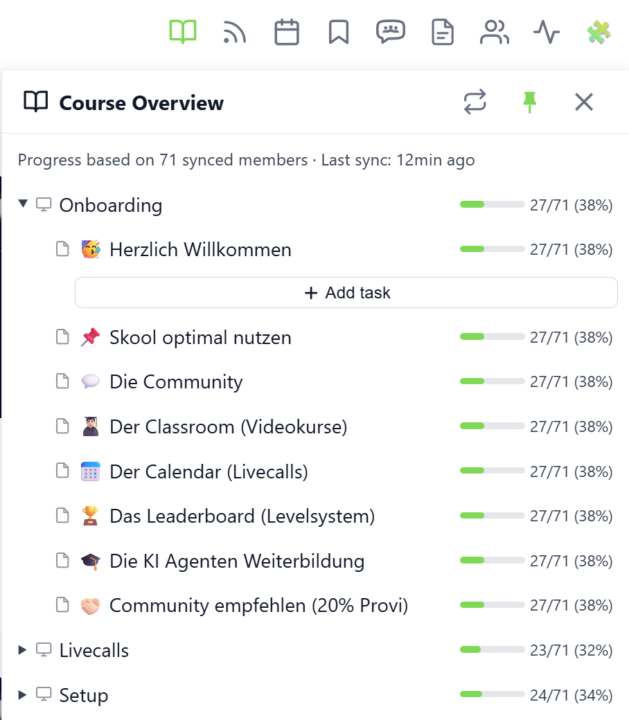
𝗖𝗼𝘂𝗿𝘀𝗲 𝗢𝘃𝗲𝗿𝘃𝗶𝗲𝘄 — 𝗬𝗼𝘂𝗿 𝗘𝗻𝘁𝗶𝗿𝗲 𝗖𝗹𝗮𝘀𝘀𝗿𝗼𝗼𝗺 𝗦𝘁𝗿𝘂𝗰𝘁𝘂𝗿𝗲 𝗮𝘁 𝗮 𝗚𝗹𝗮𝗻𝗰𝗲 Managing a Skool classroom with multiple modules, folders, and pages means a lot of clicking and scrolling to understand the full picture. Course Overview adds a dedicated sidebar panel that shows your complete course structure as an expandable tree — every module, every folder, every page — without leaving the page you're on. Click the book icon in your toolbar to open the panel. Each module shows as a collapsible row with a folder icon for subfolders and page icons for individual lessons. Click any module to expand it and reveal its nested content, loaded directly from Skool's data. The tree remembers which modules you've expanded, so your view stays consistent as you navigate. The real power comes from the completion stats. If you've synced your members' course progress, each module displays a green progress bar showing what percentage of your members have started it. Hover over the bar to see member names, or click it to open a popup with the full list — complete with avatars, tags, and pipeline status. A note at the bottom shows how many synced members the percentages are based on. Hit the refresh button to reload the course structure or update completion stats. The panel respects the 24-hour sync cooldown and shows when the next sync is available. You can pin the panel to keep it open while you browse, resize it by dragging the left edge, or close it when you're done. Course Overview is available for admins and owners only, and works on any page within your community. The feature can be toggled in the Toolkit Settings under the Admin section. --- 𝗞𝘂𝗿𝘀ü𝗯𝗲𝗿𝘀𝗶𝗰𝗵𝘁 — 𝗗𝗲𝗶𝗻𝗲 𝗴𝗲𝘀𝗮𝗺𝘁𝗲 𝗖𝗹𝗮𝘀𝘀𝗿𝗼𝗼𝗺-𝗦𝘁𝗿𝘂𝗸𝘁𝘂𝗿 𝗮𝘂𝗳 𝗲𝗶𝗻𝗲𝗻 𝗕𝗹𝗶𝗰𝗸 Eine Skool-Classroom mit mehreren Modulen, Ordnern und Seiten zu verwalten bedeutet viel Klicken und Scrollen, um das Gesamtbild zu verstehen. Die Kursübersicht fügt ein eigenes Sidebar-Panel hinzu, das deine komplette Kursstruktur als aufklappbaren Baum zeigt — jedes Modul, jeden Ordner, jede Seite — ohne die aktuelle Seite zu verlassen.
🔥
Jul 24 •
MySkool (Premium Feature 👑)
𝗠𝘆𝗦𝗸𝗼𝗼𝗹 — 𝗪𝗵𝗲𝗿𝗲 𝗮𝗹𝗹 𝘆𝗼𝘂𝗿 𝗰𝗼𝗺𝗺𝘂𝗻𝗶𝘁𝗶𝗲𝘀 𝗰𝗼𝗺𝗲 𝘁𝗼𝗴𝗲𝘁𝗵𝗲𝗿. Skool always drops you into one community at a time — there is no page that shows your whole Skool life at once. MySkool gives you that home: a personal cross-community feed that takes over the page and pulls posts from every community you pick into one stream, newest first. Open MySkool from its entry in Skool's native pin bar — it rides along like any other pin and can be moved the same way. One unified selector box at the top controls everything: pick individual communities, hit the "All communities" chip to follow everything, use the sync button for a fresh pull, or grab a "Copy link" to share the view. The same selection spans all three tabs — feed, calendar and classroom — so the events and lessons from all your chosen communities are gathered in one place too. The feed is not read-only: edit your own posts and comments inline, vote in polls straight from the stream, and like and comment as if you were inside the community. Every post shows its community icon, so you always know where a conversation lives — one click takes you there. MySkool is a Premium feature and can be toggled in the Extension Settings. --- 𝗠𝘆𝗦𝗸𝗼𝗼𝗹 — 𝗪𝗼 𝗮𝗹𝗹 𝗱𝗲𝗶𝗻𝗲 𝗖𝗼𝗺𝗺𝘂𝗻𝗶𝘁𝘆𝘀 𝘇𝘂𝘀𝗮𝗺𝗺𝗲𝗻 𝗸𝗼𝗺𝗺𝗲𝗻 Skool setzt dich immer in eine Community zur Zeit — es gibt keine Seite, die dein ganzes Skool-Leben auf einmal zeigt. MySkool gibt dir dieses Zuhause: ein persönlicher Community-übergreifender Feed, der die Seite übernimmt und Posts aus jeder Community, die du wählst, in einen Stream zieht, Neuestes zuerst. Öffne MySkool über seinen Eintrag in Skools nativer Pin-Leiste — es fährt dort wie jeder andere Pin mit und lässt sich genauso verschieben. Eine einheitliche Auswahlbox oben steuert alles: Wähle einzelne Communities, nimm den „Alle Communitys"-Chip, um allem zu folgen, nutze den Sync-Button für einen frischen Abruf oder „Link kopieren", um die Ansicht zu teilen. Dieselbe Auswahl spannt über alle drei Tabs — Feed, Kalender und Classroom —, sodass auch die Termine und Lektionen all deiner gewählten Communities an einem Ort versammelt sind.

🔥
Apr 13 •
Skool Extensions Chatbot
𝗦𝗸𝗼𝗼𝗹 𝗘𝘅𝘁𝗲𝗻𝘀𝗶𝗼𝗻𝘀 𝗖𝗵𝗮𝘁𝗯𝗼𝘁 — 𝗬𝗼𝘂𝗿 𝗜𝗻-𝗔𝗽𝗽 𝗛𝗲𝗹𝗽 𝗔𝘀𝘀𝗶𝘀𝘁𝗮𝗻𝘁 The Skool Extensions Chatbot is a built-in help assistant for the extension itself. It answers questions about the Skool Extensions toolkit: how features work, where to find settings, troubleshooting, release notes, and anything else related to the extension. Open it from the toolkit settings panel or the extension popup and ask in plain language: "How do I enable the focus mode?", "Why don't I see the members panel?", "What's new in the latest release?". The chatbot pulls from the current feature documentation and release notes, so its answers stay in sync with the version you have installed. The chatbot supports English and German, preserves your conversation history locally, and works offline-aware — if the backend is unreachable, you get a clear error instead of a silent failure. No community context or personal data is sent to the backend; only your question and the extension version. --- 𝗦𝗸𝗼𝗼𝗹 𝗘𝘅𝘁𝗲𝗻𝘀𝗶𝗼𝗻𝘀 𝗖𝗵𝗮𝘁𝗯𝗼𝘁 — 𝗗𝗲𝗶𝗻 𝗶𝗻𝘁𝗲𝗴𝗿𝗶𝗲𝗿𝘁𝗲𝗿 𝗛𝗶𝗹𝗳𝗲-𝗔𝘀𝘀𝗶𝘀𝘁𝗲𝗻𝘁 Der Skool Extensions Chatbot ist ein eingebauter Hilfe-Assistent für die Extension selbst. Er beantwortet Fragen rund um das Skool Extensions Toolkit: wie Features funktionieren, wo du Einstellungen findest, Troubleshooting, Release Notes und alles andere rund um die Extension. Öffne ihn über das Toolkit-Einstellungen-Panel oder das Extension-Popup und stelle deine Frage in natürlicher Sprache: „Wie aktiviere ich den Focus Mode?", „Warum sehe ich das Members Panel nicht?", „Was ist neu in der aktuellen Version?". Der Chatbot greift auf die aktuelle Feature-Dokumentation und die Release Notes zu, sodass seine Antworten immer zur installierten Version passen. Der Chatbot unterstützt Deutsch und Englisch, speichert deinen Gesprächsverlauf lokal und ist fehlerresistent — wenn das Backend nicht erreichbar ist, bekommst du eine klare Fehlermeldung statt eines stillen Abbruchs. Es werden weder Community-Kontext noch persönliche Daten an das Backend übertragen, nur deine Frage und die Extension-Version.

1-30 of 69

Leaderboard (30-day)
1
🔥
+126
2

🔥
+121
3

🔥
+110
4

🔥
+49
5

🔥
+35
Powered by