Activity
Mon
Wed
Fri
Sun
Dec
Jan
Feb
Mar
Apr
May
Jun
Jul
Aug
Sep
Oct
What is this?
Less
More
Owned by Kimberly
For midlife women ready to feel ALIVE. Aromatherapy + essential oils + wellness routines + life organization +a circle of people here for support.
Stop being invisible in Skool! Learn authentic engagement strategies to turn members into leaders without sacrificing authenticity or sleep. Join us!
Skoolers
150.3k
Free
Skool Extensions 🧩
1.2k
5.0
Free
AI Grimm Society
129
Free
Visibility Sprint
342
Free
Indie AI Business Hub
95
Free
The Sanctuary with Carey Kaas
506
5.0
Free
The PAID Creative
2.4k
5.0
Free
Skool Scale Camp
6.2k
5.0
Free
102 contributions to Skool Extensions 🧩

🔥
May 21 •
Community Pins
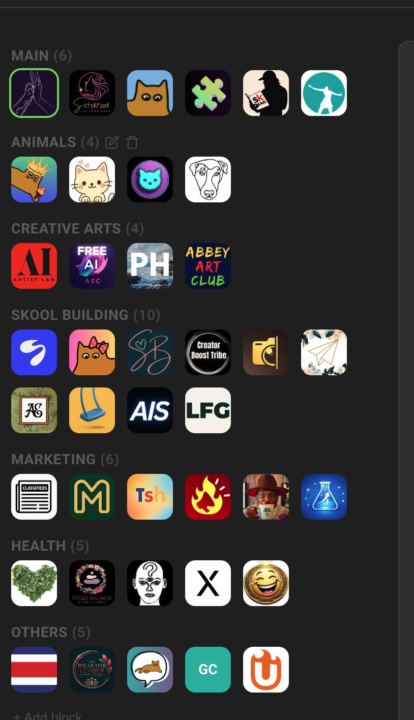
Replace Skool's left community switcher with a strip that holds every community you belong to, grouped into named blocks Skool's left sidebar only surfaces a handful of communities at a time — the rest sit behind a switcher dropdown you have to open every time. If you're active in a dozen or more, the ones you visit daily end up buried in a list you keep scrolling through. Community Pins replaces that switcher with a redesigned strip down the left edge that shows every community you belong to at once — your logos flow in rows across the space beside the page instead of one cramped column. Hover any community to see its name in a tooltip, and the one you're currently in is marked. Group your communities into named blocks. Add a block, head it "AI", "Clients", or whatever fits — each heading carries a live count of how many sit inside. A permanent "Pinned" block catches every community on its own: join a new one and it lands there, leave one and it drops out. Manage it all inline in the strip — "+ Block" adds one, the pencil renames a heading, and the trash icon removes a block (after a quick confirm) and drops its communities back into "Pinned". The "Pinned" block itself can be renamed but never deleted. Drag to organize. Reorder communities inside a block, pull one across to another block, or grab a block's heading to move whole blocks up and down. A custom mouse-driven drag tracks your cursor one-to-one, with no HTML5 ghost image or forbidden-drop flicker to get in the way. The strip scrolls quietly once the list grows long — a slim green scrollbar appears on hover and stays hidden otherwise, so the sidebar stays calm at rest. The whole arrangement is cloud-synced: lay your blocks out on one device and they show up the same on the next. Community Pins can be toggled in the Extension Settings under Appearance. --- Skools linken Community-Switcher durch einen Streifen ersetzen, der jede Community enthält, in der du bist, in benannten Blöcken organisiert Skools linke Sidebar zeigt immer nur eine Handvoll Communities auf einmal — der Rest steckt hinter einem Switcher-Dropdown, das du jedes Mal aufklappen musst. Wenn du in einem Dutzend oder mehr aktiv bist, sind die täglich besuchten in einer Liste vergraben, durch die du immer wieder scrollst.

🔥
0 likes • Jun 28
@Reese Carpenter welcome and enjoy the features.
🔥
0 likes • 1d
@Enoch Adebisi
🔥
6d •
Members Near You
𝗠𝗲𝗺𝗯𝗲𝗿𝘀 𝗡𝗲𝗮𝗿 𝗬𝗼𝘂 — 𝗦𝗲𝗲 𝗪𝗵𝗼 𝗟𝗶𝘃𝗲𝘀 𝗔𝗿𝗼𝘂𝗻𝗱 𝘁𝗵𝗲 𝗖𝗼𝗿𝗻𝗲𝗿 Skool tells you how many members a community has, but not who among them lives near you. Members Near You adds a tile below the community card on every community page: the members whose profile location is close to yours, sorted by distance — "Köln · 357 km". Members from a neighbouring country show up too when they live within 300 km, with the country next to the city: "Copenhagen, Denmark · 289 km". Each row shows avatar, name with the usual member badges, place and distance, plus when the member was last active; a click opens the profile in a new tab with this community already selected, so the feed stays where you left it and a DM or a follow is one step away. The tile reads the location each member typed into their Skool profile — the same field Skool shows on the members page — and nothing else. Distances are worked out on your device from a built-in city list, measured between city centres; no map service ever sees a location. Members in a small town the list doesn't know still appear for your country, below the measured ones and without a km value. Members without a location simply don't appear, and if your own profile has none, the tile asks you to add it and links to your settings. Up to five members show in the tile; "Show all" expands it to the full list. If you run the community and keep its member list in the Members Panel, the tile uses that complete list right away. Everyone else sees what Skool shows a regular member: a snapshot of 30 members, the ones online right now first. The tile keeps everyone it has seen and looks again every few hours while you visit, so the list grows from visit to visit. As long as it knows fewer members than the community has, a footnote says so — "Based on 30 of 313 members". Locations rarely change, so members stay in the list for two months after they were last seen. Members Near You is on by default and can be toggled in the Extension Settings, right below Community Stats.

🔥
0 likes • 4d
@Vanessa Marie Thompson I do believe DMs helpful for new members and time saving for myself. Especially love the auto level up so I don’t need to track and quick win to thank members for being engaging get results with a message back to me. I’ve used the template to make a survey for topics to cover in community too. So much they can do to save time. Scheduled posts can be repurposed and used in future if you have that kind of content like a challenge or course lessons.
🔥
1 like • 4d
@Vanessa Marie Thompson a bit of both. I have two small communities right now. So setting up and having this is a bonus vs doing it all manually.
🔥
Sep 28 •
Skool Extension Checklist as of Sept. 28, 2026
Hello Extensioners! We have another perk for you as the Skool Extensions community reached another milestone of 1k members! Here is a Skool Extension Checklist as of Sept. 28, 2026. Feel free to print it and use it to take notes on features to explore for standard, premium and VIP plans. It is a copy of features from the settings bar. As always, be sure you are updating your Skool Extensions to the latest updates and watching the Guided tour for more details on features. Let us know how you like tools like this to help you explore all the possibilities in Skool Extensions. From Your Extension Team @Marco Berlin, @Kristine Alise and myself @Kimberly Armatys
🔥
1 like • 4d
@Vanessa Marie Thompson here you go!
🔥
1 like • 4d
@Dee MamaswithMissions Im tagging @Marco Berlin to assist with your questions too. 1 https://www.skool.com/skool-extensions/plans 2 VIP defer to Marco for additional comment 3 I believe yes for 3 communities but defer to Marco
🔥
Mar 10 •
🧩 Skool Extensions starting
skool-extensions.com I’m officially releasing my Skool Extensions! 🥳 Install the extension, give me your feedback and ideas, and spread the word! --- Hiermit veröffentliche ich offiziell meine Skool Chrome Extension 🥳 Installier dir die Extension, geb mir Feedback und Ideen und erzählt es weiter.

🔥
3 likes • 9d
@Dee MamaswithMissions there’s a pdf cheat sheet I shared that lists all the features. Start with the guided tour. Have fun!
🔥
2 likes • 4d
@Dee MamaswithMissions I love the templates where you can setup your DMs. It also has a DM for when members level up and use that. I’ll tag you in the PDF I created to see features and if it’s premium or VIP. The guided tour is by premium and VIP. sorry I don’t have laptop with me as I’m traveling. I’m one of the moderators and tag us on specific questions for more help.
🔥
6d •
Skool Extensions Mobile version - Commspace
Who’s liking and using the mobile version of Skool Extensions? https://commspace.app You can bookmark (see photo 1) on phone or create an icon on phone. MySkool photo 2 you can customize. Great job in allowing us to access many features from your phone or iPad. Sorry Apple user. Any Android user please comment.

🔥
1 like • 5d
@Enoch Adebisi look in settings towards the bottom will have something like mobile app. You’ll scan that and answer questions. Very easy setup.
🔥
1 like • 5d
@Melli Heinz
1-10 of 102

🔥
@kimberly-armatys-4646
Numbers gal + aromatherapist who makes blending spreadsheets. Trusted community builder. Helping midlife women feel organized & ALIVE again. 🌿🏠📸🏒☕
Active 2h ago
Joined Mar 17, 2026
Bradley, IL
Powered by