

🔥
7d •
🎨 Looking for FREE AI chats that can generate images?
There are more options than ever, and most have free plans or daily free generations. Here's a list worth bookmarking: 🤖 Chat-based AI with image generation • ChatGPT 🔗 https://chatgpt.com • Google Gemini 🔗 https://gemini.google.com • Microsoft Copilot 🔗 https://copilot.micrsoft.com • Grok 🔗 https://grok.com • Meta AI 🔗 https://www.meta.ai • Le Chat (Mistral) 🔗 https://chat.mistral.ai • Qwen Chat 🔗 https://chat.qwen.ai • Poe 🔗 https://poe.com • HuggingChat 🔗 https://huggingface.co/chat 🎨 Dedicated AI image generators • Leonardo AI 🔗 https://leonardo.ai • Ideogram 🔗 https://ideogram.ai • Playground AI 🔗 https://playground.com • Tensor.Art 🔗 https://tensor.art • SeaArt AI 🔗 https://seaart.ai • Mage.space 🔗 https://www.mage.space • Adobe Firefly 🔗 https://firefly.adobe.com • PicLumen 🔗 https://www.piclumen.com - Nightcafe 🔗 RB'S link to NightCafe If I've missed one of your favourites, add it in the comments so we can build an even bigger list. AI tools breed faster than rabbits with venture capital.
🔥
14d •
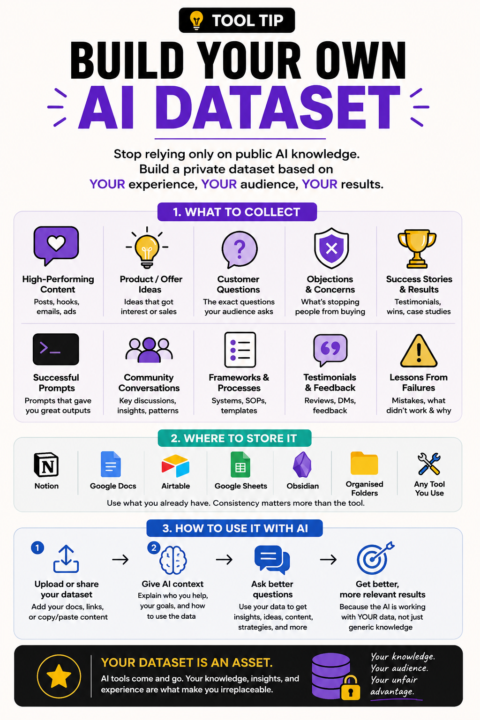
TOOL TIP: BUILD YOUR OWN DATASET
When I say "dataset" I don't mean anything technical. I mean creating a collection of information that has already worked for you. Mine would include things like: • Social posts that got engagement • Product ideas that sold • Customer questions • Common objections • Community discussions • Successful prompts • Testimonials • Frameworks I've developed • Lessons learned from failed projects You can store it in: • Google Docs • Notion • Airtable • Obsidian • A spreadsheet • A folder of organised documents The goal isn't to collect more information. The goal is to collect your information. Over time, this becomes far more valuable than downloading another prompt pack because it reflects your audience, your experience, and your results. If you lost access to every AI tool tomorrow, what information would you wish you'd saved?
🔥
19d •
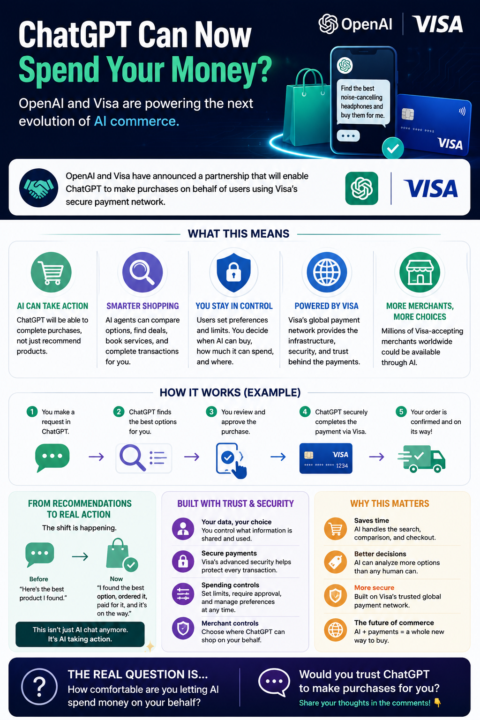
ChatGPT Can Now Spend Your Money?
OpenAI & Visa Just Changed AI Commerce This is one of the biggest AI announcements of the year. OpenAI and Visa have announced a major partnership that will allow AI agents inside ChatGPT to make purchases on behalf of users using Visa's payment network. What this means: 💳 ChatGPT will be able to complete purchases, not just recommend products. 🛒 AI agents could compare options, find deals, book services, and complete transactions. 🔒 Users remain in control with spending limits, approval requirements, and merchant restrictions. 🌎 Visa's global payment network provides the payment infrastructure and security layer behind the transactions. Think about that for a second. We're moving from: "Here's the best product I found." To: "I found the best option, ordered it, paid for it, and it's on the way." This isn't just AI chat anymore. It's AI taking action. The real question is no longer whether AI will change commerce. The question is: How comfortable are you letting an AI spend money on your behalf? Would you trust ChatGPT to make purchases for you? 👇
🔥
19d •
Anthropic Suspends Fable 5
If you've been trying to access Fable 5 and wondering why it's suddenly unavailable, it's not just you. Anthropic has suspended access to Fable 5 following a U.S. government directive issued this week. The company says it was required to disable the model while it works through new export control requirements. What this means: • Fable 5 is currently unavailable • Mythos 5 has also been affected • Other Claude models remain available • Users outside the U.S., including Australia, are impacted This is a reminder of how quickly the AI landscape can change. One week you're testing a new model. A few days later it's gone. If your business, content workflow, or products rely heavily on a single AI model, it's a good idea to have backup options and flexible systems in place. Were you using Fable 5? What did you think of it before access was suspended? 👇



1-30 of 100
powered by

Suggested communities
Powered by