
Write something
Pinned

Mar 15 •
Welcome to Clief Notes. Here's where to start.
1. Watch the intro video and introduce yourself in the intro post here 2. Start with The Foundation (free course). Concepts, folder architecture, prompting framework. Everything else builds on this. 3. Check in at the bottom of each lesson. Polls, discussion posts, other members working through the same stuff. Use them. 4. When you're ready to build real things, move to Implementation Playbooks (Level 2). When you're ready to build your own tools, Building Your Stack (Level 3). 5. Post your work. Ask questions. Help others when you can. What are you here to build?
Poll
4234 members have voted
Pinned
19h •
🌶️ CINCO DE MAYO FIRESALE — STARTS NOW 🌶️
Locked in for the next 5 days only. Ends May 5th at 10:00 AM EST. No exceptions. 🎉 Premium: $27 → $14/mo 🎉 VIP: $97 → $67/mo The closest you'll get to our original launch pricing. We're doing this because the community has shown up for us, and we want to show up back. 🤝 🔥 Already a member? Read this carefully. To lock in the new rate, you need to: 1. Cancel your current plan 2. Resign under the new price That's the only way the system can apply the new rate. We have way too many members for manual refunds, so we can't refund anyone who just signed up at current pricing. But the savings stack month over month, so if you plan to stick around (and you should 😁), the math works out fast. 🚫 A few ground rules: Please do not DM myself or Jake about pricing, exceptions, or extensions. We love you, but we're a small team and we need to stay focused on building. Everyone gets the same window. Everyone gets the same deal. If you miss it, you miss it. We'll do more things for the community down the road. ⏰ The clock: 🟢 LIVE NOW 🔴 Locks May 5th, 10:00 AM EST - Premium gets you The Vault and Afternoon Tea calls. - VIP gets you The Drawing Room, High Tea, and bespoke folder builds from Jake himself. If you've been on the fence, this is the moment. 🚀 Tag a friend who needs to be in here. Let's make Cinco a movement. 🎊 🌶️🌶️🌶️

16d •
From 2 Hours to 10 Minutes: First Major Automation Win
This is my first major win applying what @Jake Van Clief ef teaches. Since subscribing to Claude Code on March 19th, I’ve been able to show so much progress that my company has now upgraded me to the Max 5x subscription. Looking forward to pushing the boundaries of what’s possible and continuing to improve our processes! As a Finance Manager responsible for month-end closing, I wanted to see what Claude Code could actually achieve—and it delivered! Even without Azure or backend access to our ERP system (D365 F&O), I didn't let that stop me from being "efficiently lazy." Claude Code showed me how to use the Playwright MCP to control Chrome and handle the heavy lifting for me. The script now automatically downloads the monthly trial balance, populates an Excel template, identifies discrepancies via color-coding, and even takes screenshots to document numbers from various reports. I’m already tackling my next big automation project—a task that is notoriously tedious when done manually. Stay tuned for that post, as well as more month-end automation updates in the near future! I had Claude code describe the workflow: Common Reconciliation — Monthly Close Automation with Claude Code + Playwright MCP Every month-end I run a single slash command (/mec-common) and pass it a month number. Claude then drives the entire reconciliation process end-to-end, touching both a live D365 ERP system and a multi-sheet Excel workbook — no manual steps. The workflow in three phases: Phase 1 — Trial Balance Claude navigates to the D365 Trial Balance page, clears any stale filters, sets the correct date range, triggers a recalculation, and downloads the export. The Excel file is placed in the right folder, and the data is pasted (values only) into the reconciliation workbook's Trial bal D365 sheet. A full workbook recalculation is then forced before anything is read. Phase 2 — Revaluation Check Claude loops through ~50 reconciliation sheets. On each sheet it finds the last row where column C says "Revaluation" (there are two — the second one holds the actual diff) and reads the value in column G. If the diff is outside ±1, the sheet tab is colored red. One sheet (150070) is always flagged red and requires manual review regardless.

6m •
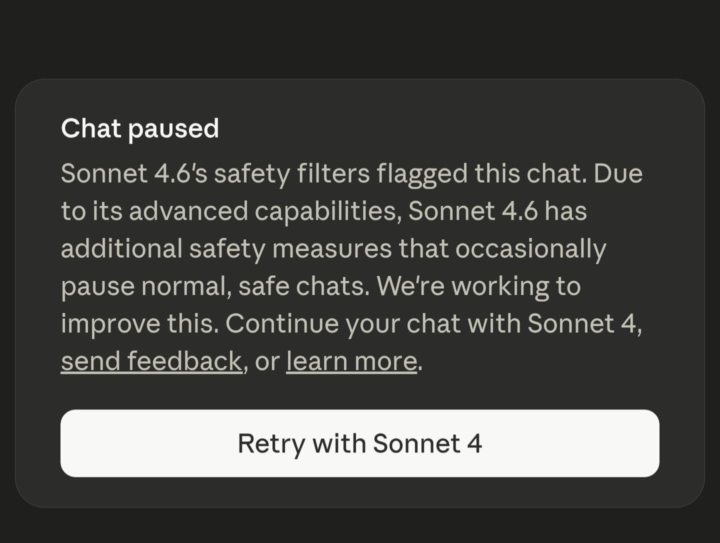
Claude's Safety Filters have NO Chill.
Has anybody else experienced Claude prompting them to switch to Sonnet 4 due to some sort of safety filters being activated? Does anybody have any suggestions on what to do so that it'll stop blocking my chats? All I've done is talked about building this folder architecture and worked through the process with it.
Mar 15 •
🏁 Foundations 3.2 Check-In
You just saw how the folder structure adapts to different use cases. Vote below, then drop your customized setup in the comments. What did you name your workspaces and why?
Poll
335 members have voted
1-30 of 907

skool.com/quantum-quill-lyceum-1116
Jake Van Clief, giving you the Cliff notes on the new AI age.
Leaderboard (30-day)
1

+764
2

+685
3

+459
4

+394
5

+385
Powered by