
Write something

3d •
Beware of the Windows Defender Phishing Attempt
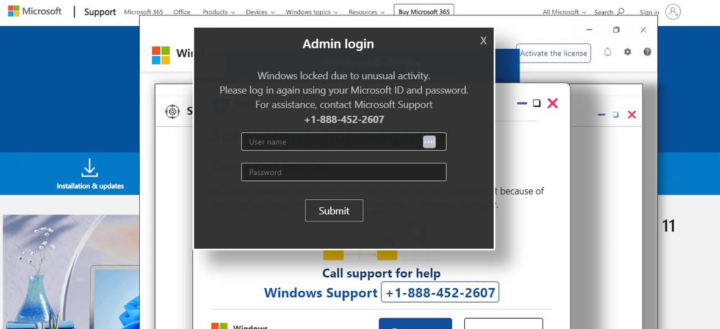
A Windows Defender malware is making the rounds (again) recently, and if you're not prepared it can be rather alarming. Here's what happens. You're minding your own business, browsing the internet on your computer. Suddenly, the screen changes and a large message pops up, informing you that Windows Defender has locked your computer for your own protection because of malware. In order to unlock your computer, you must either provide login credentials or call the number listed multiple times on the screen. Some of these attacks also manage to lock your mouse so that it truly looks like you're locked out. This is actually a website using a full-screen pop-up "ad." Here's what you do if you see this: 1) Check to see if your keyboard works. If it does, press Ctrl + Alt + Delete and choose Task Manager 2) When Task Manager opens, find the process for your browser (mine is Chrome). Right click and choose END TASK. 3) Your browser will close and you'll have full control of your computer. 4) When you relaunch your browser, it may ask if you want to restore your session. DO NOT RESTORE YOUR SESSION! Just close that window without accepting the option. 5) Once you return to your browser, CLEAR YOUR COOKIES AND CACHE. If you've got a timeframe allowable, choose at least the last hour, if not the last 24-hours. If your keyboard is not working and you can't get to the Task Manager, press and hold your power button until the computer shuts down. Then you can restart and start at step 4, above. Stay ever vigilant! NEVER enter login credentials for something like this. NEVER call the number presented to you on the screen. If you are unsure, go to your phone or another browser resource and look up the number (in this case, you'd Google Microsoft Support) and use THAT number. Good luck!
1
0
27d •
Your First Reward Unlocks at Level 3
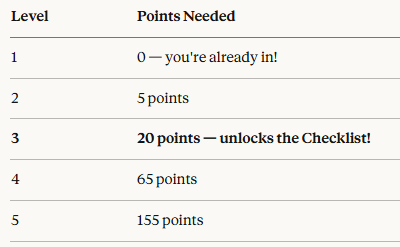
Introducing: the Home Maintenance Checklist 🏠✨ This is the first locked reward in our community, and it unlocks automatically when you hit Level 3. No waiting, no applying — just level up and it's yours. So how do you get there? Level 3 requires 20 points — and points are simple: 👉 Every like you receive on a post, comment, or reply = 1 point. That means the fastest path to Level 3 is to show up and contribute. Introduce yourself. Ask a question. Share something useful. When your fellow Travelers find it valuable, they'll like it — and your points add up fast. You can help your fellow Travelers level up by liking their content as well. Where are you right now? You can check your current level right next to your name in the community, or hop over to the Leaderboard to see how you're progressing. Drop a comment below to tell us where you are right now. Who's getting close to unlocking the first reward?
Apr 2 •
Every Day is a Learning Opportunity
It’s Day 8 of our RV trip, and Mr. Wayfinder woke up this morning with a twinge in his lower back. Rather than risk more discomfort, I stepped in and wouldn’t allow him to bend over or lift anything heavy (we’ve got a long driving day ahead of us). So I learned how to hook up our car 🚗 to be towed, and helped remove the hookups.these are important things for me to know how to do! On this Thoughtful Thursday, drop a comment and let us know something you learned this week! ✏️👇
Feb 19 •
Welcome! Start here to begin earning XP.
You’ve officially entered the Level Up w/ PrplJennifer Fellowship— now what? This is your Home Base for leveling up the "Real World" skills that traditional school forgot to teach you. Whether you're here to learn how to fry an egg without burning the house down, or you're trying to decode the mystery of credit scores, you’ve found the right place. 📜 YOUR QUEST LOG: Level 1 Initiation To move from a Level 1 Fledgling to a Level 2 Skill-Seeker, you need XP (Experience Points). Completing your first quest is the only way to begin: 1️⃣ Introduce Your Character: Drop a comment below to establish your place in the fellowship. Tell us: - Your Name/Class: Who are you and where are you joining from? 🌎 - The Current Mission: What is one "Real World" skill you’re currently grinding to improve? 🎯 - The Boss: What’s the biggest adulting "monster" stressing you out right now? 🐉 2️⃣ Check the Map: Head over to the Classroom tab. That’s where you can find the Journeys & Quests 🗺️ 3️⃣ Support the Fellowship: Like and comment on 2 other players' introductions below. Helping others is the fastest way to level up your own rank! 🤝 📈 THE RANKING SYSTEM As you contribute, your title will evolve from Fledgling all the way up to Grand Architect. Every 'Like' you receive on a post or comment earns you XP. High-level players will get access to hidden vaults and special side-quests. One final rule: There are no "noob" questions here. We are all walking our skill journeys together. Ready to begin? Drop your Intro below! 👇
Mar 23 •
🎁 Help me pick your next Level Up reward!
Taking the time to connect and learn should be rewarded. You can Level Up in our Fellowship by commenting and reacting to posts and sharing your own posts. (Check out the Leaderboards tab to learn more about Leveling Up!) So, I’m going to add a new Free Download that unlocks automatically once you hit Level 3. This is my way of saying "Thanks" for making this Fellowship amazing. But I need your help—which of these would you actually use? Vote below!" Don't see what you're looking for? Drop a comment below with your best idea! The winning resource will be added to the 'Classroom' tab and locked to Level 3 by the end of next week."
Poll
4 members have voted
1-17 of 17
powered by
skool.com/purple-jennifer-4304
Learn real life adulting skills —money management, home, food, and self care, and more; all the stuff you need know to live on your own, successfully.
Suggested communities
Powered by