

27d •
You Don't Have to Learn the Engine to Use the Bot!
One helpful way to think about Productive Bot is that OpenClaw or Hermes is the engine underneath. ProductiveBot is the business layer that makes it usable. So you don't need to know how the engine works to get value from your bot. You just tell it what you need done in a normal language. You can even give it its own personality! Here is an example...Instead of trying to figure out the technical setup for a workflow, you could say (or prompt): I keep loosing track of customer follow-ups after calls. "Help my turn my call notes into a simple follow-up process I can reuse." Your bot can help you share the steps, draft the message, organize the task list, and point out what info is even missing. Giving your bot a real-life business practice doesn't need to make you become the technical person behind it. Copy/paste this prompt to give it a try: Help me turn it into a simple workflow. Ask me any missing questions first, then give me: 1. the steps 2. what information you need from me 3. what you can draft or organize 4. what I should review before using it What tasks/workflows do you have your bot doing?
0
0

Jul 14 •
A Simple Way to Turn One Idea into Content
Hey ProdBot Community - Here’s a practical use for ProductiveBot that can save a lot of time. If you have one idea sitting in your notes, your bot can help you shape it into content without starting from a blank page. It does not need to write everything for you. A better use is to let it organize the idea first. Give it the rough thought, who the content is for, and what you want people to understand. Then ask it to give you a few options: a short post, an email angle, a video outline, or a few hooks you can choose from. That way you still decide what sounds right, but the first draft is not starting from nothing. Prompt to try: Help me organize it into a few content options. Give me: - one short social post - one email angle - one short video outline - a few possible hooks Keep it simple and natural. Do not make it sound overly polished or like generic AI copy.
1
0

Jun 30 •
What is 1 Small Thing Your Bot Helped with This Week?
Quick Tuesday check-in: ❓❓What is one small thing your ProductiveBot helped you with this week? It does not have to be huge. Maybe it cleaned up an email, helped you plan the day, summarized notes, drafted a reply, organized a messy thought, or saved you 10 minutes on something annoying. Small wins count. They are how the bot becomes part of your day. 💡 A prompt you can try on your bot: "Help me find one task from today that can make my day easier. Ask me a few questions, then suggest the simplest first steps." Share your small win with the community!


Jun 28 •
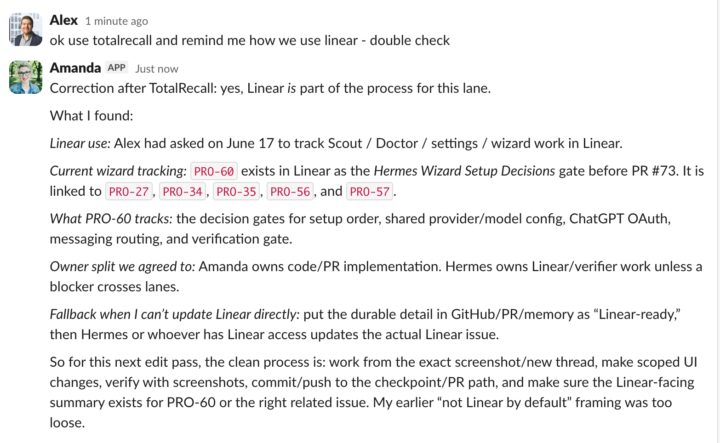
Memory Tip: Ask it to use TotalRecall when you want to confirm
When asking for something slightly more ambiguous or deeply buried in your content/history, tell your ProductiveBot to use TotalRecall to make sure. It will force it to search carefully including things that they may not think to do intuitively. See example attached.
0
0
Jun 15 •
Backup Config! 😎
Hey Community! Last week my bot went way down. I was trying to install Hermes, something went sideways and my bot was not operational. However, there is a LESSON to this and I wanted to share this with you. As we get updates to our bots, make sure you ask your bot to create a current backup of your config. Your Bot will give you the correct code for your terminal. What does this do? If you bot goes down, and if Scout can only do so much, you can run the backup via the terminal. But, always make sure you are running the most current backup! Anyway, I hope this helps!
2
0

1-13 of 13
skool.com/productivebot
Official home for ProductiveBot users! Get updates, share experiences, and connect with others who are optimizing their life with AI Assistants.
Leaderboard (30-day)
1

+5
2

+1
Powered by