
Write something
14d •
🧰 Toolbox Thursday 🧰
One of the best ways we grow together in The Plug & Play Vault is by sharing what’s working for us. Today’s challenge: 👉 Drop your #1 tool, app, or resource that’s been a game-changer for your business, content, or productivity. It could be: ✅ A scheduling app ✅ A design tool ✅ An automation hack ✅ A template you swear by The goal → By the end of today, this thread becomes a living toolbox we can all plug into. 💬 What tool do YOU recommend? Comment below ⬇️

Jul 19 •
Game Changer: How to Turn Your Instagram Comments & DMs Into Automated Cash (Step-by-Step)
Hey everyone! 👋 If you are using Beacons for your link-in-bio, you need to stop what you're doing and set up this feature immediately. Beacons has a built-in tool called Smart Reply. Essentially, it’s an automated comment-to-DM responder (like ManyChat) built right into your link-in-bio platform. When someone comments a specific trigger word on your Instagram posts, reels, or stories, Beacons will automatically slide into their DMs with your product link, freebie, or guide. Instead of manually messaging hundreds of people or losing leads because you forgot to reply, this handles everything on autopilot while you sleep. Here is exactly how to set it up in less than 5 minutes: 🛠️ Step-by-Step Setup Guide Step 1: Head to Your Menu Open up your Beacons dashboard and click on the More menu button in the bottom right corner. Select Marketing from the options list. Step 2: Open Smart Reply Inside the Marketing menu, click on Smart Reply (it has a paper airplane icon next to it). Step 3: Create Your Automation Click the big blue button that says + Smart Reply (or + New Smart Reply if you already have some running) to start creating your new automation. Step 4: Select Your Instagram Content Type Beacons will ask you where you want this automation to trigger. You can choose: Specific post or reel: Great for a targeted campaign or launching a brand new digital product bundle. • Specific post or reel: Great for a targeted campaign or launching a brand new digital product bundle. • Any post or reel: Perfect for evergreen lead magnets (e.g., "Comment FREEBIE on any of my posts to get my guide"). • Stories & DMs: Perfect for interacting with highly engaged viewers watching your daily stories. Step 5: Set Your Trigger Word & DM Message Type in your exact trigger word (like GUIDE or FREEBIE) and write out the automated friendly message that will deliver the link to your community member or customer. 💡 Pro-Tips for Maximum Conversions: 1: Keep trigger words short and simple: Words like READY, VAULT, or GROW work better than long phrases because they are easy for people to type without autocorrect messing it up.

Jul 4 •
📄 Claude Can Handle Every PDF Task… 🤯
Most people think Claude is just for writing content… But it can also become your personal PDF assistant. 💡 No switching between apps. No expensive software. No complicated tools. Here are 6 PDF tasks Claude can handle for you in seconds: ✅ Merge multiple PDFs into one file ✍️ Add your signature to documents 🗜️ Compress large PDFs for sharing 📝 Convert PDFs into editable Word documents ✂️ Split PDFs into separate files 🔄 Rearrange pages into the correct order If you’re running an online business, creating digital products, working with clients, or simply trying to stay organised, this can save you a surprising amount of time. 💎 Inside the Plug & Play Vault, I’m always sharing AI tips, prompts, and time-saving workflows like this to help you work smarter—not harder. 👇 Which PDF task would save you the most time? Comment below: 1, 2, 3, 4, 5 or 6 and let’s chat! 🚀 👑 Plug In. Play Smart. Profit Together.

Jun 25 •
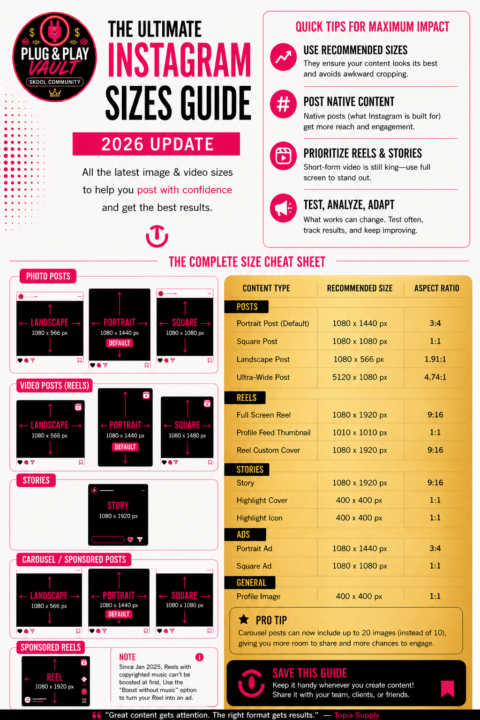
🚨 Instagram Has Changed… Are You Still Posting Using the Old Sizes? 👀
Meet the 2026 Instagram Sizes Guide. A refreshed guide with all sizing updates from last year up to now, including the long-awaited 3:4 posts that were finally released recently. Always handy to keep around so you don't have to search for the right sizes every time... am I right? This Sizes Guide helps you prepare, export, and post your content the right way, so it's seen in the quality it deserves. If you’re creating content in 2026, this is one guide you’ll want to save. Using the correct dimensions can make a huge difference to: ✅ Image quality ✅ Profile grid appearance ✅ Reach & engagement ✅ Reel performance ✅ Ad creatives Here’s the latest recommended Instagram sizes: 📌 Portrait Posts (Recommended): 1080 × 1440 (3:4) 📌 Square Posts: 1080 × 1080 📌 Landscape Posts: 1080 × 566 📌 Reels & Stories: 1080 × 1920 📌 Profile Picture: 400 × 400 💡 Pro Tip: Instagram is continuing to favour portrait (3:4) content, as it takes up more screen space in the feed and generally grabs more attention than square posts. If you’re creating content in Canva, I’d recommend updating your templates to 1080 × 1440 px for most static posts going forward. 👇 Questions for you…Have you already switched your content to 3:4, or are you still posting mostly in 1:1? Let’s chat in the comments! 💬 📌 Don’t forget to bookmark this post inside the community so you can come back to it whenever you’re creating content.
Jun 18 •
🚨 Instagram Just Dropped A Major Carousel Update! 🚨
You may soon be able to add different captions to each slide of your carousel posts. This could be a huge opportunity for: ✨ Faceless creators ✨ Quote pages ✨ Digital product sellers ✨ Affiliate marketers ✨ Community owners I’ve put together a quick breakdown of what it means and some ways you can use it to increase engagement. 👇 What do you think of this update? 👉 Would you use it on your content?

1-30 of 46
powered by

skool.com/plug-play-vault-3030
The Plug & Play Vault™ is your shortcut to passive income, digital freedom, and done-for-you success. Ready-Made Revenue in One Click
Suggested communities
Powered by