
Write something
Pinned

Aug 26 •
📸 Calling All Photo Booth Owners - LET’S BUILD OUR WHITE-LABEL NETWORK!
We’re bringing our Photo Booth Entrepreneur community together in one central place so we can connect, collaborate, refer business, and help each other cover events. The goal is simple: when you’re already booked, receive an inquiry outside your area, or need another trusted owner to cover an event, you don’t have to turn the opportunity away. Instead, you’ll have a network of Photo Booth owners you can confidently reach out to for white-label events, referrals, and overflow bookings. We want this community to make it easier for all of us to: 🤝 Connect with trusted Photo Booth owners 📍 Find owners in different cities and service areas 📸 See what experiences and equipment everyone offers 💼 Share white-label event opportunities 📣 Refer overflow bookings instead of losing them 👥 Find attendants or backup coverage when needed 🎓 Share resources, tips, and business support 🚀 Create more opportunities for everyone in the network PLEASE INTRODUCE YOURSELF BELOW 👇 Include: 📍 Business Name + Owner Name 📍 City/State 🚗 Service Area / How Far You’re Willing to Travel 📸 Photo Booth Experiences You Offer 🖨️ Printing and/or Digital Options 👥 Attendant Available: Yes or No 📅 Weekday + Weekend Availability 💰 White-Label Rate or “DM for Rates” 📲 Best Contact Method 🌐 Instagram / Website 📷 A Photo of Your Setup WHITE-LABEL EXPECTATIONS If you accept an event from another owner, remember that you are representing their company and their client. That means: ✅ Arrive on time and event-ready ✅ Maintain professional communication ✅ Wear appropriate event attire ✅ Bring clean, professional equipment ✅ Follow the provided branding and event instructions ✅ Do not promote your own business directly to the client unless approved ✅ Treat the client with the same level of service you would expect for your own event Our goal is to create a network of owners we can confidently send business to knowing the client will be well taken care of. There is enough opportunity for all of us.
Pinned
Jul 10 •
Welcome To Photo Booth Entrepreneurs Community (Free) [START HERE]
I'm excited you're here. Before jumping into the courses, take 2 minutes to read this welcome post so you know exactly how this community works and where to begin. Then complete these four steps: ✅ Introduce yourself in this post ✅ Vote in the "Where are you in your photo booth journey?" poll ✅ Visit the Start Here Classroom Course & Get Started ✅ Join us for our next Office Hours Our mission is simple: We don't just sell photo booths. We build entrepreneurs. Learn. Build. Grow. Happy to see you're ready to launch your new business to MOON! Photo Booth Entrepreneurs is here to help you launch and build a profitable Photo Booth business with the #1 team and system!😎 NEXT STEPS: Step 1: Download the Skool App on your mobile device (iOS App // Android App) 📲 Step 2: Set up your Profile - Add a profile picture - Welcome any new members 👋 - Make helpful posts - Share your wins in the & Wins tab 🏆 - Be active, join our weekly calls, and engage in the community! RULES: - No "Selling" in the DMs❌ - No Spamming in any of the tabs❌ - No Gatekeeping! (If something is working for you, share it!) ❌
Poll
9 members have voted
Aug 30 •
PHOTO BOOTH OWNERS: LOCK DOWN YOUR LUMABOOTH BEFORE YOUR NEXT EVENT
One small setting can turn into a BIG problem during a live event. In this training, I’m going over LumaBooth security settings and some of the common issues photo booth owners need to prepare for BEFORE guests arrive. A professional setup isn’t just about getting the booth turned on. You should be thinking about security, camera connections, power, internet, printing, sharing, and what your attendant should do if something goes wrong. The goal is simple: stop troubleshooting in front of your client whenever possible. I also created a downloadable LumaBooth Event Security & Troubleshooting Checklist for you. Save it to your phone, print it, or give a copy to your attendants. Inside the checklist I included: - Security PIN setup - Pre-event LumaBooth testing - Wi-Fi and sharing checks - Camera, power and printer checks - Quick troubleshooting steps - Attendant rules - A 10-minute final event test 📎 Download the checklist attached to this post. After you watch the video, comment below: What is the ONE problem you’re most worried about happening during an event? Camera? Printer? Wi-Fi? Software? Guests touching settings? Drop it below because I’ll use your answers for upcoming trainings. 👇
Aug 29 •
NEW TUTORIAL: LumaBooth Print Setup — 4x6 vs. 2x6 Photo Strips
NEW TUTORIAL: LumaBooth Print Setup — 4x6 vs. 2x6 Photo Strips If you’ve ever struggled with getting LumaBooth to print the correct size, cut your 2x6 strips properly, or wondered why your layout looks right on-screen but prints incorrectly — this tutorial is for you. In this video, I walk you through the LumaBooth setup step-by-step, including: ✅ How to set up your photo layout ✅ Understanding 4x6 vs. 2x6 print layouts ✅ How to configure your Print Setup ✅ Printer alignment and positioning ✅ Making sure your printer settings match your LumaBooth settings ✅ What to check when your photo strip isn't printing or cutting correctly ✅ Common settings that can easily cause printing problems 💡 IMPORTANT: Your design inside LumaBooth is only part of the setup. Your printer preferences also need to be configured correctly for your 2x6 or 4x6 output. I’m also including PDF notes with this lesson so you can save them, follow along with the video, and reference them when setting up your own booth. 📌 SAVE THIS POST. You’ll want to come back to it the next time you’re setting up a new printer, creating a new event, or troubleshooting your prints. 👇 QUESTION FOR THE GROUP: What LumaBooth tutorial should I make next? Camera setup? Printer troubleshooting? Creating overlays? Sharing settings? Full event setup from beginning to end? Drop it below so I can add it to the training library. 👇 #PhotoBoothEntrepreneur #LumaBooth #PhotoBoothTraining #PhotoBoothBusiness #PhotoBoothTips
Jun 27 •
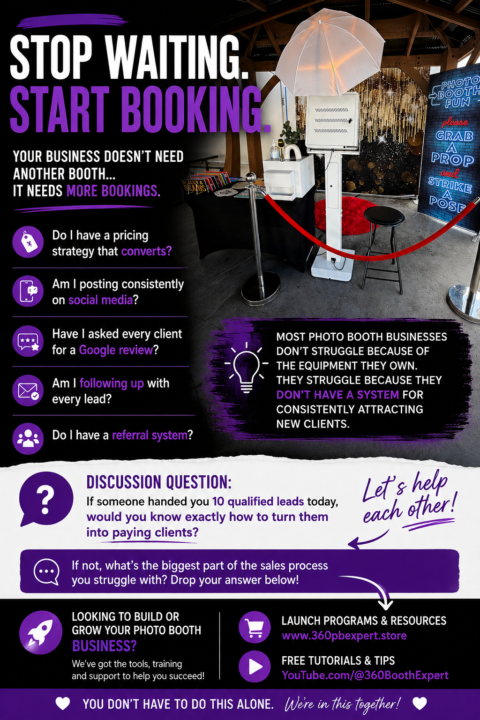
Stop Waiting. Start Booking.
One of the biggest mistakes I see new photo booth owners make is thinking they need more equipment before they can grow. The truth? Your business usually doesn’t need another booth… It needs more bookings. Before you spend another dollar on gear, ask yourself: ✅ Do I have a pricing strategy that converts? ✅ Am I posting consistently on social media? ✅ Have I asked every client for a Google review? ✅ Am I following up with every lead? ✅ Do I have a referral system? Most photo booth businesses don’t struggle because of the equipment they own. They struggle because they don’t have a system for consistently attracting new clients. 💬 Discussion Question: If someone handed you 10 qualified leads today, would you know exactly how to turn them into paying clients? If not, what’s the biggest part of the sales process you struggle with? Drop your answer below, and I’ll personally help you work through it. 👇 🎓 Looking to build or grow your photo booth business? 📚 Browse our Launch Programs & business resources:https://www.360pbexpert.store 🎥 Free tutorials:https://www.youtube.com/@360BoothExpert
1-9 of 9
powered by
skool.com/photo-booth-entrepreneurship-4876
Everything you need to start, launch, and grow a profitable photo booth business—all in one community.
Suggested communities
Powered by