
🔥
13d •
How I'm organizing my Google Drive before I hand it to an AI agent
Most of us have a Google Drive that looks like a junk drawer. Files everywhere. Old versions. Stuff you meant to sort "later." I know, because mine looked exactly like that. I'm Sybil Hall, founder of Income Without Burnout, and after years of running multiple income streams (Amazon publishing, real estate, Skool communities) through Claude and other AI tools, I've learned the hard way that messy systems make for messy AI output. This week I've been doing something that feels almost boring but is actually one of the most important things I've done for my business this year. I'm organizing my Google Drive folder by folder, file by file, before I ever ask Claude to touch it. FYI - this is my new Focused 12 goal in place of creating a new KDP product. (If you're new here, Focused 12 is the 12-week execution system I use to pick one priority and build it in public with this community, instead of spreading myself across ten ideas at once.) Here's why that matters: AI works with what you give it. If your system is chaotic, the output will be too. Garbage in, garbage out. So before I build any agents, I'm building the system I want those agents to use. Here's what I did: 1. Created one master folder in Google Drive. Everything lives in the Master Folder 2026. One place. That's it. 2. Numbered subfolders by income priority. Not alphabetical. Not random. In the order of what will move the needle most for me right now. I landed on 9 numbered subfolders, one per income stream and major project. 3. Moved loose files off my drive root. If it's just "sitting in my drive," it doesn't exist in my system. I pulled over 60 loose files out of root and gave every one of them a home. 4. Added the year to file names. Simple habit. Huge payoff when you're looking for something in six months. 5. Put my Focused 12 tracker right at the top. This is the first thing I open. Eventually, it'll be the first thing my Claude agent opens too.

🔥
12d •
🤖 How are you using AI to grow, scale, and automate your business?
Here are some of the ways I’m using it right now: ✨ Image generation ✨ Organization and project planning ✨ Amazon analysis ✨ Webpage makeovers ✨ Writing posts and content ✨ Building interactive artifacts and tools for my communities ✨ Building AI agents to start taking over repeatable jobs in my business Every week I discover another way AI can help me create, teach, or simplify my work. I’m using it less as a chatbot and more as a teammate each day. What are you using AI for in your business? I’d love to hear what’s working for you👇

🔥
Jun 11 •
GoFullPage Chrome Extension
I'm using the free Chrome extension GoFullPage all the time right now. What does it do? It automatically scrolls through an entire webpage and captures the entire page as a PDF. Why is that helpful? Because instead of copying and pasting pieces of a website into Claude, I can give Claude the entire page with all of the context. I've used it to give Claude/ChatGPT, etc., context from: ✅ Kiva loan pages ✅ Amazon listings ✅ Sales pages ✅ Competitor websites ✅ Skool classrooms ✅ Resource libraries For example, I just used it to capture my Kiva loan page. Claude could then see the entire page, including the headline, images, story, loan details, FAQs, and supporting information, all at once. Instead of explaining my business from scratch, I could simply upload the PDF and start asking better questions. That means Claude already understands: • What my business does • Who I serve • My products and offers • My story and background • The language and tone I use • The goals of the page The result? Claude spends less time trying to understand the context and more time helping me create, analyze, brainstorm, and write. The quality of Claude's feedback is only as good as the context you provide. Giving it the entire page instead of a few paragraphs often leads to dramatically better results. You can download GoFullPage here and start using it today: https://chromewebstore.google.com/detail/gofullpage-full-page-scre/fdpohaocaechififmbbbbbknoalclacl 👇 Have you used this extension before? If not, what website would you analyze first with Claude?
🔥
Jun 2 •
☀️ REPLAY IS UP: Conversion Without Convincing
Wow. That was such a fun and powerful session with Katya today. ☀️ Katya took us through two member offers live and honestly… made magic with them. Watching ideas become clearer, more experiential, and more exciting in real time was so inspiring. Thank you to everyone who joined us live today. ☀️ @Lidia Axe @Mk Duma @Kathy Hyland @Angie Turgeon-Ladeau @Claire Morgan @Berglind Davis @Jing Wang Special shoutout to Claire and MK, who got coached live during the session! Next step, implementation. If you want to create your Mini Project Idea, afterward join Oracle Connections and head into the Finishers Club to post your mini project idea(s). And yes… even those of you watching the replay can still participate in the fun, feedback, and prize drawings too. ☀️ Here are the links you will need as you follow along with the workshop. Dashboard and Mini-Project Ideas Architect: https://mpmocm.netlify.app/ One thing I keep thinking about after today is this: People do not just want information anymore. They want experiences. They want a connection. They want transformation. And today’s workshop was such a beautiful example of that. Now go watch the replay and tell us below: What mini-project idea are you thinking of creating? 👀

🔥
May 31 •
🎧 Tech Tip: Listen to Your Writing Out Loud
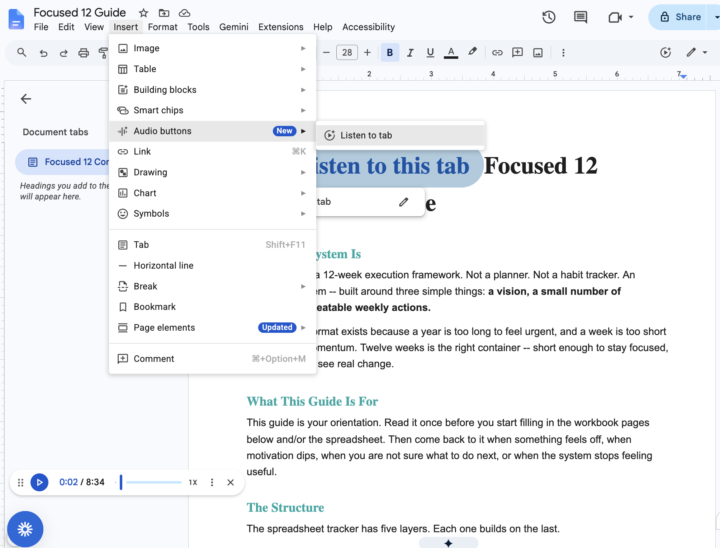
One of the most powerful editing strategies I use is listening to my writing rather than rereading it with my eyes. When you hear your words read aloud, your brain processes them differently. You notice: ☀️ awkward phrasing ☀️ sentences that are too long ☀️ repetitive words ☀️ missing transitions ☀️ places where your energy drops ☀️ spots that sound robotic instead of human There is actually science behind this. When we silently reread our own writing, our brains often “fill in the gaps” because we already know what we meant to say. We skip over errors and missing clarity because our brains predict the meaning. But hearing the words activates auditory processing differently. It slows you down enough to catch friction points and helps your brain notice rhythm, clarity, and emotional tone. This is especially helpful if you: ☀️ write with AI ☀️ create content quickly ☀️ struggle with overexplaining ☀️ want your writing to sound more human and natural ☀️ are editing sales pages, emails, posts, or scripts Here’s my simple workflow: 1 Work in Claude or the AI of your choice 2. Copy the text into a fresh Google Doc 3. Navigate to Insert 4. Select Audio Buttons 5. Click “Listen to this tab” 6. Pause the reading anytime you want to edit 7. Repeat until the writing sounds like you The goal is not perfect writing. The goal is writing that feels clear, natural, warm, and easy to follow. Your ears catch what your eyes miss.
1-21 of 21
powered by

skool.com/multiple-streams-of-income-4358
Build sustainable income streams with best-selling author Sybil Hall. Real businesses, real progress, a community growing together 12 weeks at a time.
Suggested communities
Powered by