

5d •
Restream, StreamYard, and EVMUX Features + Ecamm Tutorial
During the Inner Circle Session yesterday at 11am we went over the latest functions and features of several streaming Platforms. I recorded it and decided to make just that portion available to the entire community. That video is shared below. ____________________ We had a blast During Coaching Corner yesterday on YouTube as well - https://youtube.com/live/PelLqH1Hsds Welcome to our newest member @Tiffany M Ruffner who joined during the live show and then connected to Zoom immediately and participated! Action takers are Money Makers! Let's welcome her to the Family! Below are the AI Generated Next Steps from the Session: @Steve Factor: Record the first video in Ecamm using the new scenes setup, including intro, video playback with voiceover, and outro; ensure to mute the video audio and record voiceover as instructed. For future videos, replace the video asset in Ecamm with the next video file (e.g., for meatloaf or other recipes) and repeat the recording process. Share his recorded video or update in the next meeting/session for group feedback. @Dr. Vibe: Kirk encouraged Dr. Vibe to use his own name for future content creation, emphasizing the flexibility and versatility of personal branding. They also discussed the importance of building in public and prioritizing replay value for content, with Kirk suggesting a live format that can be cleaned up and repurposed later. @Florence Donald: Test and practice the workflow for bringing a guest's Zoom screen share into Ecamm production, including using the "add" function in Ecamm for Zoom window, and review the relevant portion of the replay for details. Provide Kirk with all necessary information (event details, graphics, links) for the upcoming March 3rd Ecamm deep-dive event, and ensure the event is added to the community calendar and promoted with the correct links.

Oct '25 •
Coaching Corner 10/29/25 (REPLAY ADDED)
Join us for Q&A and to engage with the broader community. Zoom Link is below. Today we have a treat where we'll go over some features in Suno. Suno is an AI Powered Music creation platform that enables creators to have music in their content without getting a copyright strike. Definitely a useful tool for us all to see. Replay NOW Available

19d •
1/21 Coaching Corner Replay
1/21 Inner Circle Master Class Session - How to setup a Skool Community Every week we have our Inner Circle Sessions on Wednesdays at 11am CST. Today we had our Master Class Session on how to setup Skool. For those members at the premium level please access the replay in the Classroom here - https://www.skool.com/kirkrnugent/classroom/a7475aba?md=8a73263c5e6c41d69aaf7c85d3019087 ___________________________ 1/21 Coaching Corner AI Generated Notes Available here - https://docs.zoom.us/doc/m57WrhHDQOSvJN8sXGk26w?from=doc_share&skipCheck=1 For all members marks you Calendars for our Coaching Corner / Group Coaching Call which is every other Wednesday at 1pm CST. Check the Calendar Tab for the Zoom Link. It won't always be available on YouTube like it was this time. Next Steps from our Session: - Dr. Vibe™: Set up discovery calls with interested members (7-10 people) to discuss their needs and pain points for the new community - Dr. Vibe™: Set up new community on Skool platform starting with $9/month hobby plan - Dr. Vibe™: Create founder membership tier at $10/month to cover initial platform costs - Kirk: Post information about February summit in the community about a week before the event - Florence Donald: Create and share discount code for February summit with Kirk for How It All Works community members - Dr. Bishara: Post in the community about experiences with Notebook LM - Monte: Create video comparing PTZ cameras vs mirrorless cameras, including pros/cons and use cases - Monte: Continue developing YouTube Shorts content and expand to Instagram I've added the Replay here as well.
23d •
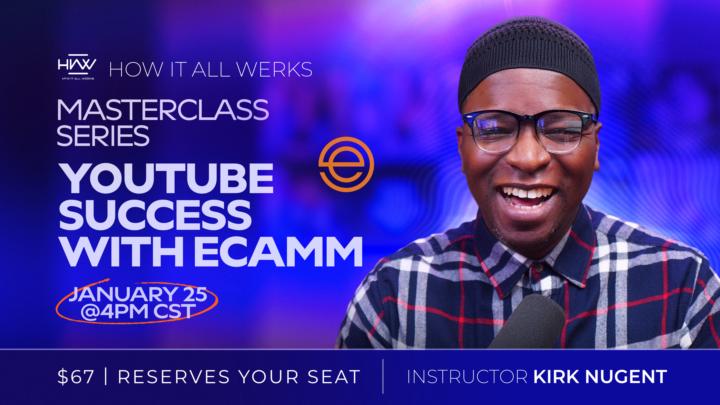
YouTube Success with Ecamm Live Pro (REPLAY ADDED)
This month, Kirk Nugent tackles YouTube Success with Ecamm Live Pro: One-take Video Production (create dynamic YouTube videos with no Editing), Live Video management and Best Practices, Repurpose Strategy to accelerate YouTube growth, Leverage Multi-Destination Live Content to expand reach the right way, and a deep-dive on Ecamm functions and features. Replay is now Available at the link below for all PREMIUM members. https://www.skool.com/kirkrnugent/classroom/42b388ab?md=3887e984442743d790435dd3c7b47a33 Special Thanks to @David Hunte @Florence Donald and @Steve Factor for showing up the Live Class.
3
0
28d •
1/7 Coaching Corner and Inner Circle QA [REPLAY]
1/7 Inner Circle Q&A Session Every week we have our Inner Circle Sessions on Wednesdays at 11am CST. This past Wednesday we had our Q&A Session which was rich. For those members at the premium level please access the replay in the Classroom here - https://www.skool.com/kirkrnugent/classroom/a7475aba?md=c3f5f254724b4cda9ba63e0905c6d97a ___________________________ 1/7 Coaching Corner AI Generated Notes Available here - https://docs.zoom.us/doc/3oe24S9pSryMCsjwUtJOIw?from=doc_share&skipCheck=1 For all members marks you Calendars for our Coaching Corner / Group Coaching Call which is every other Wednesday at 1pm CST. Check the Calendar Tab for the Zoom Link. It won't always be available on YouTube like it was this time. Next Steps from our Session: - Rodney: Record practice videos in StreamYard (not live) and post them to get reps before going live; review the "How to Establish Yourself as an Expert with Content" series in the community classroom - Katisha: Develop and refine a clear brand statement using the template Kirk will post in the community, and fill in the blanks as instructed. - Kirk: Post a template for a brand statement in the community for Katisha (and others) to fill out. - Tracy: Send Kirk a DM to schedule an interview date. - Kirk: Respond to Darren's question about "drag" with virtual desktop camera and Fifine microphone in StreamYard via message offline. - Kirk: Post information about the upcoming digital footprint program graduation (scheduled for January 27th) in the community. - Kirk: Post in the community a series of videos called "How to Establish Yourself as an Expert with Content" for Rodney and others to access - https://www.skool.com/kirkrnugent/classroom/18657c1c?md=d0f5e904fe0b4a6ba2242808a38d99f9
1-17 of 17
Leaderboard (30-day)
1
+47
2
+37
3
+34
4
+22
5

+18
Powered by