
Write something

Oct '25 •
🔦 Lumen Database: Archive of Content Removed by Search Engines
Have you ever tried searching something on Google but got hit with one of these? “In response to a complaint that we received under the (US) DMCA, we have removed 1 result(s) from this page. If you wish, you may read the DMCA complaint that caused the removal(s) at LumenDatabase.org.” This is actually great! One of my favourite tools to find hidden gems online is the Lumen Database. Here’s why: It’s a public archive of takedown and removal requests. The kind companies and individuals send to Google or platforms when they want something deleted from search results. By searching it, you can uncover traces of content that used to exist: old URLs, filenames, emails, usernames or real names that often reveal earlier identities or hidden connections. Combine what you find there with archive searches (like web.archive.org), and you can often reconstruct pages or profiles long after they disappeared. “The Lumen database collects and analyzes legal complaints and requests for removal of online materials, helping Internet users to know their rights and understand the law. These data enable us to study the prevalence of legal threats and let Internet users see the source of content removals.” https://lumendatabase.org/
Feb 28 •
2026 is a bad year to have a weak password: Data breaches on the rise
Phishing still works. And automation and AI are making it easier and more scalable for hackers to use stolen data for fraud. The real risk after a breach? Credential stuffing. Attackers take your leaked password and automatically try it on your bank, your email, your Amazon, your Apple ID. Automated, at scale, within hours. I built a free toolkit with a step-by-step approach to make this nearly impossible: → Check if your data was leaked (via HaveIBeenPwned, IntelX and IntelBase) → Fix your password management — the 4 pillars → Secure your accounts in the right order (banking first) → Set up alerts and plus-addressing to trace future leaks instantly This toolkit was written for the Odido / T-Mobile NL breach, but the steps apply to any data breach. This is exactly what OPSEC is about — and why we have a full free course on it in this community. If you haven't started OPSEC 101 yet, this is your wake-up call. One reused password can be all it takes. Start today. 🔗 https://www.cultrodistro.com/blog/odido-data-breach-toolkit
1
0
Feb 23 •
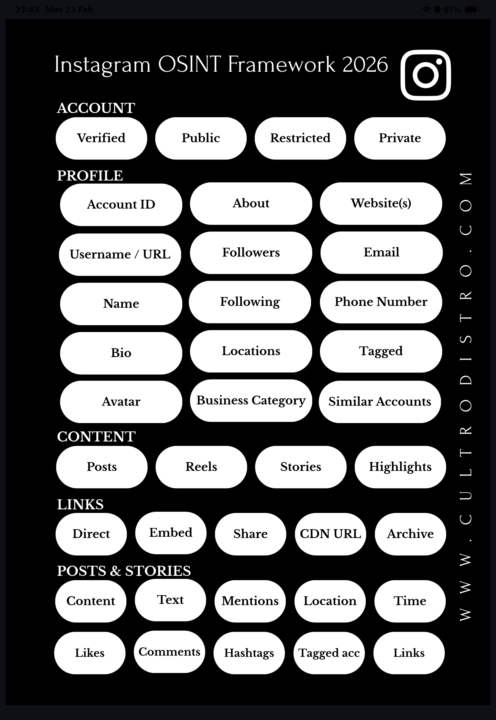
The Instagram OSINT Framework 2026 - An Exclusive Comprehensive Cheat Sheet
📌 INSTAGRAM OSINT FRAMEWORK 2026 In due diligence and compliance investigations, social media is often overlooked as an intelligence source. Instagram alone can reveal significant information about a subject, if you know where to look. This framework covers every layer. 🔗 All tools & resources referenced in this framework can be found at: • https://www.cultrodistro.com • https://www.cultrodistro.com/tools/socials • https://www.cultrodistro.com/tools/images 🔷 ACCOUNT TYPES • Public – fully accessible, crawlable with online tools • Restricted – public but hidden from some users due to content; still crawlable • Private – only username, bio & profile picture visible • Verified – public + Instagram-confirmed identity, usually business accounts 🔷 PROFILE • Account ID – assigned at creation, never changes, findable via crawlers or F12 > search “account ID” • Bio & name – often contains location hints, hobbies, personal clues • About section – shows account creation date and previous usernames • Avatar – can be enlarged and extracted for analysis • Followers/following – reveals interests and network connections • Location tags – verifiable via reverse image search or geolocation • Business profiles – expose category, website, email, phone number • Tagged posts & suggested accounts – additional context 🔷 CONTENT • Posts & Reels – permanent/semi-permanent visual content • Stories – disappear after 24h unless saved as Highlights • Highlights – thematically organized, often revealing 🔷 LINKS • Direct links – go straight to content • Embedded links – shareable on other platforms • Share links – ⚠️ contain metadata exposing your identity; avoid professionally • CDN URLs – bypass Instagram’s interface, ideal for archiving via archive.org 🔷 POSTS & STORIES • Reverse image search visuals • Analyze text for writing style, cultural clues, education level
Jan 29 •
🦞 Clawdbot → Moltbot: the AI agent that took the AI space by storm this week
Moltbot (formerly Clawdbot) exploded almost overnight. This open-source AI agent promises full autonomy: managing email, calendars, files, APIs, and even running shell commands, often controlled through WhatsApp or Telegram. Tens of thousands of GitHub stars later, it’s being pitched as the next leap in “hands-off productivity.” But here’s the short, uncomfortable reality 👇 This isn’t just a Moltbot problem. It’s an agentic AI problem. - Every input becomes an attack vector.Emails, calendar invites, documents, chats—anything the agent can read is effectively a prompt. You don’t need access to the agent to influence its behavior. - Real access, minimal guardrails.File read/write, command execution, API tokens, posting privileges. One malicious or injected task can lead to data exfiltration, account abuse, or worse. - Attribution breaks completely.If something goes wrong, was it you, the agent, a bug, or a poisoned skill? From a legal, compliance, or incident-response standpoint, that’s a mess. - Costs can spiral silently. One bad loop = millions of tokens burned. Agentic systems don’t have natural spending ceilings unless you enforce them. - Open source ≠ safe by default.Most deployments lack isolation, audits, monitoring, or proper OPSEC. Production-level access operated with hobby-level security. Bottom line: AI agents aren’t assistants yet. They’re junior operators with broad access and zero common sense. Until we have proper sandboxing, per-action authorization, hard spend caps, and verifiable audit trails, running tools like this on personal or business systems is closer to live-fire testing than productivity. So where do you draw the line? Read-only agents? Local-only? Or full autonomy?
5
0

Jan 18 •
👻 Hidden Tools: What is your favourite?
What’s your favorite OSINT tool that not many people think about? I’ll go first. 📱 Snapchat Here’s a recent simple but effective example: In my first case of 2026 as an OSINT detective, I investigated a suspected infidelity case. I was provided with the phone number of the alleged cheater. I saved the number in my phone contacts. Not long after, I received a notification: “Someone from your contacts is on Snapchat.” That account turned out to be a hidden Snapchat profile, unknown to the spouse who hired me. The profile was linked to the phone number and became a key data point in my investigation. From there, I used other OSINT tools to anonymously view and archive the profile and its content, so it could be properly documented and included as evidence in my report. Last week, they broke up 🥀. Why this works, even for adults: - Many people created Snapchat accounts years ago - Phone numbers often remain linked long after active use stops - “I don’t use Snapchat” ≠ “I don’t have Snapchat” No messages sent. No interaction. No alert to the other party. 📌 OSINT lesson: Platforms remember longer than people do. Understanding how everyday apps sync contacts and combining that with proper archiving and documentation—is often what turns a signal into evidence. Now your turn 👇 What’s an OSINT tool or platform you use that doesn’t get talked about enough?

1-14 of 14
powered by

skool.com/huisvestnl-3698
Get started in OSINT and learn how to find out about anything and anyone online, professionally.
Suggested communities
Powered by