
Write something

9d •
The Beginner's Guide to using AI in Excel
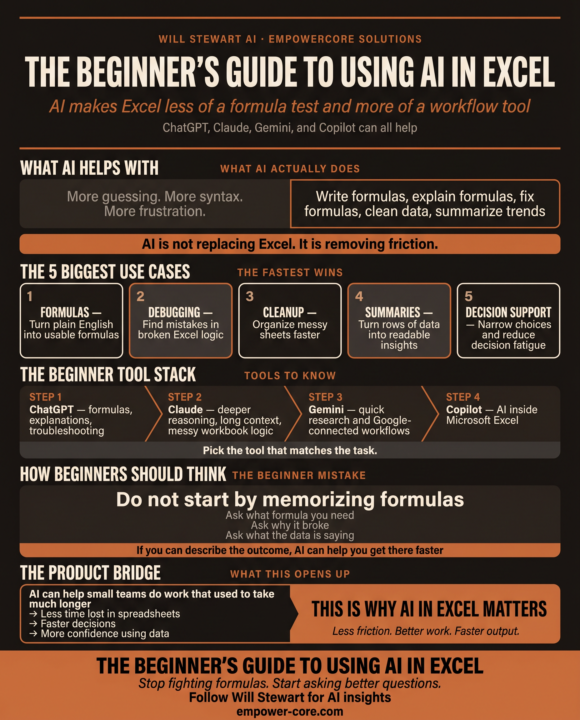
In case you missed my LinkedIn post yesterday: In my 20’s I was a legit Microsoft Excel Wizard. I could write a complex formula in minutes. Today, I’m half the Wizard I used to be since I don’t use excel as much. I find myself struggling to put together a formula like I used to. Can you relate? You’re staring at a sheet, trying to remember: • the right function • the right syntax • the right order of operations • the right way to not break the whole workbook. AI makes that a lot easier. Here’s what AI actually helps with in Excel or Google Sheets: • Writing formulas from plain English. • Explaining formulas in simple language. • Debugging broken logic. • Cleaning messy data. • Summarizing trends and patterns. • Helping you decide what to do when a sheet gets complicated. That’s why tools like ChatGPT , Claude , Gemini , and Microsoft Copilot are showing up in Excel workflows in 2026. They’re not replacing Excel… they’re making it easier to use. The beginner mistake: People wait until they already know the formula. That’s backwards. The better move is to ask AI: • What formula should I use? • Why is this formula broken? • How do I clean this sheet? • What does this data suggest? • How should I structure this report? If you can describe the outcome, AI can usually help you get there faster. The simple tool stack: ChatGPT — best for formulas, explanations, and quick troubleshooting. Claude — better for deeper reasoning, long context, and messy workbook logic. Gemini — useful for quick help and Google-connected workflows. Copilot in Excel — best when you want AI directly inside Microsoft’s spreadsheet environment. What beginners should focus on first: 1. Writing formulas with AI. 2. Fixing formulas with AI. 3. Cleaning data with AI.
0
0
1-2 of 2
powered by

skool.com/empowercore-ai-lab-2521
AI should make you money AND save you time. If it's not doing both, the problem is your system, not the tool. No hype. Just systems.
Suggested communities
Powered by