Activity
Mon
Wed
Fri
Sun
Aug
Sep
Oct
Nov
Dec
Jan
Feb
Mar
Apr
May
Jun
What is this?
Less
More
Owned by Will
AI should make you money AND save you time. If it's not doing both, the problem is your system, not the tool. No hype. Just systems.
Memberships
Skoolers
168.4k members • Free
Artemo User Group
20 members • Free
Personal Brand Intensive
169 members • Free
12 contributions to EmpowerCore AI Lab

2d •
How evaluate if a business is ready for AI
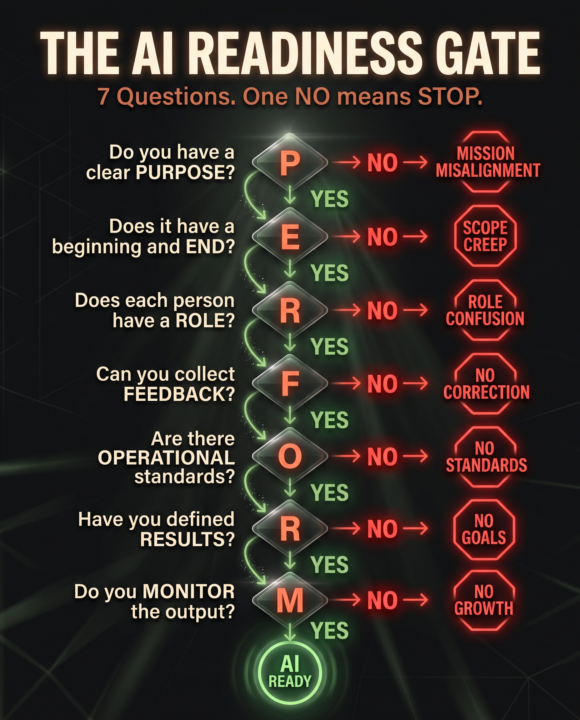
I almost made a very expensive mistake last year. A client asked me to help them automate their intake process. They had the budget. They had the tools. They were ready to go. I said no. Not yet. Because when I looked at their intake process, there was no process. There were five people doing five different versions of the same thing, no documentation, no feedback loop, and nobody could tell me what "done" looked like. If I had plugged AI into that system, I would have made the chaos faster. That experience turned into something I now use with every client before we touch a single AI tool. I call it P.E.R.F.O.R.M., and it works like a gate. Seven questions, yes or no. One "no" anywhere and we stop. P - Do you have a clear PURPOSE for this system? E - Does it have a defined beginning and END? R - Does every person and tool have a clear ROLE? F - Do you have a way to collect FEEDBACK? O - Are there written OPERATIONAL standards? R - Have you defined the RESULTS you want? M - Do you MONITOR the output? Every "no" has a specific consequence. No purpose means mission misalignment. No endpoints means scope creep. No roles means people doing work that shouldn't be theirs. No feedback means a closed loop with no correction. No standards means everyone guessing. No results means activity for the sake of busyness. No monitoring means no growth is possible. One "no" anywhere in that chain and AI becomes an accelerant on a fire you haven't found yet. This Thursday at noon ET, I'm running this diagnostic live. I'll trace a real business system on screen, show you where the owner is trapped doing work AI should handle, and walk you through how to run P.E.R.F.O.R.M. on your own business. 45 minutes that change how you see your operations before you automate them. Register free here: https://us02web.zoom.us/webinar/register/WN_yzhHXkrSQMCKilLH9JytAQ See you Thursday. Will
0
0
4d •
The Beginner's Guide to using AI in Excel
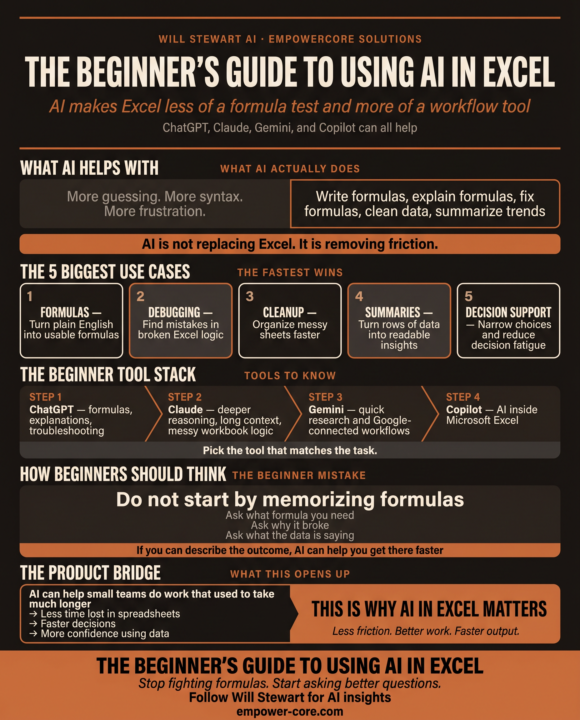
In case you missed my LinkedIn post yesterday: In my 20’s I was a legit Microsoft Excel Wizard. I could write a complex formula in minutes. Today, I’m half the Wizard I used to be since I don’t use excel as much. I find myself struggling to put together a formula like I used to. Can you relate? You’re staring at a sheet, trying to remember: • the right function • the right syntax • the right order of operations • the right way to not break the whole workbook. AI makes that a lot easier. Here’s what AI actually helps with in Excel or Google Sheets: • Writing formulas from plain English. • Explaining formulas in simple language. • Debugging broken logic. • Cleaning messy data. • Summarizing trends and patterns. • Helping you decide what to do when a sheet gets complicated. That’s why tools like ChatGPT , Claude , Gemini , and Microsoft Copilot are showing up in Excel workflows in 2026. They’re not replacing Excel… they’re making it easier to use. The beginner mistake: People wait until they already know the formula. That’s backwards. The better move is to ask AI: • What formula should I use? • Why is this formula broken? • How do I clean this sheet? • What does this data suggest? • How should I structure this report? If you can describe the outcome, AI can usually help you get there faster. The simple tool stack: ChatGPT — best for formulas, explanations, and quick troubleshooting. Claude — better for deeper reasoning, long context, and messy workbook logic. Gemini — useful for quick help and Google-connected workflows. Copilot in Excel — best when you want AI directly inside Microsoft’s spreadsheet environment. What beginners should focus on first: 1. Writing formulas with AI. 2. Fixing formulas with AI. 3. Cleaning data with AI.
0
0
8d •
The Claude Power Ladder
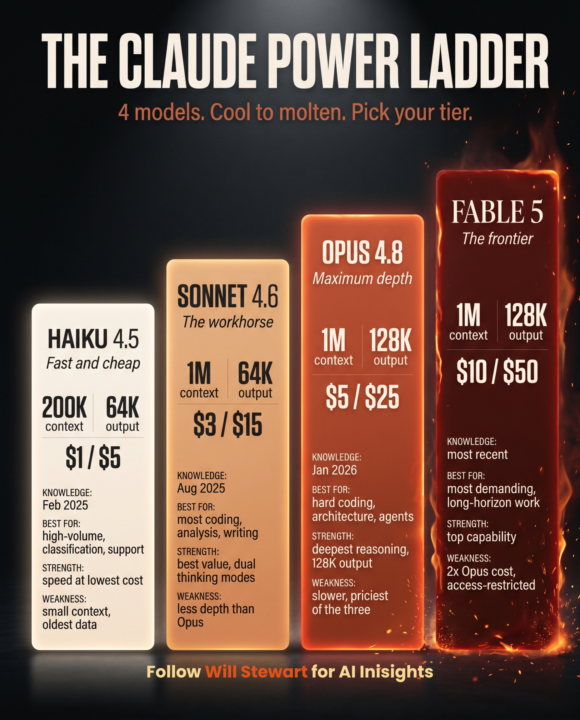
I've spent over a year building with Claude. Creating things, tearing them down, building them again a little better each time. And I still catch myself making one dumb move. When I'm slammed, I don't drop down to a lighter model for the easy work. I just stay on the heavy one, because it's already open and I'm moving fast. Multiply that across a busy month and my spend crept up. It wasn't a crisis. When I reach for Opus on the hard stuff, I get every dollar back. But I was paying flagship prices for work that never needed flagship power. Then there's Fable 5. I had access for three days before it went unavailable. In those three days it did things I didn't think were on the table yet. The ceiling is real. But here's what all of it taught me. Using Claude well is like using a set of knives. You grab a chef's knife for one job. A paring knife for another. A butter knife for another. You don't reach for a butcher's knife to cut butter. It works. Of course it works. But it's overkill, and you knew that before you picked it up. You also wouldn't cut raw meat with a butter knife. You could force it. It's just not a smart move. Not everything needs to be new. Some things just need to be gently warmed. The next level of using AI is not learning more features. It's learning when to throttle the power up, and when to throttle it back down. Real example from my own work. The multi-agent CRM I built (drafts emails, runs prospecting, follows up on leads, several agents working at once) needs real power. Haiku would choke on it. Sonnet handles it well. Fable 5 would be the perfect fit, the day I get my access back. But a quick summary or a tidy-up task? That's a butter knife job. Running it on the flagship is cutting butter with a cleaver. Refining your use cases, task by task, is how you get better at this. It's also how a business stops overpaying and starts maximizing what it spends on AI
0
0
12d •
The Beginner’s Guide to AI for Small Business
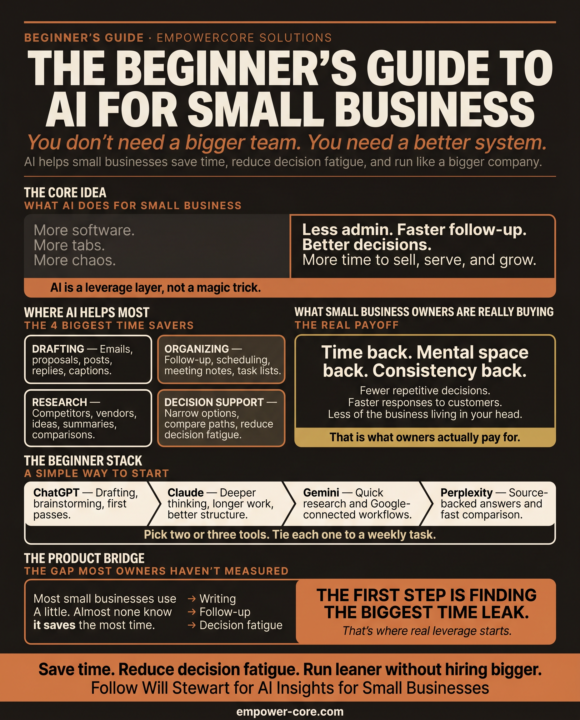
This week I fixed“AI agents” in a business because the fake AI guru was ghosting them. He charged $2500 to implement “speed-to-lead” agents and a phone answering AI agent. The problem was that the AI agent wasn’t qualifying the leads. Calls were being booked but most of the leads were not going to be good customers. Then the AI phone system was quoting wrong prices and information. The owner was ready to pull his hair out. I uncoupled all the systems immediately and diagnosed the issue with the business and not the AI. This business didn’t need “speed to lead” or a phone system. It needed an automated invoice and follow up system and an AI agent that categorizes emails, drafts responses and waits for human approval. It immediately gave the owner 15 hours back. His problem wasn’t more leads. It was completing tasks that he hated and avoided until they became emergencies. But he got sold a prescription before any diagnosis by a fast talking “techy” bro. Most owners aren’t stuck because they lack drive. They’re stuck because the day gets eaten before the real work starts. Too many decisions. Too much admin. Too many small tasks that pile up and wear you down. That is exactly where AI earns its keep. Not “AI transformation.” Nobody selling you that word has run your business. The real win is simpler: Time back. Mental space back. Consistency you stop having to force. AI handles the boring work in the background. First drafts of your emails and proposals. Follow-up that actually happens. Meeting notes summarized while you move on. The hundred tiny decisions that drain you, cut down to a few. You stop running the business out of your head. The question was never whether AI is useful. It is where it can save you the most time first. Get that one answer right and the rest gets easy. That is what my “Beginner’s Guide to AI for Small Business” is built to do. No jargon. No hype. Just the first moves that hand you your time back. Want to use AI at your business but don’t know where?
0
0
13d •
Happy Friday! Systems, AI and Happiness
Hey all! I hope this has been a good week for everyone. WE have 3 new members! Very excited. I realize that Skool is not a native platform for a lot of you, so thanks for joining it. I hate to add another page in your social media book. This week was interesting. Lots of AI, obviously. Lots of realizations. One realization that I had last night was that AI can definitely increase your productivity, without a doubt. But with that increased productivity comes more decisions. While you're getting more done, you're also draining your mental reserves, and that's something that I'm trying to get away from. Having a good system in place really does that, and I'm realizing more and more that good systems take time to set up, they're really in the back end, but what they do is they compound interest. So when you're in the front end, you're really seeing less time having to be spent on decisions, less mistakes being made, less time being wasted. The key is that if you think you've set up a system and you're not making the money that you should be, you're not saving the time, or you're still mentally exhausted at the end of the day. That's going to point right back to your system. I'm happy to discuss that with anyone, but that's been my realization this week. It's a tough pill to swallow, but once you fix it, that's where the magic really happens. How did your week go? Any AI focused insights you want to share?
0
0
1-10 of 12

@will-stewart-7317
I help companies setup smart AI systems so they can have more time and make more money. Dad to twins boys who are my life. Star Trek Nerd.
Active 1m ago
Joined Jun 8, 2026