Activity
Mon
Wed
Fri
Sun
Jul
Aug
Sep
Oct
Nov
Dec
Jan
Feb
Mar
Apr
May
Jun
What is this?
Less
More
Memberships
AI Automation Club
579 members • Free
DIGITAL EMPIRE
112 members • $39
56 contributions to DIGITAL EMPIRE

May 20 •
The output feels off but you cannot say why
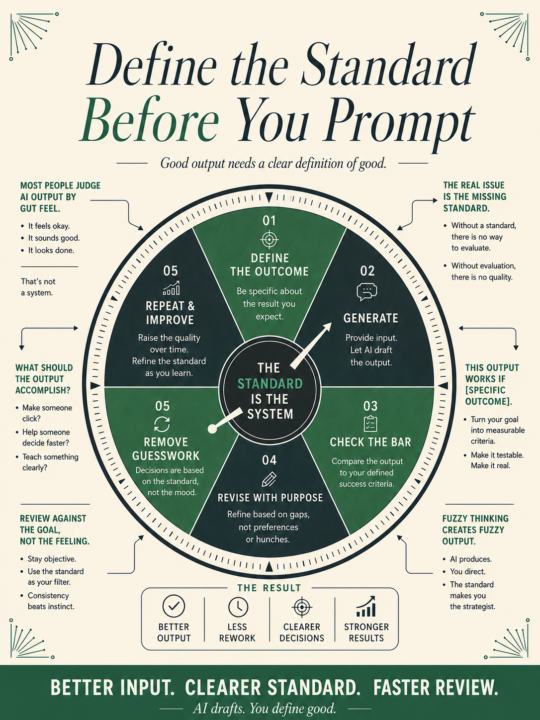
You judge AI output by gut feelings Sounds a bit off. Too generic. Could be better. But ask "better how?" And nothing specific comes out. That is the real problem. Not the model. Not the prompt. The missing standard. Before you generate anything, write down what the output needs to do. Not what it should contain. What it needs to accomplish. Is it supposed to make someone click? Get a response? Replace a call? Help someone decide faster? Move someone from skeptical to interested? If you cannot answer that before you prompt, the review after is just guessing. You end up revising in circles because the target keeps moving with each read. Here is the fix. One sentence, written before you open the tool: "This output works if [specific outcome]." Fill that in. Then generate. Then check whether the output clears that bar. It takes thirty seconds. It changes everything about how you review the draft, because now you are checking against something concrete instead of a feeling. You will also notice something useful: sometimes you cannot fill in the sentence. The job is still fuzzy. That fuzziness would have ended up in the output, buried under polished sentences that sound confident but go nowhere. Writing the success criteria first forces the thinking that should have happened before the tool opened. Better input, clearer standard, faster review. That is the whole loop. AI handles the drafting. You handle the definition of good.

0 likes • 4d
Très cool
30d •
Your AI research takes longer than it should. The query is the problem.
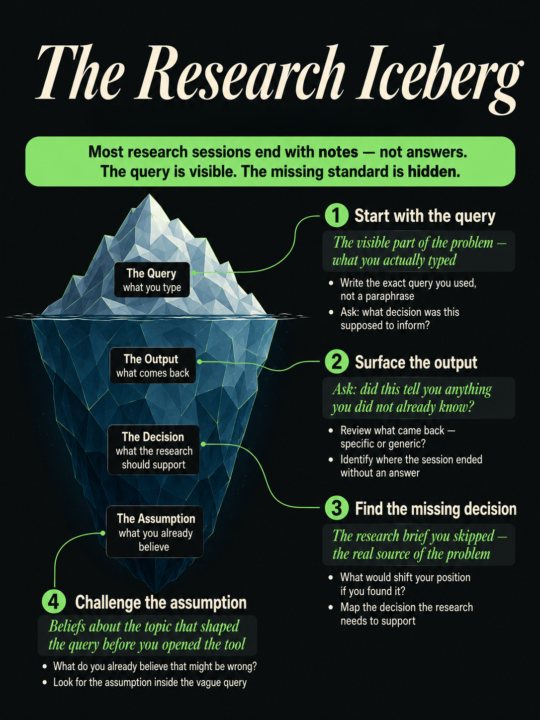
The tool is fast. Most people open the research tool the same way they open a search engine. Type a topic. See what comes back. Scroll until something looks useful. That habit made sense for browsing. For research with a decision at the end, it wastes time. Vague queries return summaries of things you already know. You get a confident paragraph that confirms the obvious, with no real signal about what you were actually trying to find out. The session ends. You have notes. You still do not have an answer. The issue is that the model cannot read your intent. It only works with what you give it. And "latest trends in B2B sales" tells it almost nothing about what you need. Before you open any research tool, write three things down: - What decision does this research need to support? - What would shift your position if you found it? - What do you already believe that might be wrong? That takes two minutes. It also changes the query completely. Suddenly you are asking the model to find evidence that challenges a specific assumption, or to surface data that would justify a specific move. The model has a job now. A real one. The output gets more specific. The session gets shorter. You end with something you can act on. The research was always one clarifying question away. Most people skip writing it down.
0 likes • 4d
Instructif
23d •
Here's how to fix your calendar in 1 week.
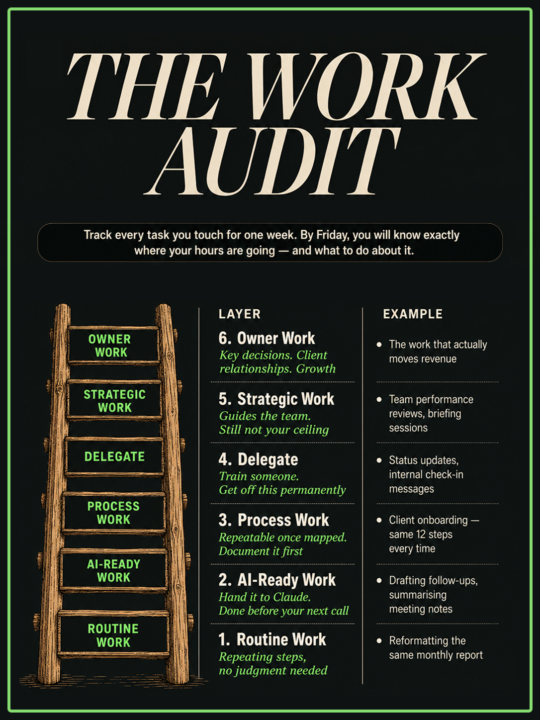
The business is at seven figures. The founder is still doing $20/hour work. Running a seven-figure digital business and still working nights? That is a calendar problem. And you can diagnose it in one week. Here is the exercise. At the end of each workday, write down every task you touched and how long it took. Just the name and the time. Nothing else. By Friday, a founder at that revenue level typically has a list that looks something like this: - Writing new client briefs: 4 hours - Monthly performance reports: 3.5 hours - Client check-in messages and status updates: 5 hours - Internal team handoff notes: 2 hours - Content for the agency's own channels: 3 hours Seventeen hours. In one week. On work that sits outside the actual service you sell. Sort that list into two groups. Work that requires your specific judgment and client relationships. Work that follows roughly the same steps every time. Everything in the second group is recoverable time. Some of it you delegate. Some of it becomes a process. A big chunk of it, you hand to an AI tool today and the hours come back this week. Claude, Grok, whatever is already in your stack. These tools exist precisely for this category of work. I used to build every piece of social content by hand. Writing, designing, formatting. Hours every week. Now AI handles it, trained on my examples and my preferences. It runs at about 90% accuracy. The remaining 10% takes less than 10% of the time the whole thing used to cost. One category cleared. Find yours. The audit takes one week. What you build with the hours after that is the actual business.
0 likes • 4d
Grand merci
21d •
How to avoid getting tricked by AI sycophancy.
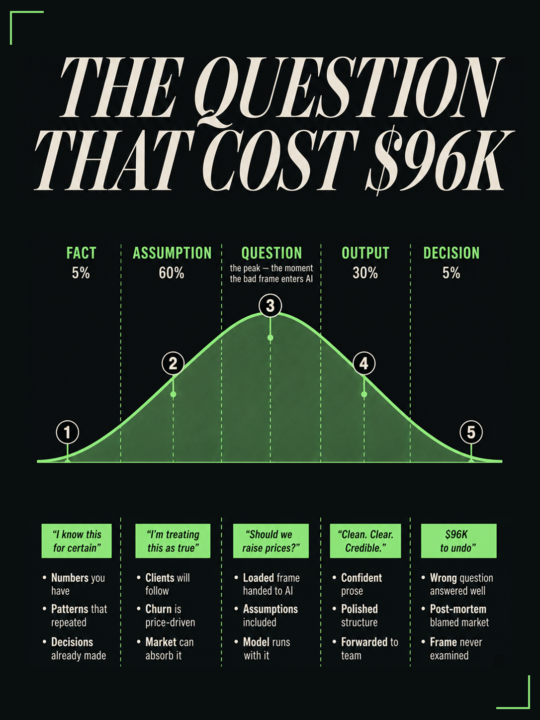
"Sycophancy refers to the behavior of offering insincere, excessive flattery to someone powerful or wealthy, usually in order to gain a personal advantage, promotion, or special favor." Simply said: AI agrees with everything you say. AI gave you the answer in 28 seconds. But cost you $96K to undo. What happened was... You gave AI a messy decision. It came back in under thirty seconds. Clean structure. Clear recommendation. You forwarded it to your team. Six weeks later you dropped the pricing model it suggested. Two clients didn't follow you into the new structure. At roughly $4,000 a month each, that's $96,000 in ARR you spent the next quarter trying to replace. You gave it a bad input and the AI just returned a polished version of that bad input. You asked: "Should we raise prices?" when the real question was: "Why are clients churning before month three?" The model answered what you asked. The answer was coherent, supported, and built on a frame that was already broken. This is the failure that never shows up in the post-mortem. When a decision goes wrong, founders blame the market, the timing, the execution. Almost never the question they handed AI. Because the output looked credible. Because confident prose signals rigorous thinking. The failure is structural. You were stressed. You opened the chat. You typed the question already forming in your head, assumptions included. The model took your frame and built on it. It does not push back on a loaded question. It runs. Here is what to do before you hand a real decision to AI. Write two things before you open the chat: 1. What you know for certain: Facts you can point to, numbers you have, patterns that have repeated 2. What you're assuming: Things you're treating as true that you haven't verified The second list is where most decisions break. For the pricing example, the fact list had one item: "margins were tighter than last year." The assumption list had five: - "clients would follow the new pricing",
0 likes • 4d
Cêst bien
May 18 •
Every time you use AI, you start from zero.
You use AI every week and still feel behind. Because you restart from zero every time. Different tab. Different instructions. Different output. So you keep “trying AI” and you never feel ahead. Do this instead: build one repeatable AI run for one recurring operator job. Here’s a clean one that fixes the weekly status update (the one you rewrite three times and still hate sending). Step 1: Create your “Update Pack” format once. Keep it boring. Same headings every week: - Wins (shipped, closed, launched) - Numbers (the 3 metrics you actually track) - Blockers (what’s stuck, who you need) - Decisions (what you need leadership to decide) - Next week (top priorities) Step 2: Spend 10 minutes filling the pack with messy bullets. No sentences. No polish. Just facts. Step 3: Give the pack to your AI and ask for one output: a status update that matches your usual tone and length. Tell it the channel too (email vs Slack) so it doesn’t write a novel. Step 4: Run a 60-second review checklist before you send: - Did it invent anything? - Did it hide the real blocker behind “in progress” language? - Did it bury the decision request? - Is every paragraph skimmable in one pass? Step 5: Send it. Then reuse the same pack next week. Same format. Same steps. Faster every time. You don’t need five AI tools for this. You need one loop you can run on a Tuesday when you’re tired. If a process doesn’t survive the second attempt, it’s a demo.
0 likes • 18d
Conseils bien retenus.Merci
1-10 of 56

@yawo-elom-motto-9768
Sociologue du développement et changement social.Concepteur et gestionnaire de projet Cherchant en spiritualité ancestrale.Entrprenariat,Trading
Online now
Joined Nov 3, 2025
Powered by