
Pinned

Mar 29 •
⛩️ Welcome to OUR Dojo ⛩️
⛩️ The dojo is officially open. ⛩️ If you are new here, watch this video before you do anything else. It will tell you everything you need to know about Cyber Judo Academy — what it is, how it works, and why it is built differently from every other cybersecurity platform out there. No hype. No fluff. Just the truth about how we train here. 🎯 What you will learn in this video: ⚔️ Why cybersecurity and judo are the same discipline 🏯 How the 7-belt progression system works 🛡️ What separates White Belt, Premium, and VIP training 📍 Exactly where to start if you are brand new 🥋 White Belt is free and the place to start. Drop a comment below 👇 Tell me your name, where you are in your journey OSS. 🥋
3
0

Pinned
Mar 28 •
🥋 What is Cyber Judo?
So where does Cyber Judo come from? I’ve trained in martial arts for over 10 years, including boxing, Muay Thai, karate, judo, and Jiujitsu. Each one teaches something different about discipline, control, and self-defense. But Judo always stood out to me. Because in Judo, you don’t rely on brute force. You rely on: - Timing ⏱️ - Awareness 👁️ - Leverage ⚖️ - Using your opponent’s energy against them 🔄 You don’t meet force with force. You redirect it. You control it. You neutralize it. That’s exactly how cybersecurity works. A lot of people think cybersecurity is about being the most technical person in the room, writing complex code, or “hacking back.” It’s not. In the real world, trying to attack back can get you into serious legal and ethical trouble. Cybersecurity is defense. It’s: - Understanding how systems work 💻 - Recognizing patterns in behavior 🧠 - Identifying threats early 🕵️ - Stopping attacks before they succeed ⚔️ That’s Cyber Judo. 🥋 Just like martial arts, everyone starts from a different place. Some people have: - Never touched a computer beyond the basics - Some IT experience but no direction - Or even cybersecurity knowledge but no real structure It doesn’t matter. In a real dojo, you’ll find: - Complete beginners - People switching from other styles - Experienced practitioners sharpening their skills Everyone trains. Everyone improves. Everyone progresses. Here, we train the same way: - 🥋 White Belts — learning the fundamentals - 🟡🟠 — building awareness and applying skills - 🔵🟣 — thinking like analysts and operators - 🟤⚫ — leading, teaching, and mastering the craft No matter where you start, there’s a path forward. This isn’t about memorizing tools.This is about learning how to think. How to stay calm under pressure. How to recognize what others miss. How to defend, not panic. Step by step. No gatekeeping. No confusion. Just progression. 🥋 Welcome to OUR dojo. ⛩️ OSS.
2
0
Pinned
Mar 28 •
🖥️ whoami // Alex
What’s up everyone, I’m Alex 👋 ──(cyberjudoacademy)-[~] : whoami I’m a father 👨👧👦, a gamer 🎮, a martial artist 🥋, and a big fan of anime, comic books, and movies 🎥. Most of all, I’m family-first. Everything I do is about building a better future for my wife and kids. So my path into cybersecurity wasn’t straightforward. I spent four years in the Navy 🇺🇸 on an aircraft carrier ⚓ handling weapons and ammunition. After that, I worked a mix of jobs through my late 20s and early 30s, still trying to figure things out. I always liked computers 💻, but I didn’t think I had what it took to work in IT. I doubted myself a lot. Eventually, I took a chance. I started learning, took IT and networking classes 📚, studied for the CompTIA A+ and Network + as well as my Cisco Certified Network Associate 🌐 so I could become a network engineer. I earned the certifications, and got my start in IT as a Manual Software Tester (breaking things on purpose) and then took on a service desk role while I planned my next move. I tried and tried but couldn't break into the network world. I was lucky enough to advance from Service Desk, to IT Operations and even Cloud Migration Consultant. Then I looked at cybersecurity. And honestly, I almost didn’t go for it. I thought it required heavy coding and advanced skills that were way beyond me. But I took another chance. Fast forward a bit... I went back to school 🎓, earned my associate’s degree in cybersecurity as an online self-learner, and kept building my skills across cloud ☁️, security 🛡️, networking 🌐, and ethical hacking. Then came the hardest part. I had the knowledge. I had the certifications.But I didn’t have experience. So I went through hundreds of interviews. A lot of rejections ❌A lot of adjustments 🔄A lot of learning 📈 Eventually, I figured out the secret sauce. I landed my first SOC role as a Cyber Defense Analyst 🛡️ From there, I kept pushing, kept studying, and kept improving. Today, I work as a Threat Hunting and Forensics Analyst 🕵️♂️, proactively identifying attacker behavior and helping stop threats before they can impact systems ⚔️
2
0

May 10 •
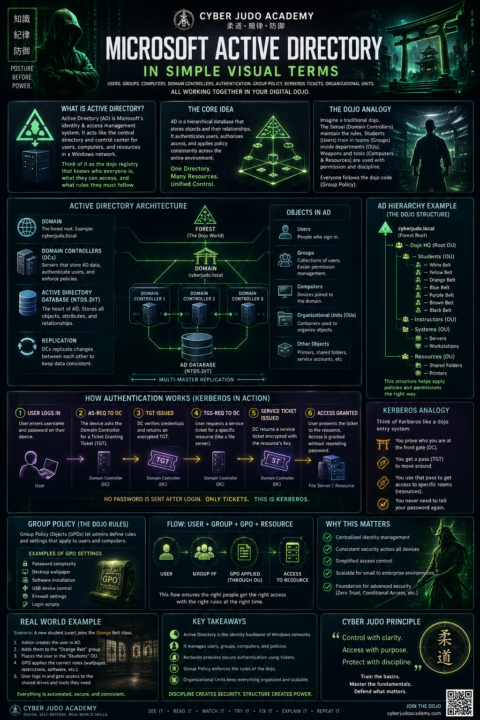
🚨 Why does ONE password control access to an entire company network?
Seriously. How does a business computer instantly know: 🖥️ who you are 📂 what files you can access 🛡️ what permissions you have 🚫 what you’re NOT allowed to touch 🔐 whether you can install software 🌐 which systems you can log into That entire system is powered by: ⚡ Microsoft Active Directory One of the MOST important technologies in IT and cybersecurity. But let’s be honest… Most beginner explanations sound like: “LDAP authenticates Kerberos tickets against domain services using Group Policy Objects inside Organizational Units…” 🤖💀 So I built a FULL visual breakdown using the Cyber Judo Academy teaching style 🥋 Inside the infographic: ✔ Domain Controllers explained simply ✔ Kerberos made visual ✔ Group Policy in plain English ✔ Users vs Groups vs Computers ✔ Organizational Units mapped visually ✔ Authentication flow diagrams ✔ Beginner-friendly analogies ✔ Matrix-style cyberpunk visuals The goal? Make cybersecurity feel understandable instead of overwhelming. 🔥 Full PDF available inside the classroom resources. 👇 COMMENT BELOW: What topic should I break down next? Ideas: DNS VPNs Firewalls SIEMs Cloud Security WiFi Phishing Zero Trust SOC Analyst workflows
Poll
Cast your vote
0
0
May 4 •
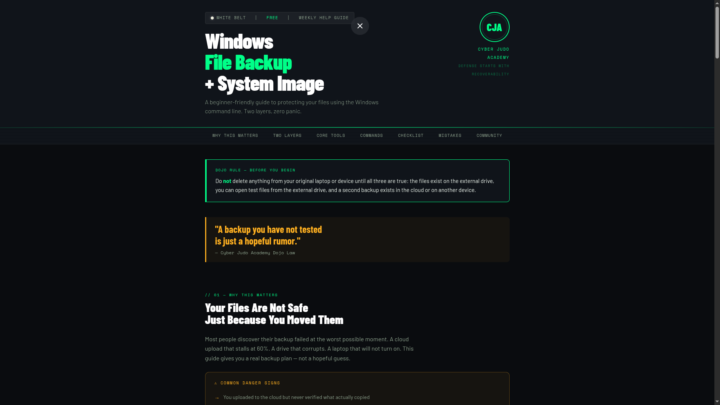
Windows Backup Guide
Your files looked safe. They were not. That cloud upload stalled halfway through, and you had no idea what actually made it — until it was too late. That is exactly why I built this week's Cyber Judo Academy help guide. 🥋💾 White Belt Weekly Help Guide 🗂 Windows File Backup + System Image Creator Using CMD This is beginner-friendly, free, and it teaches you how to back up the right way — not the hopeful way. What this guide teaches: ✅ Back up personal files with Robocopy ✅ Create retry logic so failed files get a second chance ✅ Save backup logs — your receipts, your proof ✅ Create a Windows system image with WBAdmin ✅ Verify both backup layers before you delete anything ✅ Create a Recovery USB for emergency boot situations ✅ Avoid the 6 most common beginner backup mistakes The memory hook — burn this in: Robocopy = saves your personal files WBAdmin = saves the Windows machine image Recovery USB = boots rescue tools when Windows won't start Cloud Backup = your second copy, off the physical drive Dojo Law: A backup you have not tested is just a hopeful rumor. The PDF version of this guide is available here in the community. If you have questions, drop them below. The dojo is open. Join us here and across platforms: 📘 Facebook: https://www.facebook.com/CyberJudoAcademy 📸 Instagram: https://www.instagram.com/cyberjudoacademy/ OSS. 🥋💾
0
0
1-17 of 17
powered by
skool.com/cyber-judo-academy-5096
Learn cybersecurity through discipline and strategy that teaches
Level up your skills 🎯
Train like a cyber pro ⚡
Think like an Olympic Judoka 🥋
Suggested communities
Powered by