Activity
Mon
Wed
Fri
Sun
Aug
Sep
Oct
Nov
Dec
Jan
Feb
Mar
Apr
May
Jun
Jul
What is this?
Less
More
Owned by Alex
Learn cybersecurity through discipline and strategy that teaches Level up your skills 🎯 Train like a cyber pro ⚡ Think like an Olympic Judoka 🥋
Memberships
The Strength Collective
16 members • $60/month
The Strength Saga
32 members • Free
Anime HQ
244 members • Free
Frank Boxing Academy
911 members • Free
Spartan Dynamics: Self-Defense
134 members • Free
Skoolers
164.5k members • Free
17 contributions to Cyber Judo Academy

May 10 •
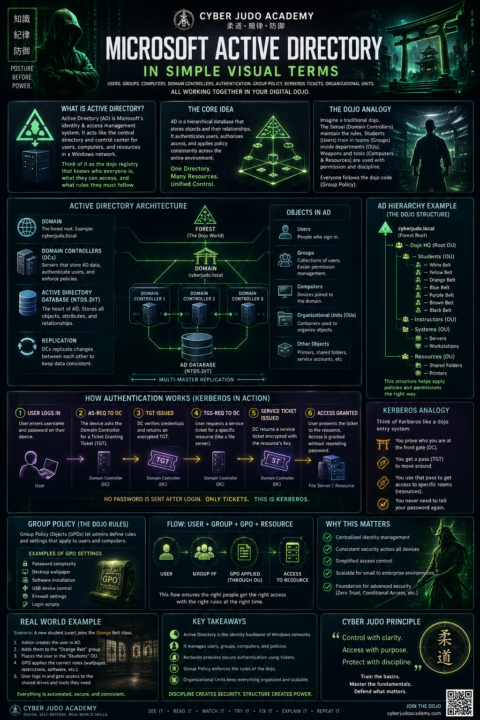
🚨 Why does ONE password control access to an entire company network?
Seriously. How does a business computer instantly know: 🖥️ who you are 📂 what files you can access 🛡️ what permissions you have 🚫 what you’re NOT allowed to touch 🔐 whether you can install software 🌐 which systems you can log into That entire system is powered by: ⚡ Microsoft Active Directory One of the MOST important technologies in IT and cybersecurity. But let’s be honest… Most beginner explanations sound like: “LDAP authenticates Kerberos tickets against domain services using Group Policy Objects inside Organizational Units…” 🤖💀 So I built a FULL visual breakdown using the Cyber Judo Academy teaching style 🥋 Inside the infographic: ✔ Domain Controllers explained simply ✔ Kerberos made visual ✔ Group Policy in plain English ✔ Users vs Groups vs Computers ✔ Organizational Units mapped visually ✔ Authentication flow diagrams ✔ Beginner-friendly analogies ✔ Matrix-style cyberpunk visuals The goal? Make cybersecurity feel understandable instead of overwhelming. 🔥 Full PDF available inside the classroom resources. 👇 COMMENT BELOW: What topic should I break down next? Ideas: DNS VPNs Firewalls SIEMs Cloud Security WiFi Phishing Zero Trust SOC Analyst workflows
Poll
Cast your vote
0
0
May 4 •
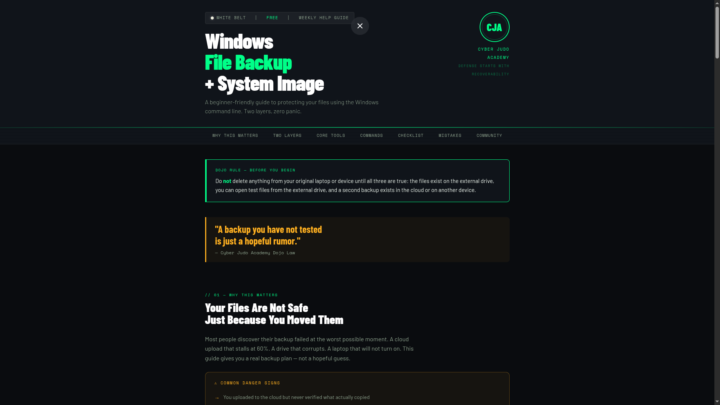
Windows Backup Guide
Your files looked safe. They were not. That cloud upload stalled halfway through, and you had no idea what actually made it — until it was too late. That is exactly why I built this week's Cyber Judo Academy help guide. 🥋💾 White Belt Weekly Help Guide 🗂 Windows File Backup + System Image Creator Using CMD This is beginner-friendly, free, and it teaches you how to back up the right way — not the hopeful way. What this guide teaches: ✅ Back up personal files with Robocopy ✅ Create retry logic so failed files get a second chance ✅ Save backup logs — your receipts, your proof ✅ Create a Windows system image with WBAdmin ✅ Verify both backup layers before you delete anything ✅ Create a Recovery USB for emergency boot situations ✅ Avoid the 6 most common beginner backup mistakes The memory hook — burn this in: Robocopy = saves your personal files WBAdmin = saves the Windows machine image Recovery USB = boots rescue tools when Windows won't start Cloud Backup = your second copy, off the physical drive Dojo Law: A backup you have not tested is just a hopeful rumor. The PDF version of this guide is available here in the community. If you have questions, drop them below. The dojo is open. Join us here and across platforms: 📘 Facebook: https://www.facebook.com/CyberJudoAcademy 📸 Instagram: https://www.instagram.com/cyberjudoacademy/ OSS. 🥋💾
0
0
Apr 26 •
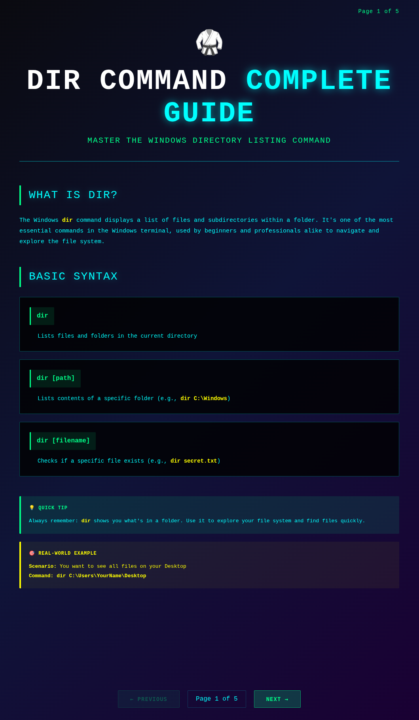
🥋 DIR COMMAND COMPLETE GUIDE - Master It in 5 Pages
I just created something I'm really proud of. An interactive, 5-page guide to the DIR command. 📚 WHAT IT COVERS: Page 1: Introduction & Basic Syntax What is DIR? Why does it matter? Basic usage. Page 2: Essential Switches (Beginner-Friendly) The 6 switches that actually matter: - /p (pause) - /w (wide format) - /s (recursive search) - /b (bare format) - /ah (hidden files) - /ad (directories only) Page 3: Sorting & Filtering How to organize your results: - /os (by size) - /od (by date) - /on (by name) - /ar, /as (attribute filtering) Page 4: Wildcards & Advanced Techniques Power moves: - *.txt (wildcard patterns) - file?.doc (single character match) - /q (show owner) - /x (8.3 names) - Output redirection (> filename.txt) Page 5: Complete Reference Table All 15+ switches at a glance. Real examples for each. Your cheat sheet forever. ✨ HOW IT WORKS: It's interactive. Click NEXT/PREVIOUS or use arrow keys to navigate. Each page is designed to teach, not overwhelm. Every command has a real-world example. It's all about DOING, not just reading. By the end, you'll understand: ✅ How professional developers navigate file systems ✅ How to find any file in seconds ✅ How to solve real problems with the command line ✅ Why hackers love the terminal This is the foundation. 🔗 HERE'S THE GUIDE Download it using the link below. Work through it at your own pace. Try every command. Come back to the reference table when you need it. Questions as you go? Reply below. This is what community learning looks like. 🥋
1
0

Apr 24 •
🥋 Module 1 Complete — Lessons Learned + Wins + Visual Breakdown
White Belt Basics Module 1 is officially complete. This one was more than just building lessons…it was about building the training system behind the lessons. 🧠 Lessons Learned • Simpler explanations > overloading beginners• Repetition builds confidence faster than complexity• People don’t just need information… they need structure• “Read → Watch → Practice → Reinforce” works Also learned:Teaching forces you to understand things at a deeper level. 🏆 Wins • Completed a full beginner module from start to finish• Built a consistent lesson structure across all content• Added real training elements:⚡ command simulations🎴 flashcards✔️ quizzes • Created a system that goes beyond “just videos” 🧩 The Visual Breakdown (How This Actually Works) If you watched the walkthrough, you saw the placecards. That wasn’t just for visuals… that’s the system: 📚 You Read ItBreak things down simply so you understand the concept 🎬 You Watch ItSee the process step-by-step 🥋 You Practice ItActually apply it through commands and exercises Then we reinforce it with: ⚡ Interactive simulations🎴 Flashcards✔️ Quizzes 🥋 Why This Matters Most people get stuck because they:watch → forgetread → forget This is built so you:learn → apply → retain 🎯 Moving Forward Module 1 = foundation Next modules will build on this:more commandsmore real-world scenariosmore depth 📘 Facebook:👉 https://www.facebook.com/CyberJudoAcademy 📷 Instagram:👉 https://www.instagram.com/cyberjudoacademy Appreciate everyone following along and training with me. 🥋 OSS.
1
0
1-10 of 17
@alex-garcia-9598
Threat Hunter | Forensics Analyst | Navy Vet | Martial Artist | Dad | Gamer
Active 20d ago
Joined Mar 26, 2026