
Write something

Mar 30 •
Logo Prompts
Try these logo prompt! perfect for branding and design! 1. A stunning 3D digital rendering featuring the name {Add Name} crafted in glossy pink gel lettering with elegant shimmering gold borders. The three-dimensional letters have a smooth, translucent appearance that catches and reflects light, creating depth and luminosity across each character. Three soft pastel pink hearts and three pristine white hearts are delicately scattered around the lettering, each rendered with subtle dimensional shadows and highlights. The entire composition floats against a clean, pure white background that emphasizes the vibrant colors and reflective surfaces of the gel-like text and heart elements. 2. Generate the image based on the text {Add Name}. Transform the entire icon into a high-end translucent glass object with strong glossy reflections and realistic refraction. Apply thick, smooth, liquid-glass material with vibrant iridescent edges in tones of electric blue, cyan, orange and gold. Add intense highlights to enhance a premium crystal look, giving visible depth, curvature and volume. Slight backward tilt for a 3D presence, but never change the icon's geometry. Background must be pure black with no reflections or noise. Ultra-detailed, hyper-realistic rendering. Camera: Canon EOS R5, 85mm f/1.2, f/2.8. Negative prompt: blurry, low-res, flat, text, watermark, distortion. 3. Create a highly detailed embroidered patch of the TEXT { Add Name }. The patch should feature raised stitching and textured embroidery, giving it a realistic, 3D look. Maintain accurate colors and logo proportions. Present the patch isolated on a transparent PNG background, without any fabric or surface beneath it. Make it look like a professionally made logo patch ready for apparel or accessories. 4. The image presents the name {Add Name } rendered in a vibrant, 3D style, centrally positioned against a solid, purple background. The text is crafted with a cursive script design, and each letter is covered in sparkling glitter, with each
Mar 22 •
Sell Digital Products on Facebook with AI
✅ Step 1: Pick ONE niche Choose something people are already desperate to solve. Examples: - Lose weight fast - Save money on a low income - Start a side hustle from home - Get more done in less time - Grow a page without showing your face You’re not inventing anything.You’re just helping solve a problem that already exists. ✅ Step 2: Focus on ONE problem only Don’t build a big course.Don’t overthink it. Create one simple guide that solves one clear thing. Examples: - 7-day meal plan for busy moms - Beginner guide to selling Canva templates - How to start a faceless Facebook page - AI tools that save you 10 hours a week - Budget planner for people living paycheck to paycheck Simple is better.People don’t want complicated.They want results fast. ✅ Step 3: Create it in 1 sitting Use ChatGPT to write the content.Use Canva to design it.Done. No tech skills.No fancy equipment.No perfection needed. Just something useful that solves the problem. ✅ Step 4: Set up your free store Upload your product to a free platform: - Stan Store - Systeme.io - Gumroad - Beacon Once it’s uploaded, the platform handles everything.Someone buys. They get access. Automatic. You don’t need to do anything manually. ✅ Step 5: Post daily inside Facebook groups This is the step most people skip. Instead of scrolling tonight…Spend 1 hour posting inside niche Facebook groups. Use a simple copy & paste style post that: - Names a real problem - Shares one quick tip - Mentions your guide You’re not spamming.You’re helping people who already need the answer. ✅ Step 6: Stay consistent (just 1 hour a day) You don’t need to go viral.You don’t need 10,000 followers. You just need: - 1 product - 1 clear message - 1 hour of daily posting That’s it. Over time, people start asking questions.People start DMing you.People start buying.
Apr 3 •
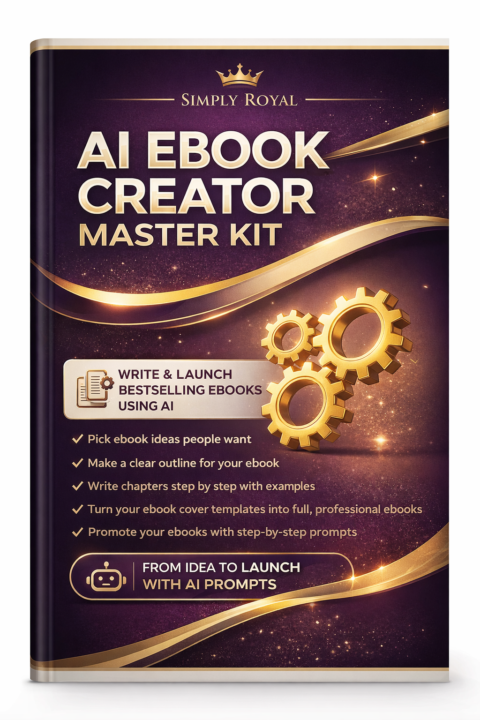
AI Ebook Creator Master Kit
AI Ebook Creator Master Kit is your all-in-one system to turn simple ideas into professional, profit-ready ebooks using AI. From choosing winning topics to writing, designing, and launching, this kit gives you step-by-step prompts and strategies to create, publish, and sell your ebook with confidence—even if you’re a complete beginner. 🚀 https://shop.beacons.ai/simplyroyalenterprise/1949d93c-54fe-4961-8323-c09c0c27a875
4
0
Mar 23 •
Design, Edit, and Schedule content in 30 min
Use ChatGPT to design, edit, and schedule 30 days of content in just 30 minutes. 1. Content Calendar In Seconds “Act like an expert social media marketer having an experience of 10 years. Your today's task is to generate a 30-day content calendar for [Insert your niche]. Include: platform, topic, hook, CTA, and format (carousel, reel, thread, etc..). Make it optimised for growth, problem-solving, engagement.” 2. Get Viral Hooks In No Time “Write 10 scroll-stopping hooks for [Insert topic]. Keep each under 11 words. Make sure that they are bold, curiosity-driven, and impossible to ignore. Act like an expert copywriter having an experience of 10 years experience while doing this task.” 3. Faceless Video Script Machine “Write a 90-second scroll-stopping faceless video script for [Insert idea/Niche]. Include voiceover text + on-screen captions + b-roll suggestions. Make sure that the video goes viral the moment it goes live.” 4. Expert Carousel Copywriter “Act like an expert Instagram marketer having an experience of 9 years. Your today's task is to turn the following idea into a 7-slide carousel. Here's the idea: [Insert Idea]. For each slide there should be only [Insert number] sentences. Start the first slide with bold hook + impossible to ignore and end the 7th slide with CTA to follow.” 5. Engaging Caption Generator “Act like an expert copywriter having an experience of 12 years. Your today's task is to rewrite the below transcript for captions. Here it is [Insert transcript ]. Keep it under 12 words per line. Add natural pauses, and it should be full of emotions.” 6. Image Prompt Writer “Act like an expert prompt writer. Your task is to write an AI image prompt for [Insert idea/style] social media background. Keep it minimal, bold, and high-contrast. Include space for text overlay.” 7. Auto Content Scheduler “Your today's task is to organize these 30 posts into a scheduling table: platform, date, time, caption, hashtags, and media file name. Suggest timing for max reach.”
1-30 of 128
powered by
skool.com/credit-freedom-society-2939
Welcome to Credit Freedom Society™
This is your roadmap to fix, build, and master your personal credit along with building Digital Wealth
Suggested communities
Powered by