

8h •
If You Have a BagThatThang Up Site...
Do these 3 things TODAY! 1. Put your link in your linktree/Beacons/Stan or directly on your profile 2. Do a screen record... but STOP recording before you hit the Amazon website 3. Post it to your TikTok Okay bye!!! 😀 If you don't have one, you're missing a super easy way to earn. IJS

10d •
Prime Day Prep with Your Bag That Site
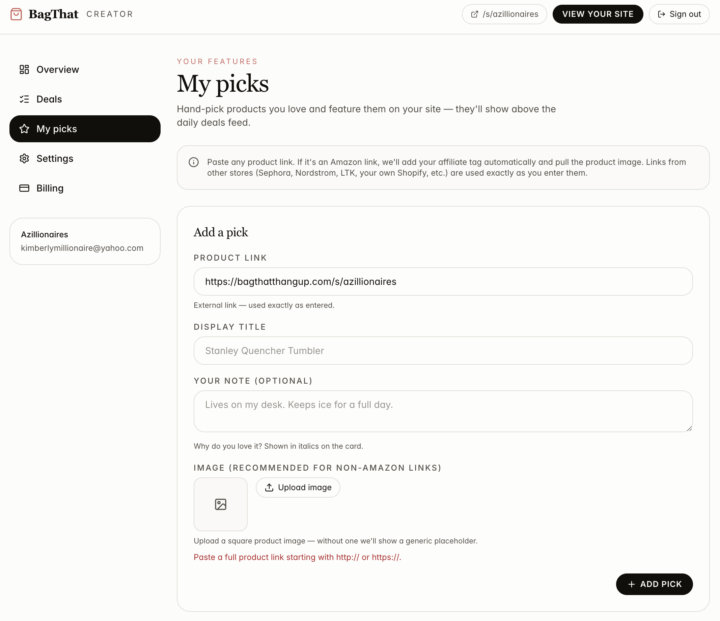
Good morning Creatives! One of the new BagThat features is a dashboard where you can choose your own items to display on your site. Here is how you are going to use that for Prime Day prep! 1. Create a list on Amazon of the Prime Day Deals you want to showcase, and save the list as a draft. DO NOT PUBLISH IT. 2. In your bagthat dashboard, go to MY PICKS, and enter your bagthat url (or a url of your choice) instead of the link to your list. You will change it to the list link on Prime Day, but not before then. 3. Write your short description of what they can expect. 4. Upload the image of your choice featuring Prime Day 5.On Prime day, publish your list, then switch out the link in your dashboard to the link for the actual list Need to see an example?? Just click here. Drop your questions below!
2
0

12d •
Amazon Associate Account
If our associate account becomes in active do we have to reapply or how does that w?
Feb 25 •
Amazon Storefront?
If you are an Amazon Influencer, drop your storefront link below, so that those who are willing can support you. ❤️

1-30 of 32

skool.com/coffeeandcashflow
A creator ecosystem for building income with Amazon, Passive Profit Millionaire, Content Creation, UGC and digital products — learn, earn, or do both.
Leaderboard (30-day)
1

+33
2

+19
3

+15
4

+12
5

+10
Powered by