
Write something
Pinned

👑
⭐
2h •
Welcome to Clief Notes. Here's where to start.
1. Go check out 📚Navigating The Course to see how to get around and what's here. 2. Start with The Foundation. Concepts, folder architecture, prompting framework. Everything else builds on this. 3. Check in at the bottom of each lesson. Polls, discussion posts, other members working through the same stuff. Use them. 4. When you're ready to build real things join in on our Biweekly competitions and win some real cash. ⭐ Competitions Mega Thread 5. If you are wanting to dive into the masterminds, grab all the past templates, artifacts and resources. Upgrade and head into the The Vault for Premium and The Drawing Room (VIP) for VIP 6. Post your work. Ask questions. Help others when you can. What are you here to build?
Pinned

1d •
🏆 HOW COMPETITIONS WORK FROM NOW ON 🏆
Quick update on the competition schedule so everyone knows what to expect. 📅 NEW CADENCE: TWICE A MONTH We're dropping comps on the 15th and the 30th of every month. Two chances to compete, every month, on a set schedule you can plan around. ✍️ WHY THIS SCHEDULE Spacing them out this way means we can give tailored feedback on every single submission. Not just the winners. Everyone who enters gets notes on what worked, where it's weak, and what to do next. 🎁 WHAT WINNERS GET Along with the prize, every winner gets a 15-minute one-on-one with Jake. Use it to talk through your build, ask questions, or bring whatever else is on your mind. Two comps a month. Feedback on every entry. Direct time with Jake for the winners. Mark your calendar for the 15th and let's get to work!
Pinned
1d •
🎆 GOOD NEWS: THE SALE STAYS OPEN. HAPPY 4TH 🎆
We're holding the last sale through the holiday weekend so nobody misses it. 🎉 Premium: $27 → $14/mo 🎉 VIP: $97 → $67/mo This is the cheapest it will ever be. Once it closes, the price is gone for good. ⏰ New deadline: July 5th, 10:00 AM EST. This is the last extension. If you've been on the fence, sign up now. You lock this rate in and keep it every month going forward. 🖥️ ONE MORE REASON TO JOIN The week of July 5th we're dropping the software we've been building for this community. It goes out for beta testing first, and only Premium and VIP members get access. Sign up before the sale closes and you're in from day one.

1d •
How does everyone get Claude/AI to consistently follow ICM / Jake methodology on every build?
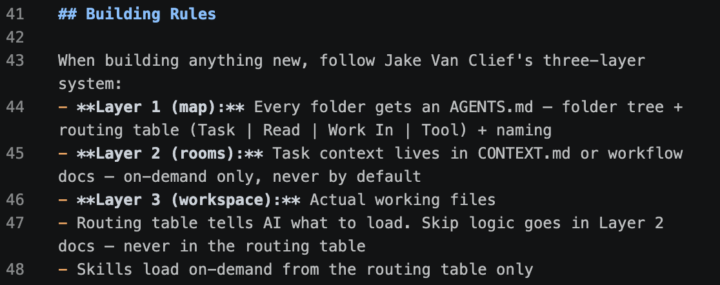
I've been working on this and have something that somewhat works, but I keep running into pieces that get messy and don't hold up well in practice. My current approach: the image I've attached lives in my AGENTS.md at the root of the project, so any time I build, the AI has the structure to reference. What I'm really after is the best way to implement the ICM system so that anything I build, Claude/AI already knows the way to build and stays inside that structure. Is anyone else doing this? Would love to hear how you've set it up.

9d •
Before / After: 10 days since joining...
It has been 10 days since I joined Clief Notes community and started Jake's coursework. It has been a massive step change in how I understand - and now use AI more effectively. A few days ago I joined into a paid subscription and the resources have proved to be very helpful in setting up my own folder structure. Before joining this community my use of AI was prompting the web user interface and copying the artefacts / outputs for my work. I had projects setup with various context files and instructions. I recently created my first website (in-progress) using Claude Code in VS Code and Jake's 'workflow-starter-code-project.md' template to create the folder structure. Most of the time has been spent in learning ICM, configuring the folder and file structure to route AI, and planning the geological database schema. Building the website was the easy bit! What has changed / unlocked in my use of AI: - spending more time planning and less time managing prompts and outputs - output has significantly increased with less prompts required to get the same job done I feel more "human" now and less like a "machine" in my use with AI since moving to the ICM method. The time being creative and planning is often away from the computer, where I'm spending time with family or doing the things I enjoy outdoors. I appreciate how Claude just "gets me" now without typing out an essay or giving me vague responses or hallucinations. If you are new here my advice is: - take your time to work through the foundation content - no rush, it takes time to learn and understand how to implement this knowledge into your work - start small and build for something specific - don't spend time creating a folder structure on what you think you will use - build for what you will use today, in 30 minutes. - play around and fail fast it won't be perfect to start with and that is OK :) Thank you to Jake - and everyone who has contributed to this community and built the resources that exist.

1-30 of 2,190

skool.com/cliefnotes
What we give away free beats most paid courses. Build durable AI systems with a Marine vet and Edinburgh researcher. 40+ lessons, growing.
Leaderboard (30-day)
1

🔥
+1701
2

🔥
+1674
3

+1244
4

+969
5

+616
Powered by