

May 21 •
What are you trying to build with AI?
Drop your idea here. It can be polished, messy, half-formed, or just something you have been thinking about. You might want to build: • A website • A software product • An automation • An internal tool • A content system • A business workflow • A client-facing tool • A course, community, or digital product • Something you are not sure how to describe yet Use this format: What I want to build: Who it is for: Why it matters: Where I am stuck: What would make this useful: The goal is not to sound smart. The goal is to get the idea out of your head so we can help you add structure to it.
1d •
Be honest — where did your last AI build actually end up?
No judgment, no wrong answers — where did your last AI build actually end up? Vote, then tell me in the comments what broke or what shipped. I read every one, and the most common wall gets its own video on the channel.
Poll
20 members have voted

2d •
Site Optix UK (TUPE-Flow Module)
Hey everyone! I’m Mark, and I’m building Site Optix UK, an operational software suite tailored for the B2B Facilities Management, commercial cleaning, and security sectors. My first core module is TUPE-Flow—a mobile-first onboarding utility that automates the chaotic 28-day window when a company wins a new multi-site contract and inherits a massive frontline workforce from an outgoing competitor. It handles personal data ingestion, right-to-work compliance, sector-specific certifications (like live SIA licence verification and BICSc logs), and holiday/payroll liabilities. The goal is to eliminate manual spreadsheets, stop day-one payroll errors, and protect commercial contract margins for operations directors. The Part I’m Least Sure About: Since I’m building this as a non-technical founder using AI app-builders (looking at full-stack environments like Hostinger Horizons and Lovable), the piece I am least sure about is structuring the multi-tenant user permissions and data segregation safely. Because TUPE involves highly sensitive employee data (passport photos, contracts, and legal IDs), I need to make sure that: 1. Inherited frontline workers can only see their own secure mobile upload form. 2. Incoming Mobilisation Managers have a high-level master dashboard to review documents and track completion metrics across multiple specific sites simultaneously. If anyone here has tackled secure document uploads and role-based user dashboards within an AI no-code/low-code setup, I’d love to hear how you structured your backend database to keep corporate data locked down safely. Looking forward to seeing what everyone else is building!

6d •
What I'm building with AI
I use Cursor on Auto most days, and switch to other models sometimes for planning or executing a vague plan. What I'm building? Short answer - a lot - flex.town being the strongest userbase and gaine.ibo.garden being the newest site cuilt with Cursor. For You: what I want to share is this: a tool to help AI build apps on the XPR blockchain. You can use this repo in Cursor to easily make an app for XPR blockchain: https://github.com/dougbutner/xpr-app-forge I hope to see you on XPR Network soon and am happy to welcome anyone who mentions this Skool community with 100 EASY

8d •
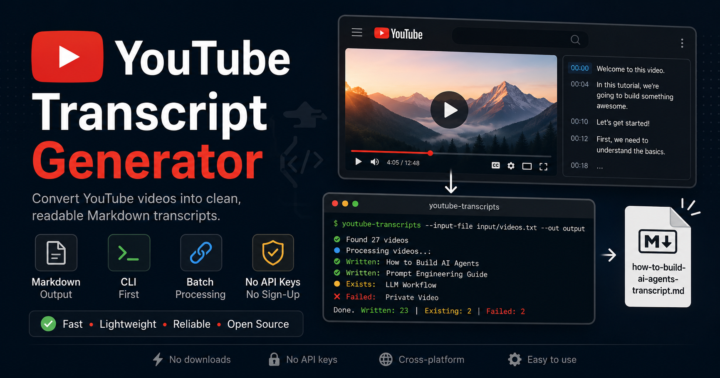
YouTube Transcript Generator - Build Log
One of my biggest frustrations with online YouTube transcript generators is that, in my experience, they sometimes struggle with longer videos or don't make it easy to get the full transcript in a format I can immediately use. So I decided to vibe-code my own standalone CLI tool. The real goal wasn't just downloading transcripts, it was turning YouTube videos into AI-ready Markdown documents. Once a transcript is saved, I can drop it straight into ChatGPT, Codex, Claude, or any other LLM to generate summaries, action items, project plans, documentation, research notes, content ideas, or even complete implementations inspired by the video's content. I thought it'd be fun to share exactly how this project came together. For this build I used ChatGPT Pro (Codex included)($20/month) for ideation and project planning, then handed everything off to Codex for implementation. Also worth noting: from initial idea to a polished GitHub repository, this entire project took me just a smidge over 1hr to complete & only used about 15% of my current 5-hour ChatGPT Pro usage allowance and 4% of my weekly allowance. Here's the exact workflow I used to build the project from idea to GitHub repository. ChatGPT (Ideation) 1. I want to build a stand alone CLI based youtube video transcript generator. Please help me create a mvp_prd.md. Output into one single inline markdown mvp_prd.md 2.Create a 1200x630px image for my project "YouTube Transcript Generator". 3. Update this image to 830x400px for my github readme header. Codex (Implementation) 1. Create a plan based on mvp_prd.md and then save it in the root as plan.md 2. I have this project open in vscode. Lets assume that is where the end user will be guided to use this tool from now on. Lets build around that implementation. Is it ready to test from the terminal command line inside of the project root in vscode? 3.Create a command prompt where I can pass the single YouTube video URL in the command. We'll save the urls.txt method for batch processing
1-5 of 5
skool.com/aicodethatworks
Build the app you've been thinking about — with AI, without writing a line of code.
For anyone starting from zero, or stuck trying to make AI work.
Leaderboard (30-day)
1
+28
2

+8
3

+8
4

+7
5

+7
Powered by