

🍀
May 22 •
Today we built a new Market Research skill LIVE and I added to a Github REPO
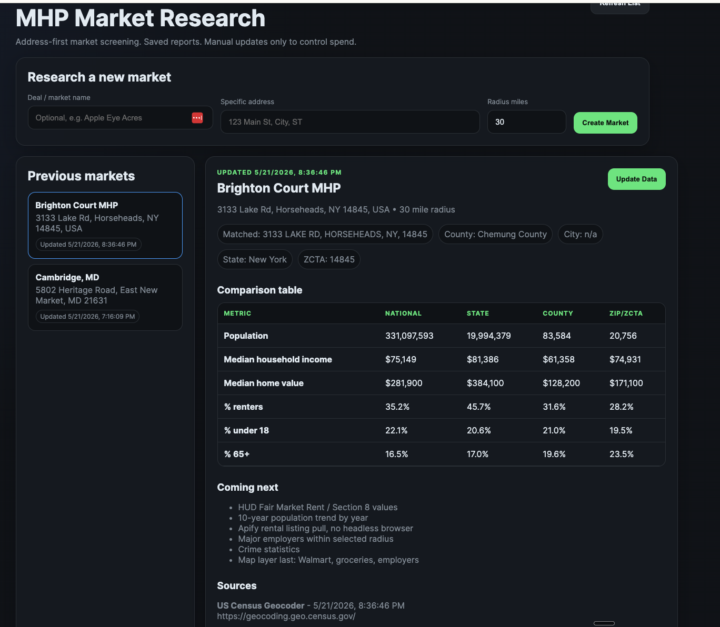
In just ONE HOUR we built the below product: Here it is if you want it: https://github.com/mikepans1013/MarketResearch @Shawn Dwyer @Dylan Stewart thanks for joining and participating One of the biggest mistakes investors make is underwriting the property but barely underwriting the market. So we built a simple market research dashboard to help evaluate new MHP markets faster. You enter a property address, and the tool starts pulling together market-level data around that location, including: • State, county, city/place, ZIP/ZCTA, and census tract data • Population • Median household income • Median home value • Renter percentage • Age demographics • Saved market reports so you can revisit old searches • Manual update button so you only refresh data when you want to A few important notes: The goal is not to replace your underwriting. The goal is to quickly answer: “Is this a market I should spend more time on?” Next up, we’ll be adding rent data, Section 8/FMR values, population growth trends, major employers, crime data, and eventually a map layer showing nearby Walmart/grocery access and employers. This is still early, but the direction is simple: Less guessing. Faster market screening. Better questions before going deep on a deal.
🍀
Mar 2 •
Within THE FIRST HOUR after Setup....
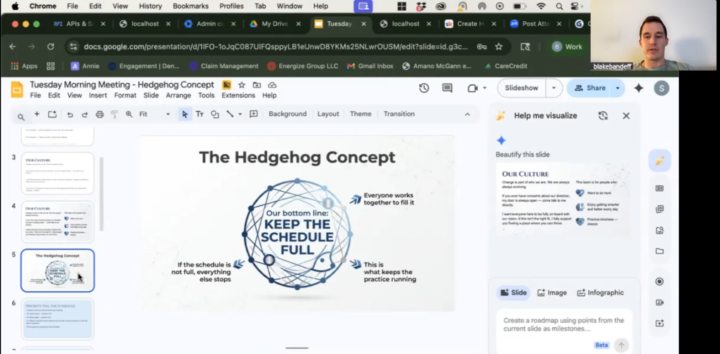
Within THE FIRST HOUR after Setup TODAY....@Blake Bandeff and @Reagan Thomson had already used OpenClaw to create a staff presentation they had been procrastinating on.... Blake opened a voice note and SPOKE to his bot Aria, prompting her with just stream-of-conscious for what he wanted to create and the key points he wanted inside that presentation.... and VOILA! OpenClaw opened a Google Slides deck and created the whole presentation for them in seconds.... You don't have to be a power user to see immediate benefit. OUR NEW SLOGAN THEREFORE IS: JUST TALK TO IT!
🍀
Mar 21 •
Skill: Lender Research & Outreach Skill
What It Does Researches local lenders for a real estate deal, finds commercial lending contacts via LinkedIn, and executes outreach campaigns. Step-by-Step Workflow Step 1: Gather Deal Parameters • Ask the user for: property location, lot count, deal name • MUST ask for spreadsheet URL - never assume which spreadsheet to use Step 2: Research Lenders via Google Places API • Search "banks near [location]", "credit unions near [location]", "community banks near [location]" • Categorize results (Community Bank, Regional, National, Credit Union) • Cross-reference existing spreadsheet to avoid duplicates • Only add new banks; update "Deal" column for existing banks that serve the area Step 3: Research Commercial Lending Websites • Find each bank's commercial lending page (usually under Business → Loans) • Add URL to spreadsheet Website column • Extract any contacts (names, phones, emails) from "Meet Our Team" or "Contact Us" sections • Add contacts to Contacts tab with Source = "Bank Website" Step 4: Find LinkedIn Contacts via Apify • Run Google search via Apify: "[Bank] commercial lending officer [STATE] site:linkedin.com/in" • Score contacts by title relevance: • A-tier: VP, SVP, Chief Lending Officer • B-tier: Commercial RM, Lending Specialist • C-tier: Branch Manager Step 5: Update Spreadsheet • NEVER overwrite existing data - only add new rows or fill empty cells • Financing Leads tab: banks with addresses, types, status • Contacts tab: names, titles, emails, phones, LinkedIn URLs, quality scores • Highlight top-priority contacts in yellow Step 6: LinkedIn Outreach via Browser • Log into LinkedIn • Send connection requests with 10-15 second delays • Use personalized notes for top 2-3 contacts (LinkedIn limits ~3-5/month) • Template: "Hi [NAME], I'm a MHP investor looking for financing on a small [LOT_COUNT]-lot park [LOCATION_DESCRIPTION]..." Step 7: Extract Contact Info • Check profiles for public contact info (About section, Contact Info overlay)
🍀
Mar 17 •
Use Case: Tenant Screening
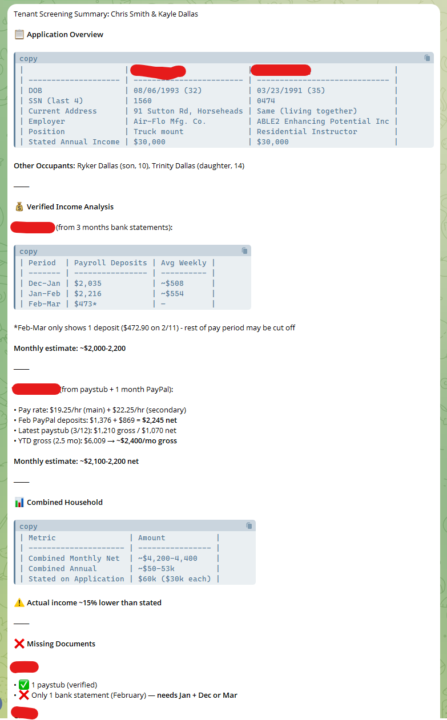
Tenant screening is one of the most important parts of real estate investment. Oftentimes, we receive a bunch of jumbled documents with very little context. Even using RentManager to have our tenants fill out their applications, it's sometimes a process to get those applications into a go/no-go status. I've started using OpenClaw to compile these documents, rename them, put them in the right folders, and develop a risk analysis for each prospective tenant.

Mar 19 •
Individual thread
Don't know if anyone has posted this already or not. Don't have one continuous convo on telegram with your bot. Break topics into their own threads.
1-15 of 15
skool.com/agenticai
OpenClaw One Click Install & Support group! We help you get set up in seconds and demo skills you'll ACTUALLY USE. Plus weekly live learning sessions!
Powered by